
Vandaag of morgen in huis

Kwaliteit gegarandeerd

Welkomstaanbiedingen ontgrendelen: GRATIS bezorging | Tot 80% korting | Gratis 30 dagen JoyPlus-proefperiode
Download de app
A hot processor, rising fan speeds and a noisy case usually don’t mean that you simply need the most expensive PC cooling. Often, the problem is the wrong size, an incompatible connection or airflow that isn’t moving properly through the case.
For gamers, PC builders and RGB enthusiasts, these are the three main pitfalls to watch out for:
Looking only at maximum airflow
A high CFM rating sounds appealing, but it doesn’t tell the whole story. Fan placement, resistance from a dust filter and the layout of your PC case all affect real-world airflow.
Confusing RGB with ARGB
A 5V 3-pin ARGB connection isn’t the same as a 12V 4-pin RGB connection. Connecting them incorrectly can damage the lighting. Always check your motherboard header or use a suitable controller.
Buying a CPU cooler without checking the socket or available space
An AIO liquid cooler needs to be compatible with both your processor socket and your case. A 360mm radiator won’t automatically fit in every case. Also check the available space around the motherboard, memory and the top or front of the case.
A 120 mm fan is a common size for rear, top and radiator mounting. A 140 mm fan can move more air at a similar speed, but needs more mounting space. Check:
A larger fan isn’t automatically the right choice. Available space and the airflow direction you want determine whether it’s a practical fit.
A PWM fan usually uses a 4-pin connection. This lets your motherboard control the speed more precisely through the BIOS or software. It’s useful if you want quieter operation during light use and extra airflow while gaming.
Check the full speed range. For example, a fan running from 330 to 1700 RPM can run quietly while you’re working, while a model with a higher maximum speed gives you more room to adjust under heavy loads. The stated noise level, such as 10 to 36 or 37 dB, is generally a range measured under certain conditions. Your actual experience will also depend on resonance, your case and your other fans.
Airflow, often given in CFM or m³/h, indicates how much air the fan can move according to its specifications. Static pressure, for example in mmH₂O, is particularly relevant when a fan needs to push air through a radiator, a dense dust filter or a compact heatsink.
For a regular case fan, airflow is often a useful starting point. For an AIO liquid cooler radiator, static pressure is just as important. Also check:
According to the product information provided by the brands concerned, specifications can vary between versions. Compare the exact model number, not just the product name.

Why it suits this profile: This single 120 mm case fan is a straightforward choice for a first upgrade. According to the product information, it supports PWM and is suitable for case and radiator cooling.
The product specifications clearly state the size, PWM range and 4-pin connection. Do check that your motherboard has a compatible RGB or ARGB connection.
120 mm size, PWM control, 480–2400 RPM and 34 individually addressable LEDs, according to Corsair product information.
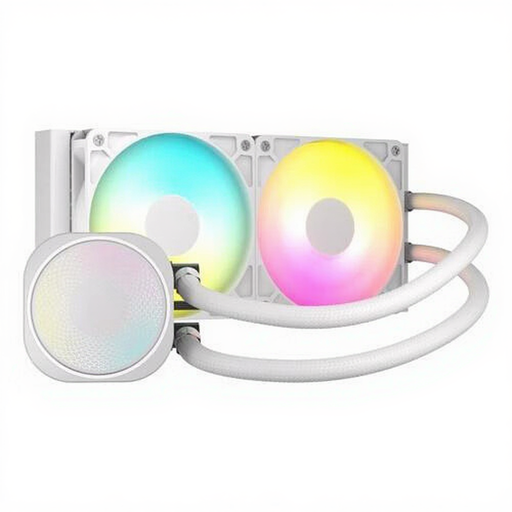
Why it suits this profile: A 240mm AIO liquid cooler is a good fit for builds where a standalone air cooler doesn’t offer enough space or the look you want. According to Corsair, this model is compatible with LGA 1700, AM4 and AM5.
Socket compatibility and radiator length are clearly specified. Before buying, check that your case supports a 240mm radiator and that your ARGB header is 5V.
Two fans, PWM support, an aluminium radiator and compatibility with Intel LGA 1700 and AMD AM4/AM5, according to the product information.
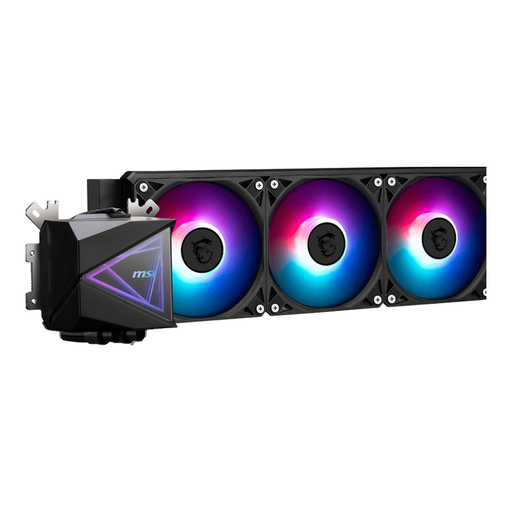
Why it suits this profile: This PC liquid cooler is aimed at users whose case can accommodate a 360mm radiator and who want multiple fans for demanding processor workloads.
Compatibility includes AM4, AM5, LGA 1700 and LGA 1851, among others. Also check the available radiator space carefully and connect the pump to the correct header.
360mm radiator, three included 120mm fans, PWM support and ARGB connections, according to the product specifications.
We’ve put together a complete, up-to-date list of products that meet these strict selection criteria and the applicable European safety regulations.
At the front or bottom of the case, fans usually draw air in. Rear and top fans expel warm air. Check the arrows on the frame: they show the direction of rotation and airflow.
Completely shut down your PC and unplug it from the mains before installing a PC fan, case fan or AIO. Keep cables away from rotating blades and tighten mounting screws without forcing them. Clean fans regularly with compressed air or a soft brush; don’t use water inside your PC.
With an AIO liquid cooler, make sure the pump is connected correctly before starting the system. Follow the installation guide for the correct bracket, thermal paste and radiator position.
It depends on your case, processor and graphics card. For an average gaming PC, a combination of intake fans at the front and an exhaust fan at the rear is a sensible starting point. First measure the available mounting positions, then choose between 120 mm and 140 mm fans.
Not necessarily. An AIO has a pump as well as fans. PWM control and a suitable fan curve can help keep noise down under light loads, but the actual noise level depends on the pump, fans, case and settings.
A case fan has few moving parts and can last a long time with proper maintenance. An AIO has additional components to consider, including the pump, tubing and radiator. Regularly check for dust, unusual noises and visible leaks. According to the product information provided, the products in this selection are covered by the statutory warranty of at least two years; additional rights may apply under Dutch law.
