
Vandaag of morgen in huis

Kwaliteit gegarandeerd

Welkomstaanbiedingen ontgrendelen: GRATIS bezorging | Tot 80% korting | Gratis 30 dagen JoyPlus-proefperiode
Download de app
A hot processor, noisy fans or a stuffy home office usually aren’t reasons to buy the most expensive cooling system straight away. When it comes to PC cooling, it’s all about finding the right balance of compatibility, airflow, noise levels and intended use.
Many buyers focus mainly on RGB lighting or a high fan speed. These features can look appealing, but they don’t automatically mean a product is right for your computer. As Joybuy Product Recommendation Officer, I’ve picked out the key product specifications and common buying pitfalls to help you choose.
A fan with a high maximum speed can move a lot of air, but it may also make more noise at that speed. Always check the noise levels at both low and high speeds, as well as the maximum airflow.
A quiet PC fan with PWM control can automatically adjust its speed to match the temperature. This means it runs more quietly during light use and doesn’t have to operate at full speed all the time.
A 360mm radiator won’t fit in every PC case. Check:
With an AIO CPU cooler, you’ll also need to consider the position of the tubes and how the pump is mounted. Always follow the manufacturer’s installation instructions.
An ARGB CPU cooler or RGB case fan can give your PC a polished look, but lighting won’t cool your processor. Check whether your motherboard has a compatible 5V 3-pin ARGB connection. A 12V RGB connection is different and may not be compatible.
Some systems also need a separate controller. This applies to certain Corsair iCUE products, for example. Check in advance how the fan or lighting connects.
Airflow, often shown in CFM or m³/h, indicates how much air a fan can move. It’s a useful guide for general case ventilation. Static pressure matters most when air needs to pass through a radiator, dust filter or tightly spaced grille.
A radiator fan therefore has different characteristics from a fan mounted at the front of an open case. A 120mm PC fan is a versatile choice, while a 140mm PC fan can often move more air at lower speeds. Exact performance depends on the case and mounting position.
A 4-pin PWM case fan can usually be controlled more precisely by the motherboard than a basic 3-pin fan. As well as checking the fan connection, check the lighting connections:
A 120mm fan is a common choice for compact and mid-sized cases. A 140mm model needs compatible mounting points. Don’t just look at the stated minimum decibel rating: the maximum noise level at high speed is just as relevant.
For example, the Corsair iCUE LINK RX120 MAX RGB has a stated noise range of 10 to 29,5 dB and airflow of up to 71,3 CFM. The fan is 30mm thick, so you’ll need to check that there’s enough clearance. This is a practical consideration for compact builds.

Why it suits this type of user: This standalone 120mm fan is a good choice if you want to upgrade an existing PC step by step, without installing a complete liquid-cooling system straight away.
The specifications list both PWM control and a noise range of 10 to 37 dB. You can adjust the speed to match the workload instead of relying on the maximum fan speed.
Maximum airflow of 63,1 CFM, 34 addressable LEDs and a 4-pin PWM connection.
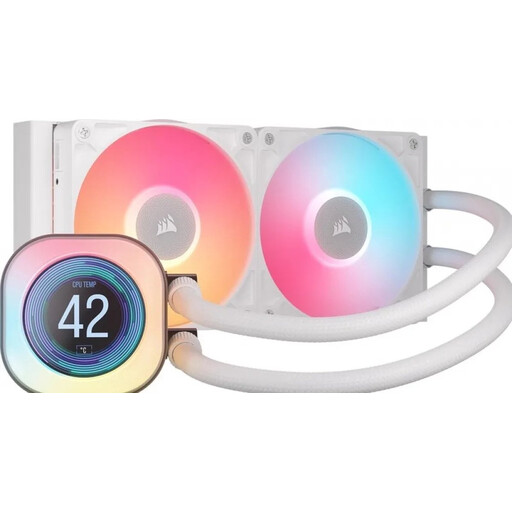
Why it suits this type of user: A 240mm AIO CPU cooler is a good fit for gamers and hardware enthusiasts who want to combine CPU cooling, an LCD screen and a neat finish in one system.
Check the radiator size and socket support before buying. This model is listed as compatible with AM4, AM5, LGA 1700 and LGA 1851, among others.
240mm radiator, two fans, PWM support and a 2,1-inch LCD display.
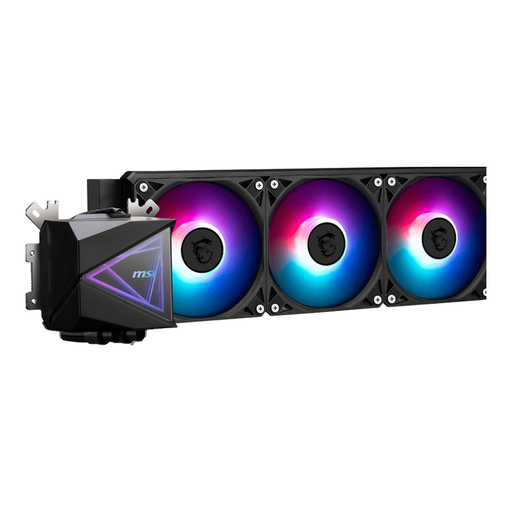
Why it suits this type of user: This MSI AIO cooler is designed for systems with enough room for a 360mm radiator and three fans. It’s suited to sustained gaming or rendering workloads, for example.
The installation details specify the radiator length, supported sockets and separate PWM and ARGB connections. Check these before buying.
360mm radiator, three 120mm fans, PWM control and support for AM4, AM5, LGA 1700 and other sockets.
A PC cooler lowers the temperature of components inside your computer. A portable air conditioner cools the room where you work or game. The two solutions aren’t interchangeable.
A 9000 BTU air conditioner may be suitable for a smaller room, while a 12000 BTU portable air conditioner may be intended for a larger space. Always check the stated room size, where the exhaust hose needs to go, the noise level and energy consumption.
The TCL 9000BTU portable air conditioner has cooling, fan and dehumidifying modes, as well as a timer and window kit. According to the product description, the Candy 12000 BTU portable air conditioner also supports heating, cooling, fan and dehumidifying modes. These features are based on the product specifications and don’t guarantee a particular room temperature.
We’ve put together a complete, up-to-date list of products that meet these strict selection criteria and the applicable European safety regulations.
PC air cooling is usually easier to install and involves fewer parts. PC liquid cooling with an AIO system can be useful if your processor is under heavy load for extended periods and your case supports a radiator. For either option, check the socket, dimensions and connections.
Its lifespan depends on usage, dust, the pump and the fans. Check regularly for dust, unusual noises and visible leaks. A sealed AIO system shouldn’t be opened or dismantled.
Start with good airflow: direct warm air out through the rear or top, and let cooler air in through the front or bottom. Use PWM control and set a suitable fan curve. A quiet PC fan will only help if the case and the other fans are set up sensibly.
