
Vandaag of morgen in huis

Kwaliteit gegarandeerd

Welkomstaanbiedingen ontgrendelen: GRATIS bezorging | Tot 80% korting | Gratis 30 dagen JoyPlus-proefperiode
Download de app
A good PC controller can be the difference between a frustrating gaming session and an immersive victory. But with so many models on the market, choosing the right one can be challenging. Should you go wireless? Do you need extra programmable buttons? And what about compatibility?
As a Joybuy Product Recommendation Officer, I'm here to help you navigate the options. In this article, I'll provide practical tips and a selection of popular controllers to help you find a model that fits your playstyle and budget.
Before we get to the recommendations, here are a few key points to consider that will help you make your choice.
The choice between a wired and a wireless controller depends on your personal preference.
Not every PC gamepad is created equal. Think about which features are important to you.
Below is a selection of controllers that stand out for their specifications and functionality.

Why It Stands Out: This is the default choice for many PC gamers, and for good reason. The controller offers seamless integration with Windows, a comfortable and familiar design, and reliable performance.
The Xbox Wireless Controller is designed for comfort, with a refined geometry and textured grips on the triggers and back. The hybrid D-pad provides precise input for platformers and fighting games. According to the manufacturer's specifications, the battery lasts up to 40 hours.
Pros:
Who Is It For? For the PC gamer who wants a reliable, no-nonsense gaming controller that works perfectly right out of the box. It's also an excellent choice if you play on both PC and an Xbox Series X|S or Xbox One.
View the Xbox Wireless Controller

Why It Stands Out: The GameSir G7 Pro is a pro PC controller packed with advanced features often found in more expensive models. The combination of Hall Effect technology and tri-mode connectivity makes it exceptionally versatile.
This controller is equipped with Hall Effect joysticks and analog triggers, which use magnetic sensors to eliminate stick drift and ensure a consistent response. The ABXY buttons are mechanical micro-switches for fast, clicky feedback. With Tri-Mode connectivity, you can easily switch between wired (for Xbox/PC), 2.4GHz wireless (for PC/Android), and Bluetooth.
Pros:
Who Is It For? For the competitive or enthusiast gamer looking for advanced features like anti-drift joysticks and programmable buttons without paying a premium price.
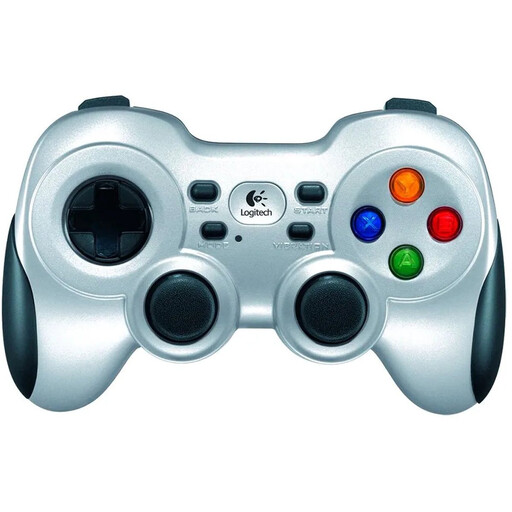
Why It Stands Out: The Logitech F710 has been a popular choice for years due to its reliability and broad compatibility, especially for those seeking an affordable wireless solution.
This PC gamepad uses a stable 2.4GHz wireless connection via a small nano-receiver. A unique feature is the switch that lets you toggle between XInput and DirectInput, the two most common standards. This ensures the controller works not only with modern games but also with many older PC classics. The dual vibration motors provide tactile feedback in games that support it.
Pros:
Who Is It For? For the casual gamer seeking a solid and affordable wireless controller for a wide range of PC games, from the latest titles to retro classics.
This selection covers a wide range of needs, but there are, of course, many more models available. If you're looking for different styles, colors, or specific features, be sure to check out our full assortment.
? Explore all wireless PC controllers on Joybuy
1. Can I use an Xbox controller on a PC? Yes, using an Xbox PC controller is very simple. Modern Xbox controllers (like the Xbox Wireless Controller) can connect directly to a Windows PC via Bluetooth or a USB-C cable. Windows automatically recognizes the controller, making it a plug-and-play experience.
2. What is the advantage of a pro controller for PC? A pro PC controller offers features aimed at serious gamers. The main advantages are extra, programmable buttons (often on the back), the ability to swap components like joysticks, and software to fine-tune the sensitivity of triggers and sticks. This gives you an edge in competitive games.
