
Vandaag of morgen in huis

Kwaliteit gegarandeerd

Welkomstaanbiedingen ontgrendelen: GRATIS bezorging | Tot 80% korting | Gratis 30 dagen JoyPlus-proefperiode
Download de app
Building or upgrading a new PC starts with compatibility, not the colour of the RGB lighting. If you focus only on clock speed, storage capacity or an appealing product photo, you could end up with components that do not work together, do not fit in the case or require additional accessories.
The most common pitfalls when buying PC components are:
First, check the processor socket. For recent AMD systems, look for an AM5 motherboard. According to the product information, the MSI MAG X870E TOMAHAWK WIFI supports AMD Ryzen 7000, 8000 and 9000 series processors and DDR5-SDRAM. The GIGABYTE A620M GAMING X also uses the AM5 socket and supports DDR5.
For Intel systems, an LGA 1700 motherboard is relevant. The MSI B760M Project Zero and MSI PRO B760M-P are examples of LGA 1700 motherboards. Pay close attention to the memory type: the B760M Project Zero is designed for DDR5, while the MSI PRO B760M-P uses DDR4.
Practical checks:
An NVMe SSD and a SATA SSD are not the same thing. An NVMe SSD usually uses an M.2 slot and communicates via PCIe. This reduces cable clutter and is convenient when building a new PC. A SATA SSD generally uses a 2.5-inch enclosure and requires both a SATA data cable and a power cable.
Check the following on the motherboard:
According to the product information, the Kingston KC600 256 GB is a SATA III 2.5-inch SSD with read speeds of up to 550 MB/s and write speeds of up to 500 MB/s. This type of storage is particularly suitable for an existing PC with a spare 2.5-inch drive bay, or for an upgrade where no M.2 slot is available.
Good airflow involves more than simply choosing a high fan speed. Consider airflow, static pressure, PWM control, noise level and the available mounting points.
The Corsair iCUE LINK LX120-R RGB 3-pack lists a maximum speed of 2400 RPM, airflow of up to 70 CFM, PWM support and 18 RGB LEDs per fan. The Corsair iCUE LINK RX140 MAX RGB lists a range of 300 to 1600 RPM and airflow of up to 102.9 CFM. These figures are product specifications; actual noise levels and cooling performance depend on the installation, case and fan curve.
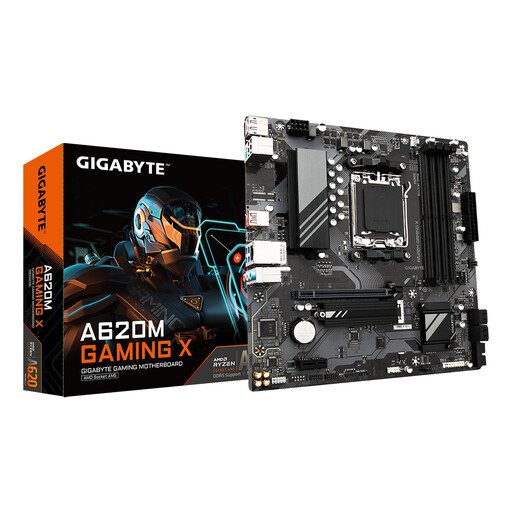
Why it suits this profile: The micro-ATX form factor is suitable for a compact AM5 build. The product specifications list four DDR5 slots, one M.2 PCIe 4.0 slot and four SATA connections.
The socket and memory type are clearly specified. However, check the exact maximum RAM capacity in advance, as the supplied product information lists different figures for this.
AM5, micro-ATX, DDR5 and support for M.2 and SATA storage.
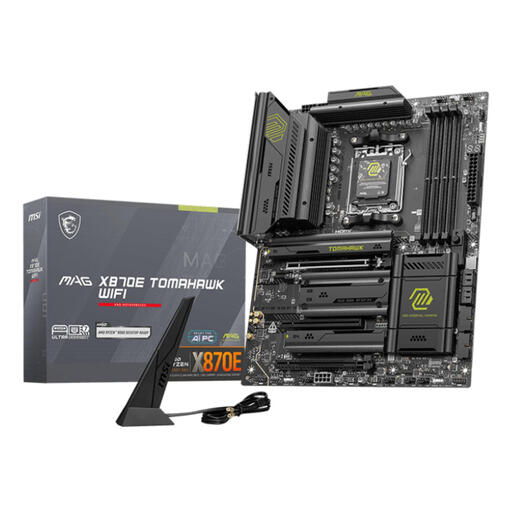
Why it suits this profile: According to the product details, this ATX motherboard offers four memory slots, support for up to 256 GB DDR5, multiple M.2 and SATA connections, Wi-Fi 7 and 5 Gigabit Ethernet.
The connections and platform support are clearly stated. Even so, check your case dimensions and your processor’s BIOS support.
Extensive expansion options, DDR5 support and built-in wireless networking features.

Why it suits this profile: The set contains three 120mm fans with PWM control, specified airflow of up to 70 CFM and support for case and radiator cooling.
PWM enables automatic or manual speed control. According to the instructions, an iCUE LINK hub is required for the lighting; this is sold separately.
Three fans in one pack, PWM support and specified static pressure of up to 3.8 mmH2O.
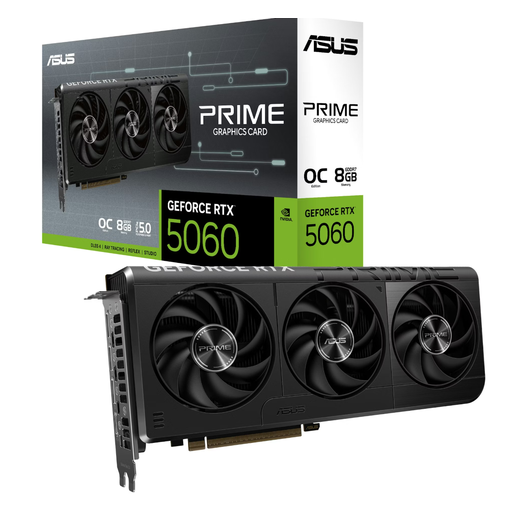
Why it suits this profile: According to the product information, this RTX 5060 graphics card has 8 GB GDDR7, three DisplayPort connections, HDMI 2.1b and a specified length of 268.3 mm.
The required 8-pin power connection and 145 W power consumption are listed. Before buying, check your power supply, available case space and airflow.
8 GB GDDR7, PCIe 5.0 interface and four video outputs according to the product specifications.
We have compiled a complete, up-to-date list of products that fully meet these strict selection criteria and the applicable European safety regulations.
Start with the processor and motherboard, as the socket and chipset determine the rest of the build. Then choose RAM that is compatible with the motherboard. Next, check the graphics card, power supply, storage, case and cooling. This helps you avoid buying DDR4 RAM for a DDR5 platform or choosing a graphics card that will not fit in the case.
No. NVMe storage offers a compact solution and can deliver high transfer speeds, but a SATA SSD is often sufficient for the operating system, general software and many games. Focus particularly on the available connections, capacity and your budget. On an older PC, a SATA SSD can be a straightforward upgrade.
Lifespan depends on usage, temperature, dust, the power supply and mechanical stress. Good airflow helps remove heat. Clean fans carefully, use a suitable power supply and check all connections before installation. The statutory guarantee for the products mentioned is at least two years according to the product information provided; additional rights may apply under applicable Dutch law.
