
Vandaag of morgen in huis

Kwaliteit gegarandeerd

Welkomstaanbiedingen ontgrendelen: GRATIS bezorging | Tot 80% korting | Gratis 30 dagen JoyPlus-proefperiode
Download de app
A simple upgrade often seems straightforward: more RAM, a new motherboard or a more powerful CPU cooler. But many problems arise when components are bought separately. A DDR5 module won’t fit in a DDR4 motherboard, a large radiator won’t fit in every PC case, and a motherboard with the right socket won’t necessarily support every processor.
As a Joybuy Product Recommendation Officer, I look at product specifications to identify practical risks when you’re buying. This helps you see which PC components suit your needs, budget and existing system.
A memory kit rated at 6000 MT/s sounds appealing, but its speed depends on the motherboard, processor and enabled profile. Without an XMP or EXPO profile, the memory may run at a lower default speed. So always check:
A 2 × 16 GB kit is generally suitable for dual-channel use, but the correct memory slots vary by motherboard.
The socket determines which processor physically fits. An AM5 motherboard is designed for compatible AMD Ryzen processors, while an Intel LGA 1700 motherboard uses a different connection. Even with the same socket, the BIOS version, chipset and power delivery can affect support.
Check the manufacturer’s processor support list before buying. For example, the Colorful B850 and B650 models list support for AMD Ryzen 7000, 8000 and 9000 Series processors with an AM5 socket. This isn’t a general guarantee for every processor, so check the specific model and BIOS requirements.
A Micro-ATX motherboard won’t automatically fit every case advertised as a “gaming case”. Check the combination of:
For an all-in-one water cooler, the case must also support a radiator of the right size. Check whether there’s a dedicated connection for the water pump, too.
DDR4 and DDR5 aren’t interchangeable. The notch is in a different position on each module, so you can’t fit a DDR5 module into a DDR4 slot. DDR4-3200 remains a practical choice for an existing system with a DDR4 motherboard. For example, the Kingston FURY Beast 16GB is a 16 GB DDR4 DIMM, rated at 3200 MT/s and CL16 according to the product specifications.
DDR5 is required for a new AM5 system. According to the product information, the Kingston FURY Beast DDR5 32GB runs at 5600 MT/s and uses a single 32 GB module. A 2 × 16 GB kit, such as Kingston FURY Beast RGB DDR5-6000, has a different configuration and, according to the listing, supports Intel XMP 3.0 and AMD EXPO. Check your motherboard’s memory list for both options.
For everyday use and many games, 16 GB is a starting point; 32 GB gives you more room for multitasking, streaming and demanding applications. For video editing, 3D software or large projects, 64 GB may be a better fit.
Don’t just look at the total capacity. Two modules can take advantage of dual-channel functionality, while a single module may be easier to upgrade later. The G.SKILL Aegis 32 GB kit consists of 2 × 16 GB DDR4-3200 with CL16. The G.SKILL Trident Z5 Neo RGB kit offers 64 GB as 2 × 32 GB DDR5-6000 with CL30.
Don’t choose a motherboard based on its chipset name alone. Also consider:
The MSI PRO B760M-P uses an Intel B760 chipset, LGA 1700 socket, four DDR5 slots and a stated maximum memory capacity of 192 GB. The MSI PRO H610M-G, by contrast, is a DDR4 model with two memory slots. These two models aren’t direct replacements for one another.
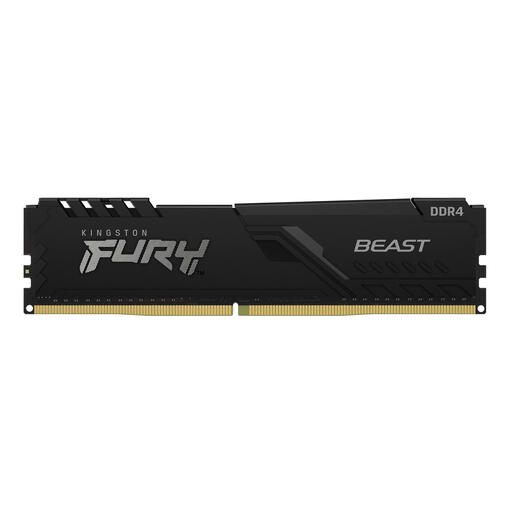
Why it suits this profile: A straightforward upgrade for an existing DDR4 system, without immediately buying multiple modules or a new platform.
The listing specifies DDR4, 3200 MT/s, CL16 and a 288-pin DIMM format. This makes it easy to check whether your motherboard is compatible.
16 GB capacity, CL16, XMP 2.0 according to the product specifications, and an integrated heatsink.
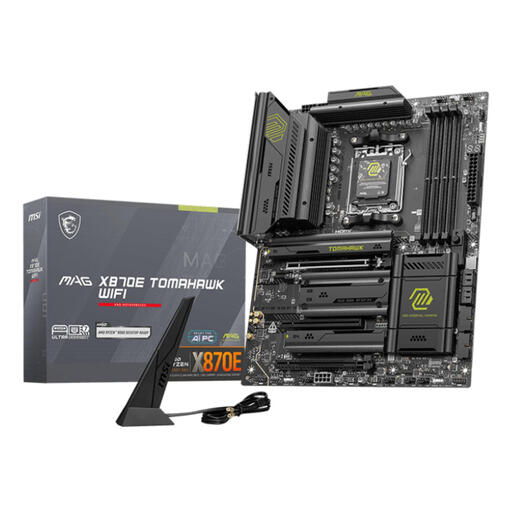
Why it suits this profile: For a new AMD system with plenty of expansion options, fast storage and built-in wireless networking.
The socket, DDR5 support and four memory slots are clearly listed. Be sure to check the CPU support list before installation.
Support for up to 256 GB DDR5, Wi-Fi 7, 5G Ethernet and multiple M.2 connections according to the product specifications.
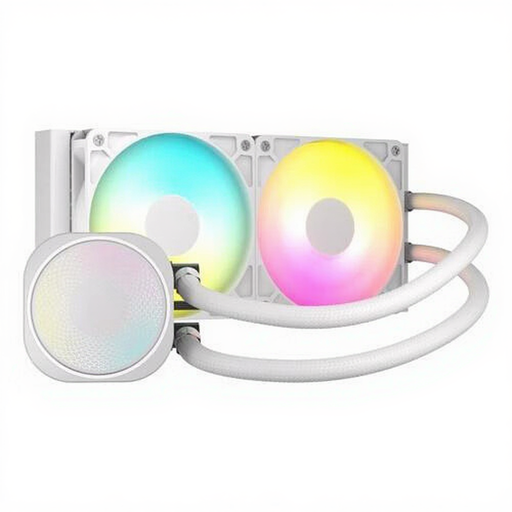
Why it suits this profile: A good fit for builders with room for a 240mm radiator who want CPU cooling with PWM control and ARGB lighting.
Compatibility with LGA 1700, AM4 and AM5 is listed. Also check the radiator clearance in your case and the pump header on your motherboard.
Two fans running at up to 2100 RPM, PWM control and stated compatibility with several CPU platforms.
If you want to upgrade an existing PC, start by choosing the component that’s causing the bottleneck. If you don’t have enough memory, adding RAM makes more sense than replacing the motherboard straight away. If the socket is outdated, switching platforms may be the better option, as you can then choose a processor, motherboard and memory that work well together.
We’ve put together a complete, up-to-date list of products that meet these strict selection criteria and the applicable European safety regulations.
Check whether your motherboard uses DDR4 or DDR5, and whether you need desktop DIMM or laptop SODIMM memory. Then compare the speed, capacity and maximum supported memory with the manual or compatibility list.
Lifespan depends on workload, temperature, dust and power supply. A well-ventilated case and correct installation help reduce wear. Also check the warranty terms; the product information states that these components come with a minimum of two years’ statutory warranty.
That depends on the improvement you’re looking for. Adding RAM is usually a smaller change than switching to a new platform with a processor, motherboard and DDR5 memory. Before you start, make a list of the components you can keep, such as the case, storage and power supply.
