
Vandaag of morgen in huis

Kwaliteit gegarandeerd

Welkomstaanbiedingen ontgrendelen: GRATIS bezorging | Tot 80% korting | Gratis 30 dagen JoyPlus-proefperiode
Download de app
Choosing a new graphics card, extra memory or a more powerful power supply can seem straightforward. Yet most buying mistakes aren’t caused by choosing the wrong brand, but by overlooking compatibility. A graphics card might not physically fit in your case, DDR5 RAM won’t work in a DDR4 motherboard, and a high-wattage power supply can still have the wrong connectors.
This guide helps gamers, PC builders and content creators compare PC components using specifications you can check. That way, you can look beyond terms such as “gaming”, “OC” or “high performance”.
A higher clock speed doesn’t automatically mean a component will work in your system. With RAM, first check the memory type, capacity and number of modules. DDR4 RAM and DDR5 RAM aren’t interchangeable: the notch is in a different position, and the motherboard’s memory controller must support the right type.
A higher boost frequency doesn’t tell you everything about a graphics card, either. Also check:
Manufacturers use terms such as “ultra”, “extreme” and “gaming-ready”. These descriptions mean little without technical details. According to the manufacturer’s product information, for example, the ASUS Dual GeForce RTX 5050 OC Edition has 8 GB GDDR6, a 128-bit memory bus, PCIe 5.0 and one 8-pin PCIe connector. These are specifications you can verify. Actual performance also depends on the processor, drivers, resolution, settings and software you use.
You should also check claims about brightness, efficiency or lifespan in other product categories against the original source. A brand’s own research might, for example, show that a product uses less energy or lasts longer than a standard model, but don’t treat this as a universal result for every user.
A 1000W power supply isn’t automatically suitable for every PC. Also consider the ATX version, connectors, dimensions, efficiency rating and how power is distributed across the 12V rail. A 650W power supply may be enough for a mid-range system, while a powerful Radeon graphics card or several expansion cards may need more headroom.
Also check that the supplied mains cable is suitable for use in the Netherlands. A model with a UK plug may need a suitable cable or adapter.
A graphics card is essential for gaming, 3D software and GPU-accelerated applications. Check the following:
An RTX graphics card and a Radeon graphics card also differ in software features, connections and architecture. So compare the specifications of the specific model, not just the GPU family.
For a new build, 32 GB is often a practical amount for gaming, multitasking and content creation. A two-module kit can use dual-channel, provided you install it in the motherboard’s recommended slots.
Check:
A gaming RAM kit with RGB lighting mainly adds a visual touch. Lighting is no substitute for compatibility or capacity.
If you’re buying an AM5 motherboard, check that your processor uses an AM5 socket. According to its product information, the Gigabyte X870E AORUS ELITE WIFI7 ICE is designed for AMD Ryzen processors with an AM5 connection and supports DDR5 memory. That doesn’t mean every DDR5 profile will automatically run at its maximum speed: the BIOS version, processor and memory kit also play a part.
Also consider:
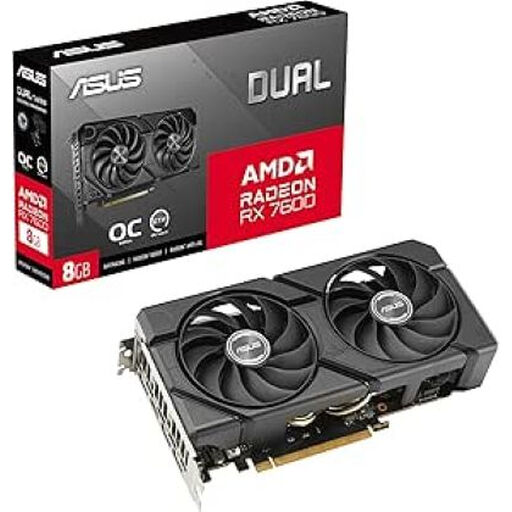
Why it suits this profile: A straightforward choice for a first gaming PC, with 8 GB GDDR6, HDMI and DisplayPort as the key features. Check the space in your case and your power supply beforehand.
The key details are clear: 8 GB GDDR6 and a specific card model. Compare these specifications with the space and connections available in your system.
8 GB GDDR6, HDMI and DisplayPort outputs, and a distinctive dual-fan design according to the product listing.

Why it suits this profile: Designed for builders looking for an AM5 platform, DDR5 support and plenty of connections for a feature-rich PC build.
The AM5 socket and DDR5 support make it easy to check the platform choice. Still, check processor compatibility and case size.
ATX form factor, AM5 platform, DDR5 support and Wi-Fi 7 according to the product description.
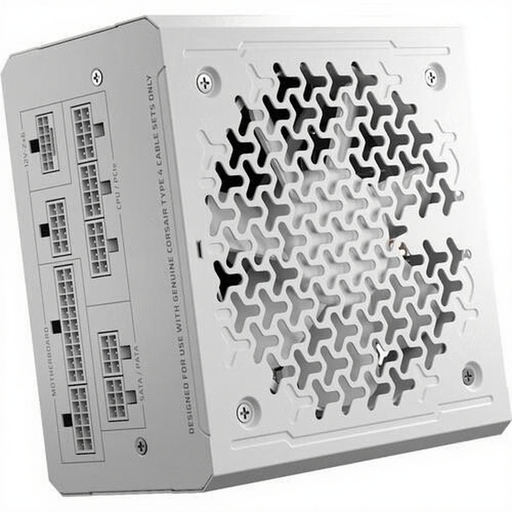
Why it suits this profile: A good choice for users looking for a high-capacity power supply with modular cables for a powerful or upgradeable PC.
The wattage is clearly listed, but before buying, also check the PCIe cables you need and the dimensions of your case.
1000W total power, ATX 3.1, 80 PLUS Gold and fully modular cables according to the product information.
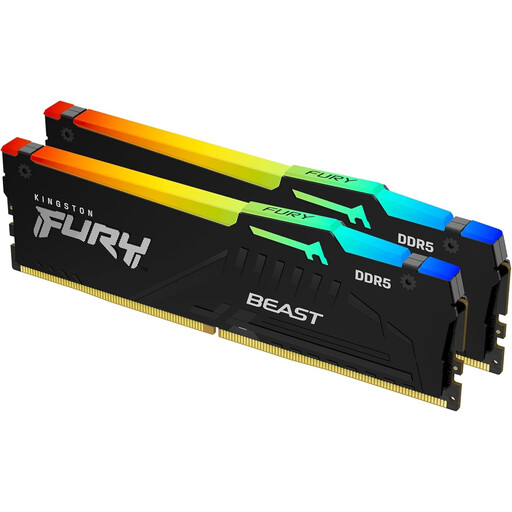
Why it suits this profile: A 32GB kit with two modules for users who combine gaming, video editing and running several programmes on a DDR5 platform.
It’s explicitly a 2 × 16 GB DDR5 kit. This makes it easy to distinguish from a single DDR4 module, but always check your motherboard beforehand.
32 GB DDR5, 6000 MT/s, CL36 and support for Intel XMP 3.0 and AMD EXPO according to the product information.
We’ve put together a complete, up-to-date list of products that meet these strict selection criteria and the applicable European safety regulations.
First compare the processor socket with the motherboard, then check the memory type, graphics card size and power supply connections. Also check the manufacturer’s manuals. A mismatch is especially likely to make a system unusable if you mix DDR4 and DDR5 components.
That depends on the processor, graphics card and other components. Use the manufacturer’s recommended PSU wattage as a starting point, and allow for extra storage, fans and future upgrades. A 650W power supply may suit a moderate build, while a more powerful configuration may need more headroom.
Lifespan varies depending on the component, how you use it, temperature and maintenance. Make sure there’s enough airflow, keep dust away from the fans and use a power supply with suitable capacity. Before buying, also check the statutory guarantee and any additional manufacturer’s warranty terms.
