
Vandaag of morgen in huis

Kwaliteit gegarandeerd

Welkomstaanbiedingen ontgrendelen: GRATIS bezorging | Tot 80% korting | Gratis 30 dagen JoyPlus-proefperiode
Download de app
A separate graphics card, new memory or a more powerful gaming motherboard can noticeably enhance your desktop. However, things often go wrong with PC components in areas that receive less attention in product adverts. A component may be fast on paper, but still not fit your case, power supply, processor or motherboard.
So don’t focus only on terms such as “gaming”, “OC”, “high performance” or “future-ready”. Above all, check the technical specifications that will actually determine whether your build works.
A powerful graphics card is often longer and thicker than a standard model. So check:
For example, the Gigabyte GeForce RTX 5080 Gaming OC is 340 mm long, 140 mm wide and occupies four slots according to its product specifications. A case with a maximum GPU length of 380 mm may therefore appear suitable, but also check the remaining space around cables and fans.
DDR4 RAM and DDR5 RAM use different memory slots. They are not interchangeable. A DDR5 module will not fit a DDR4 motherboard, even when the capacity and speed are comparable.
Before buying, check:
A 2 x 16 GB kit can be practical for gaming and multitasking, while a single 32 GB module leaves room for an upgrade later. The final choice depends on the number of memory slots and your upgrade plans.
A PC power supply rated at 650 W is not automatically suitable for every gaming PC. In addition to total power output, the connectors, form factor, efficiency and peak load are all important.
Look out for:
According to the product specifications, the Gigabyte RTX 5080 Gaming OC requires a power supply of at least 850 W and uses a 12+4-pin PCIe Gen 5 connector. The Corsair SF850 is an 850W SFX model with ATX 3.1 and a fully modular design. This makes it an interesting option for a compact build, but always check that your case supports SFX.
For gaming and graphics work, the GPU model, amount of video memory and connections are all relevant. According to the listed specifications, the Gigabyte RTX 5080 Gaming OC has 16 GB GDDR7, a 256-bit memory bus, PCIe 5.0 x16 and three DisplayPort connections alongside HDMI 2.1b.
The Acer Predator BiFrost Radeon RX 9070 OC also offers 16 GB of memory, but uses GDDR6 and two 8-pin power connectors. Its listed dimensions are 297 x 120 x 52 mm and it occupies three slots. So don’t compare only the name or maximum resolution: consider the connections, dimensions and the rest of your system.
Claims about ray tracing, AI acceleration or performance come from the product information provided by the manufacturer or seller. Treat these as product specifications and check whether your games and software support the stated features.
The motherboard determines which processor, RAM generation and expansion cards you can use. The Colorful BATTLE-AX B650M Frost WIFI V15 uses an AMD AM5 socket, a B650 chipset and four DDR5 slots. According to the specifications, the board supports Ryzen 7000, 8000 and 9000 series processors, as well as Wi-Fi 6 and a 2.5G network connection.
For an Intel system with DDR4, the MSI PRO H610M-G is an alternative option. This Micro-ATX board has an LGA1700 socket, two DDR4 slots and a stated maximum memory capacity of 64 GB. An AM5 processor or DDR5 kit is therefore not compatible with it.
Also check for the presence of:
A computer case should not just look good. Check the maximum GPU length, maximum CPU cooler height, radiator support and airflow intake.
The MSI MAG PANO 100R PZ supports ATX, Micro-ATX and Mini-ITX and, according to the product information, provides space for graphics cards up to 380 mm. The case comes with four 120mm fans and supports up to ten fans. The MSI MEG PROSPECT 700R supports graphics cards up to 400 mm and CPU coolers up to 185 mm.
A PC fan with a PWM connection allows its speed to be controlled via the BIOS or software. However, check that your motherboard has enough fan headers. RGB is an additional feature, not a replacement for good airflow. For RGB PC lighting, you should also pay attention to the difference between 5V 3-pin ARGB, 12V 4-pin RGB and proprietary controllers.
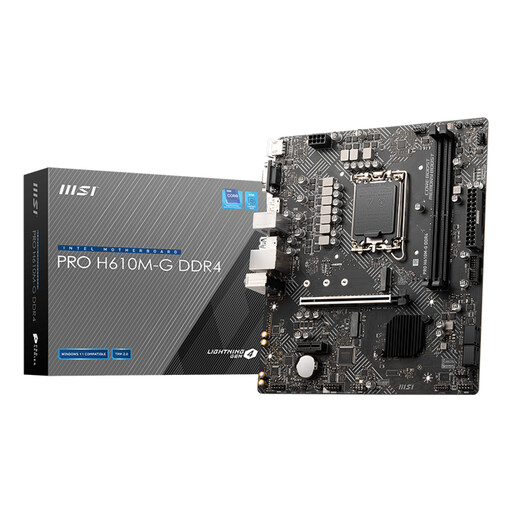
Why it suits this profile: This Micro-ATX motherboard is suitable for a compact Intel build with DDR4 memory and a straightforward basic configuration.
The socket, DDR4 support and Micro-ATX form factor are clearly specified. However, check processor support before buying.
Two DDR4 slots, one PCIe 4.0 x16 slot, M.2 support, and HDMI, DisplayPort and VGA.
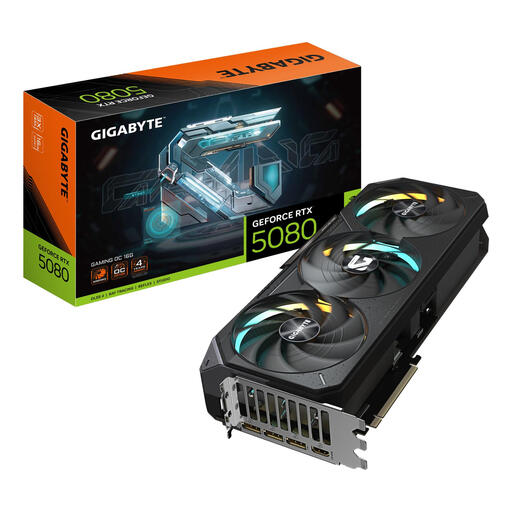
Why it suits this profile: This card is aimed at users with demanding graphics requirements for games, creative software or multiple screens.
The length, slot width, power connector and recommended 850W power supply are listed. Check that your case has room for four slots.
16 GB GDDR7, PCIe 5.0 x16, three DisplayPort connections and HDMI 2.1b.
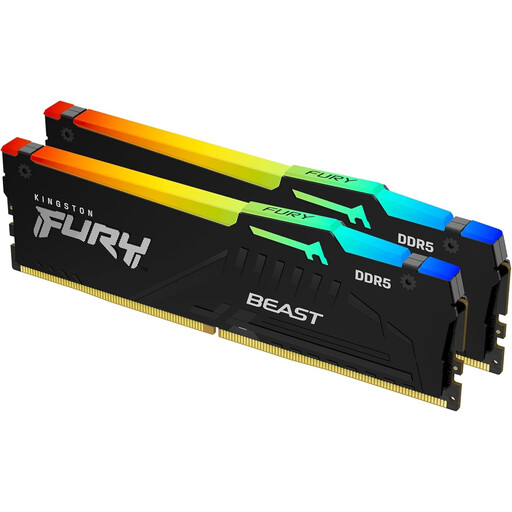
Why it suits this profile: This kit is designed for a DDR5 desktop used for gaming, video editing, 3D work and intensive multitasking.
This is a DDR5 kit consisting of two modules. Before buying, check that your motherboard supports DDR5 and that XMP or EXPO is available.
32 GB split across 2 x 16 GB, 6000 MT/s, CL36, with support for Intel XMP 3.0 and AMD EXPO.
We’ve put together a complete, up-to-date list of products that fully meet these strict selection criteria and the applicable European safety regulations.
At a minimum, you’ll need a processor, motherboard, RAM, graphics card, storage, PC power supply and computer case. You’ll often also add a CPU cooler and one or more PC fans. Check compatibility between the socket, memory standard, case form factor, GPU dimensions and power supply.
Not for every existing PC. DDR5 offers different speeds and features, but requires a compatible motherboard and processor. For upgrading a DDR4 system, DDR4 RAM may be more practical and cost-effective. Compare the total cost of the motherboard, processor and memory together.
That depends on the processor, graphics card and other components. Check the graphics card’s recommended power output and allow for peak loads and future upgrades. Also check the connectors and form factor: an 850W SFX power supply will not automatically fit in a standard ATX case.
