
Vandaag of morgen in huis

Kwaliteit gegarandeerd

Welkomstaanbiedingen ontgrendelen: GRATIS bezorging | Tot 80% korting | Gratis 30 dagen JoyPlus-proefperiode
Download de app
Building a new gaming PC is an exciting project. You carefully select the processor and graphics card, but the PC case is often the last component chosen, based purely on looks. That's a pitfall. The wrong computer chassis can undermine the performance of your expensive components and cause significant frustration. As a Product Recommendation Officer at Joybuy, I see where things often go wrong. Let's skip the marketing jargon and look at what really counts.
Avoid these three common mistakes:
RGB PC case with all-glass panels might look stunning, but without proper ventilation, you're creating a hotbox. Components get too hot, start to "throttle" (automatically slowing down to prevent overheating), and thus perform worse. A beautiful design is useless if it costs you performance.To avoid the problems above, focus on a few objective specifications. These determine whether a case is suitable for your build.
The size of your case must match your motherboard. The most common form factors are:
ATX case offers a good balance between space and size.Most PC builders opt for a Midi Tower. This type of case typically supports all three form factors and provides enough room for most components. Always check the case specifications for:
Good PC cooling is crucial for stable performance. A case's airflow is determined by its design and the case fans.
case fans you can install and of what size (usually 120mm or 140mm). If you're considering water cooling, check where you can place radiators (top, front, side) and their maximum size (e.g., 240mm, 280mm, or 360mm).A good baseline is at least two fans: one at the front for cool air intake and one at the back for warm air exhaust.
Below are some popular choices, tailored to different types of users. We base these recommendations on objective specifications that help avoid the most common pitfalls.
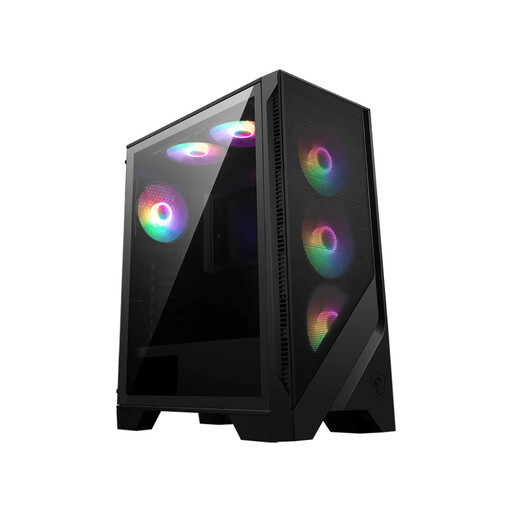
Why This Fits Their Persona: Ideal for first-time builders. This case focuses on ease of use and delivers great performance out of the box without needing to purchase extra components.
Directly tackles the "Aquarium" pitfall with a mesh front panel and six pre-installed RGB fans. This ensures excellent airflow at no extra cost.
Great value for money. Supports GPUs up to 330mm and includes a magnetic dust filter, which simplifies maintenance.
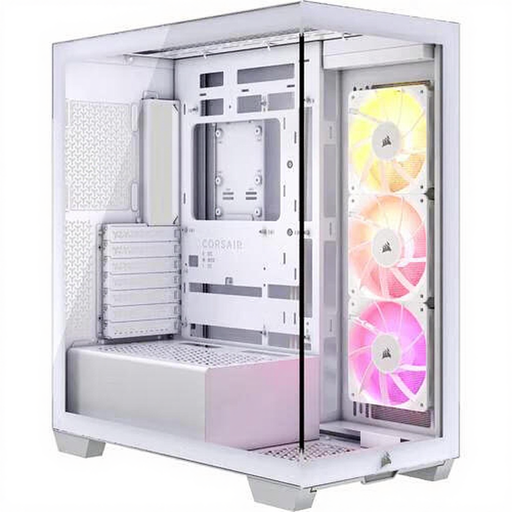
Why This Fits Their Persona: For the builder who wants to showcase their components. The seamless glass design turns your PC into a showpiece without compromising on modern features.
Although it has a lot of glass, the cooling is smartly designed with side, top, and bottom ventilation. The modern dual-chamber design prevents the cable spaghetti nightmare.
Offers a panoramic view of your hardware. Comes with three ARGB fans and supports the latest back-connect motherboards for an ultra-clean look.
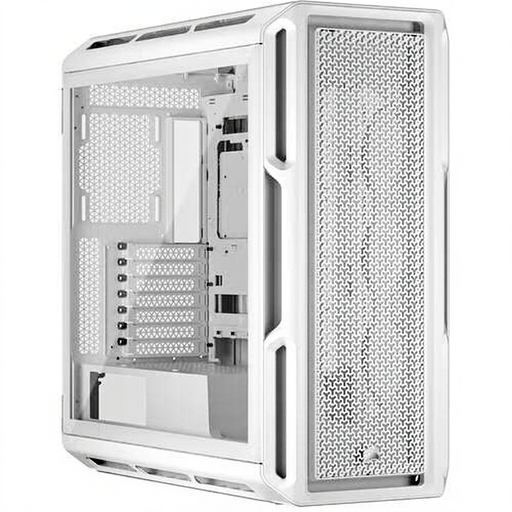
Why This Fits Their Persona: For the hardware enthusiast who makes no compromises. This `Corsair case` offers maximum space, flexibility, and cooling potential for the most powerful systems.
Designed for maximum airflow and avoids the "Almost-Fit" nightmare with room for GPUs up to 450mm. The excellent cable management options make a clean build easy.
Enormous flexibility for cooling (up to 10 fans and multiple radiators). Supports E-ATX motherboards and has a premium finish with steel and tempered glass.
We have compiled a complete, up-to-date list of products that fully meet these strict selection criteria and local regulations.
For a standard gaming PC, a setup with two or three fans is often sufficient: one or two at the front as intake and one at the back as exhaust. For high-end systems with a powerful CPU and GPU, you might consider adding extra fans at the top (exhaust) to improve warm air removal.
No, this is a common misconception. Although an ATX case is the standard, internal dimensions vary. Modern high-end graphics cards are often very long and thick. Always check the "maximum GPU length" specification of the case and compare it with the dimensions of the graphics card you have in mind.
Not necessarily "better," but different. Water cooling, especially an All-in-One (AIO) system, can handle higher peak temperatures better and often provides a cleaner look in your build. However, a high-quality air cooler can be just as effective and sometimes even quieter during normal use. The choice depends on your budget, the components you want to cool, and your personal aesthetic preference.
