
Vandaag of morgen in huis

Kwaliteit gegarandeerd

Welkomstaanbiedingen ontgrendelen: GRATIS bezorging | Tot 80% korting | Gratis 30 dagen JoyPlus-proefperiode
Download de app
An extra PC case fan can improve airflow in your desktop, but not every computer fan will fit every case. The wrong size, a missing connector or excessive noise can quickly lead to extra costs and disappointment. Use these practical checks to choose a PC case fan, radiator fan or 3-pack more confidently.
A high rotational speed may sound appealing, but it does not tell you everything about performance. Airflow is usually measured in CFM or m³/h. For a case, it is important to strike a good balance between air movement and noise. A fan that only moves a lot of air at maximum speed can be unnecessarily noticeable in everyday use.
An RGB case fan often has two separate functions: the fan motor and the lighting. A 4-pin PWM connection controls the speed, while RGB or ARGB may require its own connection or controller. Systems such as iCUE LINK work with specific hubs and cables. So do not just check whether your motherboard has a fan header; also make sure the lighting type and controller are compatible.
A 120 mm PC fan is a common size, but 140 mm models will not automatically fit every case. Also pay attention to the thickness. According to the product information, the Corsair RS120 MAX is 30 mm thick, while many standard fans are approximately 25 mm thick. Check the available space around the motherboard, RAM, radiator and side panels before ordering.
First measure the existing cut-out or consult your PC case manual. The most common sizes are:
Also check the mounting holes. A fan intended for a radiator must fit correctly and must not touch any components.
Airflow indicates how much air the fan can move according to the product specification. Static pressure, measured in mmH₂O, is particularly relevant when air needs to be pushed through a radiator, dust filter or restrictive front panel.
For an open case grille, airflow is usually the first point of comparison. For a radiator fan or a case with a restrictive dust filter, static pressure deserves extra attention. CFM and m³/h are not the same units, so do not compare figures without checking the unit first.
A PWM PC fan generally uses a 4-pin connection. This allows the motherboard to adjust the speed automatically according to the temperature. That helps a quiet PC fan run slowly under light loads and speed up during gaming or rendering.
Pay attention to the following details:
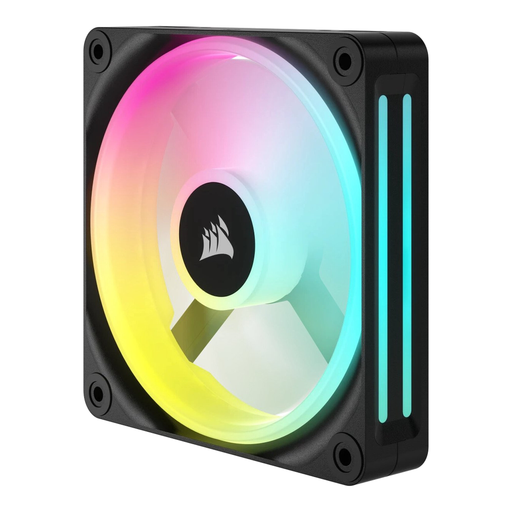
Why it suits this profile: A single 120 mm fan is ideal if you want to replace one worn-out fan or make a gradual start towards better airflow. According to the product description, the speed ranges from 480 to 2400 RPM and LED lighting is included.
You do not have to buy an unnecessary set if only one mounting position is available. However, check the connector and 12 cm size beforehand.
12 cm size, LED lighting, adjustable range of 480–2400 RPM and a maximum stated airflow of 63.1 CFM according to the product information.

Why it suits this profile: This set is aimed at PC builders who want to fill three 120 mm positions at once and manage RGB lighting through a central hub.
The product description mentions an iCUE LINK System Hub being included, making it clearer which ecosystem you need beforehand. Nevertheless, check the maximum port load in the manual.
Three fans, PWM support, 400–2100 RPM, eight RGB LEDs per fan and a stated noise range of 10–36 dB.
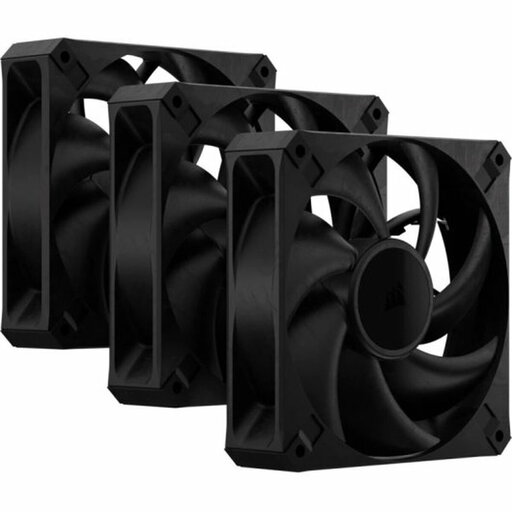
Why it suits this profile: This set is aimed at users looking for case or radiator fans for a system that is regularly under heavy load.
The specifications include both airflow and static pressure. This lets you assess the set more precisely for use with a radiator or restrictive dust filter. However, the 30 mm thickness requires an extra clearance check.
Three fans, 4-pin PWM, up to 2000 RPM, stated static pressure of up to 4.2 mmH₂O and a maximum of 29.5 dB according to the product description.

Why it suits this profile: This single fan combines lighting with PWM control, making it suitable for a white build where one position needs to be filled.
The listing specifies PWM and 34 individually addressable LEDs separately. This makes the functions clearer than a general claim such as “RGB-ready”. However, check your RGB header or controller.
4-pin PWM, 480–2400 RPM, a maximum stated airflow of 63.1 CFM and a noise range of 10–37 dB according to the product information.
Switch the computer off completely and unplug it from the mains before fitting a computer fan. The arrows on the frame usually indicate the direction of rotation and airflow. Use intake fans at the front or bottom and exhaust fans at the rear or top, depending on the layout of your case.
Secure each fan firmly, but do not overtighten the screws unnecessarily. Keep cables away from the blades and check that nothing is obstructed after installation. Dust on the blades and filters can reduce airflow and increase noise. Clean them regularly with compressed air, while making sure the fan cannot spin freely.
We have put together a complete, up-to-date list of products that fully meet these strict selection criteria and the applicable European safety regulations.
Not always. Check the mounting positions, available depth and the space around the radiator, graphics card and cables. A 120 mm fan that is 30 mm thick may be less suitable than a standard 25 mm model.
PWM is not essential, but a 4-pin PWM connection makes automatic speed control easier. Check whether your motherboard has a suitable 4-pin header. A 3-pin connection works differently and may offer fewer control options.
Power consumption varies by model and is affected by the motor speed and lighting. RGB LEDs add a limited extra load, but several fans and a separate hub require more connections overall. Therefore, check your motherboard, power supply and any controller before buying a set.
