
Vandaag of morgen in huis

Kwaliteit gegarandeerd

Welkomstaanbiedingen ontgrendelen: GRATIS bezorging | Tot 80% korting | Gratis 30 dagen JoyPlus-proefperiode
Download de app
Building a new PC or upgrading your current system is an exciting project. The computer case is more than just a box; it's the foundation of your build. It determines not only how your PC looks, but also how it performs and how easy it is to build. However, the market is filled with marketing claims that create more confusion than clarity. Let's go over the most common pitfalls so you can make an informed decision.
Pitfall 1: The "Good Airflow" Illusion Many manufacturers advertise their Gaming PC case with "high airflow," often by featuring a mesh front panel. But a mesh panel alone doesn't guarantee good cooling. If the internal layout obstructs airflow, the included fans are low-quality, or there's insufficient space for cable management, your components can still overheat.
Pitfall 2: Blinded by RGB Lighting A PC case with RGB can look fantastic, but aesthetics should never come at the expense of functionality. Some cases with spectacular lighting are made of thin, vibrating steel, have poor dust filters, or offer barely any room to neatly manage cables. This results in a messy build that's difficult to maintain.
Pitfall 3: The Compatibility Gamble "It's a Midi Tower case, so my ATX motherboard will fit." This assumption is a classic mistake. The dimensions of your graphics card (especially its length) and the height of your CPU cooler are just as important. Nothing is more frustrating than discovering that your brand-new, expensive graphics card is a few millimetres too long for your chosen case.
To avoid these pitfalls, focus on a few objective specifications. These will determine if a case is suitable for your components and needs.
The ATX case is the most common standard, but always check the details.
A good Airflow PC case is designed to efficiently draw in cool air and exhaust hot air.
Case with a glass panel (tempered glass) is popular for showcasing your components. However, be aware that a solid glass front panel can restrict air intake compared to a mesh front.Here are some recommendations, linked to specific user profiles and based on their objective specifications.
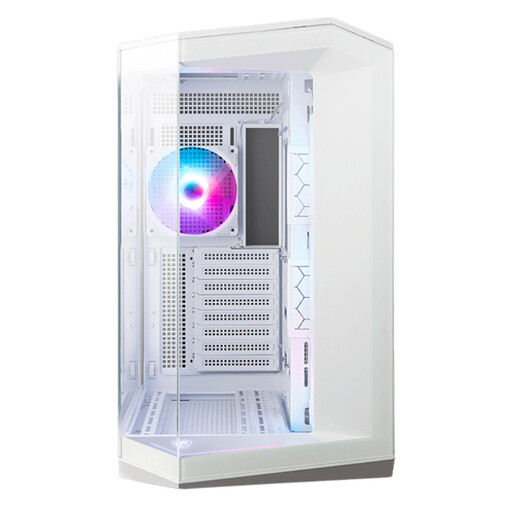
Why This Fits Their Persona: Perfect for those who want a visually stunning build. This `white PC case` with a panoramic glass design puts your components and RGB lighting front and centre. Ideal for a showpiece for your desk.
This `MSI PC case` bypasses the "style over substance" pitfall with a dual-chamber design and support for 10 fans, ensuring excellent cooling despite the extensive glass.
Four ARGB fans are pre-installed. It supports back-connect motherboards for an extremely clean look with no visible cables.
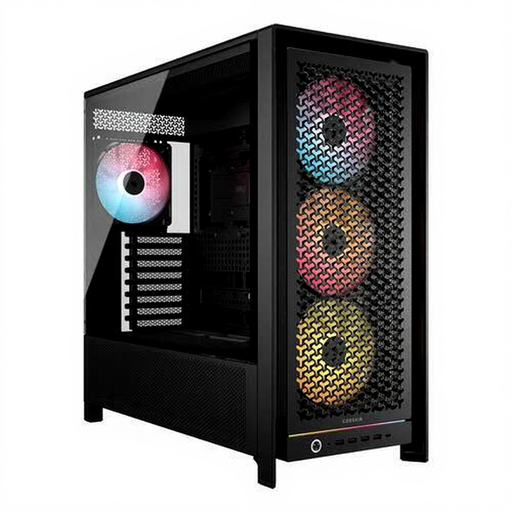
Why This Fits Their Persona: For the user who demands maximum cooling performance for high-end components. This `Corsair case` is built for serious airflow and offers tremendous flexibility for both air and water cooling.
Tackles the "airflow illusion" with an optimised 3D Y-pattern front panel and space for up to 12 fans. This isn't marketing; it's measurable cooling capacity.
Extremely spacious internal layout with support for GPUs up to 450mm and multiple radiators simultaneously. The InfiniRail system makes fan installation simple.
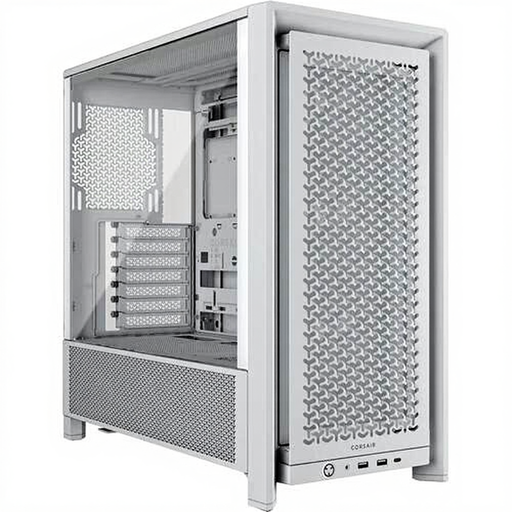
Why This Fits Their Persona: For the builder seeking a reliable, no-nonsense `Midi Tower case` that offers an excellent balance between performance, ease of building, and a clean, modern look without unnecessary frills.
Avoids the compatibility gamble with a smart, spacious layout that accommodates most common component combinations without issue. It's a popular choice, meaning many build examples can be found online.
Excellent cable management thanks to the RapidRoute system. The ventilated front panel ensures solid airflow, and the case feels sturdy and well-finished.
We have compiled a complete, up-to-date list of products that fully meet these strict selection criteria.
For a standard gaming PC, two intake fans (at the front) and one exhaust fan (at the rear) are a good starting point. This creates positive air pressure, which helps keep dust out. For high-end systems with powerful components, you can add extra fans at the top (as exhaust) for better temperatures.
No, absolutely not. While an ATX case supports an ATX motherboard, the graphics card length is a separate specification. Top-tier graphics cards, in particular, have become significantly longer in recent years. Always check the case's maximum GPU length and compare it with your graphics card's dimensions.
Not necessarily. A case with a glass panel on the side does not affect airflow. However, a case with a solid, closed-off glass front panel can restrict air intake. Many modern designs solve this with ventilation gaps on the sides of the front panel. A mesh front generally remains the more functional choice for maximum airflow.
