
Vandaag of morgen in huis

Kwaliteit gegarandeerd

Welkomstaanbiedingen ontgrendelen: GRATIS bezorging | Tot 80% korting | Gratis 30 dagen JoyPlus-proefperiode
Download de app
A PC case affects far more than the appearance of your build. It influences temperatures, noise levels, ease of installation and future upgrades. Yet many buyers focus mainly on RGB lighting or a glass side panel. This can result in a case that looks great but is not compatible with the graphics card, processor or cooling system.
A mid-tower case is often easier to place under or beside a desk than a full-tower PC case. However, size is not the whole story. Always check the internal space available for the motherboard, graphics card and CPU cooler.
An ATX PC case will generally accommodate standard ATX motherboards. With an E-ATX PC case, you need to check that the wider PCB will not block a cable-routing opening or cover plate. Even cases of the same size can differ considerably in the number of centimetres available.
A PC case with RGB lighting can look appealing, but lighting says nothing about airflow. Look at:
A case with a closed front panel may allow less air through than a model with a perforated airflow front. Also check whether the included fans connect directly to the motherboard or require a separate controller.
If you are looking for a PC case for water cooling, do not just check the radiator length. Also check the combined thickness of the radiator and fans, as well as the clearance around the RAM, motherboard and graphics card. For example, a 360mm radiator may be suitable for top mounting, while tall memory modules could still make installation there difficult.
First choose the motherboard form factor you will be using:
Also check the number of expansion slots. Eight slots are common in spacious mid-tower cases, while larger models may offer more. This is important if you are using multiple expansion cards or vertical mounting, provided the case and accessories support it.
A modern graphics card can be more than 40 cm long. Therefore, compare the maximum GPU length supported by the PC case with the length of your card, including any front fans or radiator.
For the CPU cooler, the maximum height is important. A 170 mm air cooler will not fit in every mid-tower case. With water cooling, check the radiator positions and maximum dimensions separately. Manufacturers sometimes specify different dimensions for each mounting position.
A PC case with good airflow has sufficient intake and exhaust options. A practical setup often consists of fans at the front or side for intake, with fans at the rear or top for exhaust. The exact arrangement depends on the case.
Dust filters at the front, top and bottom reduce the amount of dust that gets inside, but they do not eliminate the need for maintenance. Remove the filters regularly, clean them according to the product instructions and only put them back once they are completely dry.
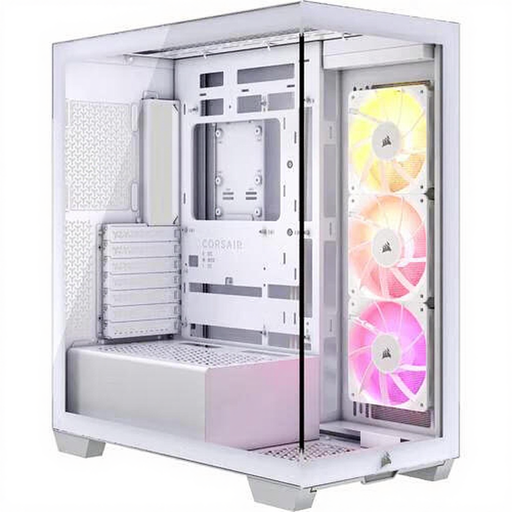
Why it suits this profile: This mid-tower provides a well-organised foundation for a gaming PC, with three pre-installed 120mm ARGB fans and support for ATX and E-ATX motherboards.
The specifications list both fan positions and room for a radiator up to 360 mm. However, check the chosen mounting position before ordering your components.
Supports GPUs up to 410 mm, CPU coolers up to 170 mm, two 2.5-inch and two 3.5-inch positions, plus USB-C.
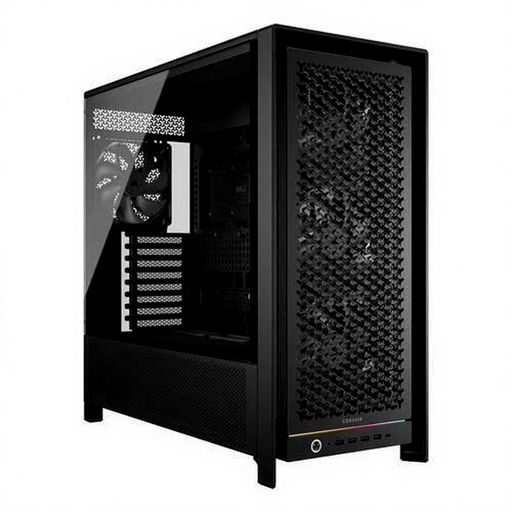
Why it suits this profile: This spacious Corsair PC case is designed for powerful ATX, E-ATX and workstation builds where cooling, storage and cable routing all need to work together.
According to the product specifications, four 140mm fans are included. The empty case weighs 15.5 kg, so plan the installation on a stable surface.
Room for GPUs up to 450 mm, six 2.5-inch and two 3.5-inch positions, dust filters and a modular FRAME system.
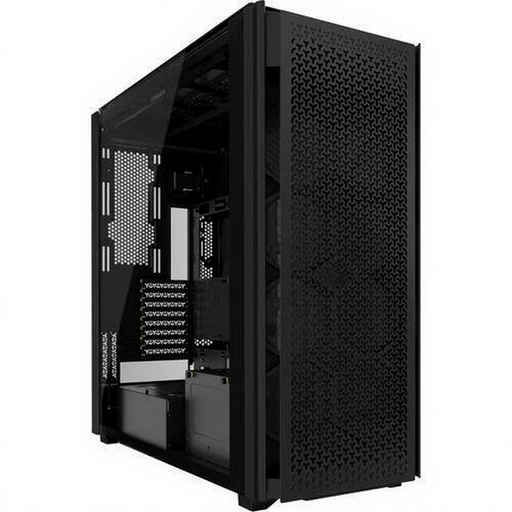
Why it suits this profile: This full-tower PC case is designed for large systems with multiple storage drives, extensive ventilation and room for air or custom water cooling.
The airflow design and dust filters are included in the product specifications. Check the exact radiator and GPU dimensions of your components in advance.
Ten expansion slots, six 2.5-inch and five 3.5-inch positions, two USB-C ports and support for multiple fan sizes.
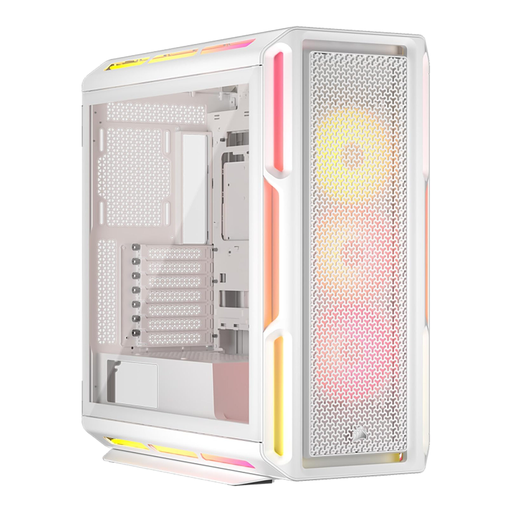
Why it suits this profile: This model combines a glass side panel, addressable RGB lighting and support for ATX and E-ATX builds, with a focus on cable management.
The three included 120mm RGB fans provide a solid starting point. The iCUE LINK hub and power supply require internal connections.
GPU clearance up to 450 mm, three 2.5-inch and two 3.5-inch positions, multiple radiator mounts and a glass side panel.
We have compiled a complete, up-to-date list of products that fully meet these strict selection criteria and the applicable European safety regulations.
Start by checking the motherboard, graphics card and CPU cooler. A mid-tower is often sufficient for an ATX system. Choose a roomier model if you are using a long GPU, multiple storage drives or a large radiator. Check the maximum dimensions in millimetres; a general label such as “gaming” is not enough.
A PC case with tempered glass displays the components and suits a build with RGB lighting. However, the glass is heavier and must be handled carefully. Do not place a removed panel on tiles or stone, and hold it by the edges. Also check that you have enough room to remove the panel safely during maintenance.
The case itself generally uses very little power. Energy consumption mainly comes from the fans, RGB lighting and the components inside the PC. The number of fans and the way the RGB is controlled can increase consumption slightly. A separate fan or RGB controller is not always included, either, so check the product specifications before ordering.
