
Vandaag of morgen in huis

Kwaliteit gegarandeerd

Welkomstaanbiedingen ontgrendelen: GRATIS bezorging | Tot 80% korting | Gratis 30 dagen JoyPlus-proefperiode
Download de app
At first glance, choosing a new PC case might seem to be mainly about colour and size. In practice, your computer case determines how much room you have for a graphics card, which cooling options will fit and how easy it is to replace components later. With a powerful gaming PC or workstation, even small mistakes can lead to extra costs.
A PC case with RGB lighting and tempered glass may look attractive, but lighting tells you nothing about the available space or airflow. Always check the maximum graphics card length, CPU cooler height and the positions for fans and radiators.
A glass side panel also needs careful handling. Tempered glass can break if an edge hits a tiled floor or metal surface hard.
A midi tower case often offers plenty of room, but not every midi tower supports E-ATX. Wide motherboards can also partly block cable cut-outs or side panels. So check the motherboard form factor: Mini-ITX, micro-ATX, ATX or E-ATX.
Pay attention to the power supply too. An ATX power supply won’t necessarily fit in every case if a long graphics card, hard drives or a radiator also need that space.
“Supports ten fans” doesn’t mean ten fans are included. Check both specifications. A case may offer plenty of room for expansion, but you might still need to buy extra fans and possibly a controller later.
With RGB fans, the connection is important too. Check whether the lighting works through a 5V ARGB header, an included hub or the manufacturer’s software.
For a typical gaming PC, a midi tower case is often a practical choice. According to the product specifications, the Corsair 3500X ARGB supports ATX and E-ATX motherboards, graphics cards up to 410 mm and CPU coolers up to 170 mm.
Larger builds with multiple storage drives or extensive water cooling may benefit from a bigger case. The Corsair 9000D RGB AIRFLOW is a full tower case with room for six 2.5-inch drives and five 3.5-inch drives, according to the product information. Before buying, check the exact dimensions of your components. A spacious case also takes up more room next to or under your desk.
Good airflow comes from a clear path for intake and exhaust. Front or side fans usually draw air in, while fans at the back or top expel warm air. A mesh front panel can help with airflow, but the dust filter needs regular cleaning.
If you’re looking for a case for water cooling, don’t just check whether it’s described as “water cooling ready”. Check the maximum radiator size and mounting position. The Corsair FRAME 5000D RS ARGB lists support for radiators up to 420 mm. According to the product specifications, the MSI MEG PROSPECT 700R supports radiators up to 360 mm and CPU coolers up to 185 mm.
For a new build, 2.5-inch bays are suitable for many SSDs, while 3.5-inch bays provide room for traditional hard drives. Check the front-panel connections too. USB-C is useful for modern external storage, but requires a compatible internal header on the motherboard.
Cable management isn’t just about appearance. Cable channels behind the motherboard help keep airflow clear and make maintenance easier. Also check whether a power supply is included. According to the product information, the Corsair and MSI cases mentioned here do not include one.
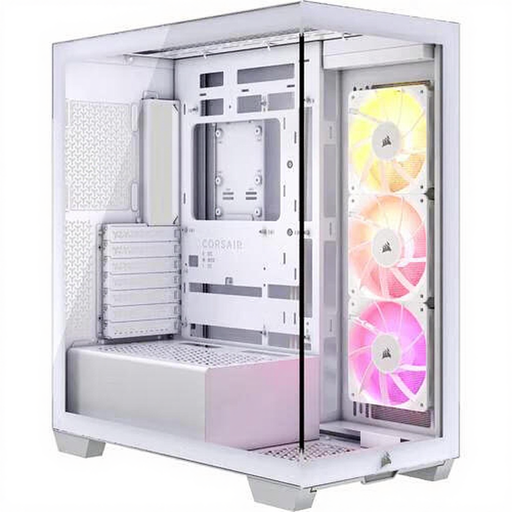
Why it suits this profile: This midi tower has room for ATX and E-ATX builds without requiring you to step up to a full tower. The three included 120mm ARGB fans also mean fewer components to buy straight away.
The product information gives clear limits: 410mm for the GPU, 170mm for the CPU cooler and support for a radiator up to 360mm.
Three 120mm ARGB fans, two 2.5-inch bays, two 3.5-inch bays and a front USB-C connection.
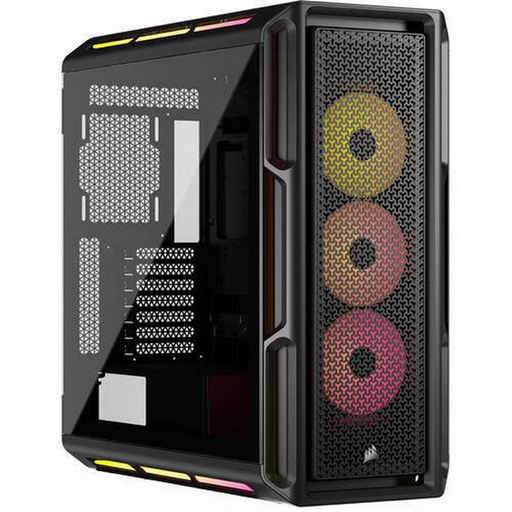
Why it suits this profile: This Corsair PC case is designed for users who value a high-quality finish, RGB control and plenty of room for a high-end build.
The case lists support for ATX, E-ATX, micro-ATX and Mini-ITX, as well as room for graphics cards up to 450mm and water cooling.
Three pre-installed 120mm RGB fans, an iCUE LINK hub, tempered glass and support for up to ten fans according to the product specifications.
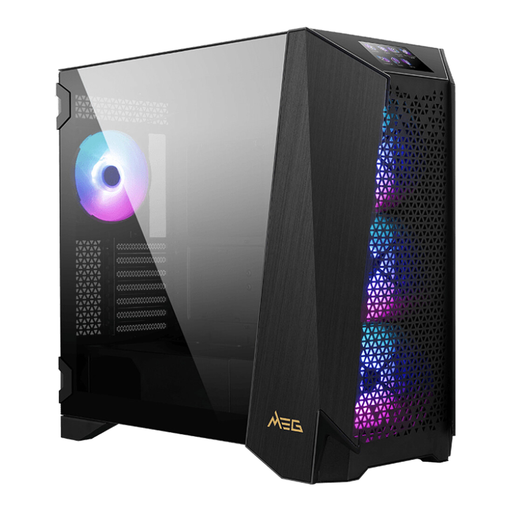
Why it suits this profile: This MSI PC case is designed for large components, multiple fans and a water-cooled gaming PC or workstation.
The listed clearances are easy to check: GPU up to 400mm, CPU cooler up to 185mm and radiators up to 360mm.
Four included 140mm ARGB fans, E-ATX support and a maximum capacity of 80.74 litres.
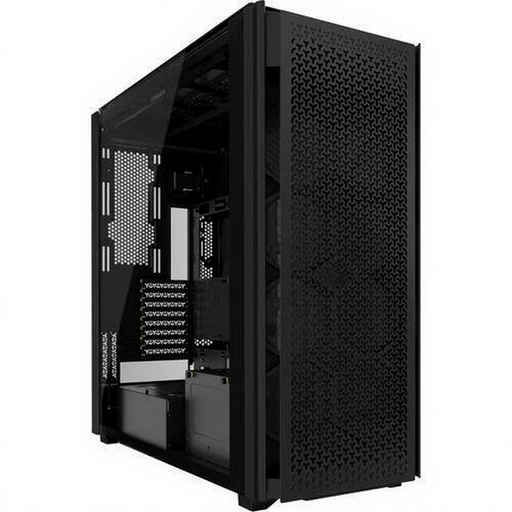
Why it suits this profile: If you want to combine multiple storage drives, large radiators or lots of fans, this full tower gives you more flexibility when arranging your components.
The product listing specifies the bays and fan positions, so you can check in advance whether your storage and cooling plans will fit.
Six 2.5-inch bays, five 3.5-inch bays, ten expansion slots and support for RGB and water cooling.
We’ve put together a complete, up-to-date list of products that meet these strict selection criteria and the current European safety regulations.
A midi tower is enough for many gaming PCs. Choose a larger model if you’re using an E-ATX motherboard, multiple radiators, lots of storage or an especially long graphics card. The dimensions of the individual components are what matter, not just the “gaming PC case” label.
There’s no fixed replacement date for a computer case. A steel case can last through several upgrades if you maintain the fans, dust filters and connections. When upgrading, check the available room for your graphics card, power supply and cooler again.
The case itself uses a negligible amount of power, but RGB fans, LED strips and controllers do use electricity. The difference depends on the number of components and the brightness setting. An RGB PC case may also need extra cables and a compatible controller.
