
Vandaag of morgen in huis

Kwaliteit gegarandeerd

Welkomstaanbiedingen ontgrendelen: GRATIS bezorging | Tot 80% korting | Gratis 30 dagen JoyPlus-proefperiode
Download de app
Choosing a new PC case can sometimes feel like navigating a maze of marketing terms. A sleek design with glass panels and RGB lighting quickly grabs your attention, but the wrong choice can lead to overheating components and frustration during the build process. Before you invest in a new PC case, it's crucial to look beyond the aesthetics.
Many builders fall into a few common pitfalls:
A good computer case is the foundation of your system. Let's break down the most important factors so you can make an informed decision.
Focus on the specifications that truly matter. A good case balances aesthetics with functionality. Pay special attention to the following three points.
The dimensions of your case determine which components you can use. The most common sizes are Midi Tower and Full Tower.
Always check these specifications before you buy:
Proper airflow is crucial for the performance and stability of your PC, especially in a gaming case. An airflow case is specifically designed to maximise this.
A well-designed case makes the building process much more pleasant. Look for features that make your life easier.
Here are some popular choices, tailored to different types of builders.
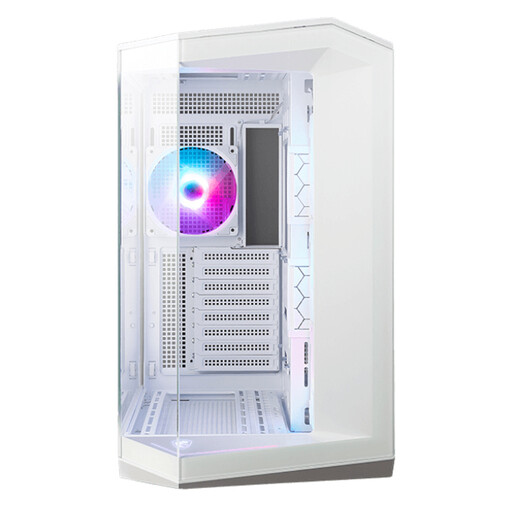
Why This Fits Their Persona: This white PC case is ideal for those who want to showcase their components. The panoramic 270-degree glass design makes it a real showstopper, perfect for a build with plenty of RGB lighting.
Unlike many "aquarium" cases, this model from MSI has smart ventilation options on the side, top, and bottom, including included reverse-blade fans that draw in air without obstructing the view. This avoids the "Aquarium Trap" of poor airflow.
Four ARGB fans are pre-installed, giving you a complete RGB PC case setup right out of the box. The dual-chamber layout ensures excellent cable management.
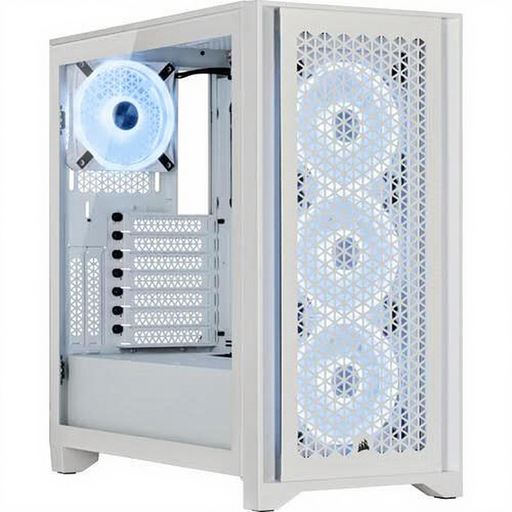
Why This Fits Their Persona: For those who prioritise cooling performance above all else. This Corsair case combines a clean aesthetic with a high-airflow front panel, ensuring components receive maximum cooling during intense gaming sessions.
This case is the direct answer to the "Aquarium Trap." The steel front panel is engineered for maximum air intake. Additionally, its spacious interior accommodates GPUs up to 360mm, avoiding the "Almost Fits" trap for most cards.
Corsair's RapidRoute cable management system provides 25mm of space behind the motherboard and a channel to route major cables. This enables an exceptionally clean build, which further improves airflow.
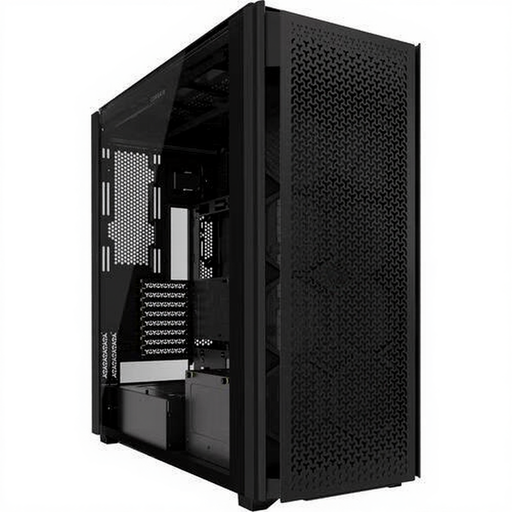
Why This Fits Their Persona: This is a full tower for the most extreme builds. If you don't want to make any compromises on space, cooling, or future upgrades, this case offers every possibility you could wish for.
This case completely eliminates the "Almost Fits" trap. With room for the largest motherboards, multiple 360mm or even 480mm radiators simultaneously, and a massive amount of storage, you will never run out of space. Airflow is, as the name suggests, a top priority.
The immense flexibility and modular design make this a dream for custom water-cooling enthusiasts. The InfiniRail system makes mounting fans and radiators easier than ever.
We have compiled a complete, up-to-date list of products that fully meet these strict selection criteria and current regulations.
For a standard gaming PC, a configuration of two or three intake fans at the front and one exhaust fan at the rear is a solid baseline. This creates positive air pressure, which helps keep dust out and ensures a constant flow of cool air over your components. For very high-performance systems, you can add extra fans at the top (exhaust).
No, definitely not. Although an ATX case indicates a standard motherboard size, the internal length of cases varies enormously. Always check the 'maximum graphics card length' specification of the case and compare it with the length of the graphics card you intend to buy. High-end cards from the latest generations are often longer and thicker than you might expect.
Surprisingly, that's usually not the case. Dust and fingerprints are often more visible on a black case. A white PC case with a matte finish can look cleaner for longer. The effectiveness of the dust filters is far more important for keeping the inside clean than the colour of the outside. Cleaning the filters regularly is the key to a dust-free system.
