Start with even lighting and control over exposure and white balance; a more expensive camera body won’t automatically make a white background look white. A standard zoom can be a good starting point for wider shots, but for small pasta details, check the magnification and compatibility of the lens actually included.
Who is this guide for?
Creating consistent pasta photos
You photograph portions of pasta against the same white background time and again, and want the background and pasta colour to look consistent. Nikon discusses white balance in changing light, while Canon Netherlands covers exposure compensation for unusually bright scenes.
Photographing pasta details
You want to show the texture of the dough, the filling or a small ingredient up close. Canon Netherlands Store discusses different perspectives for food photography, while Nikon Netherlands specifies 1:1 magnification for a dedicated macro lens.
Getting started with a complete set-up
You’re looking for a practical combination for wider shots and want to know in advance which lens and accessories come with your chosen kit. Check the contents for each model, as listed in the product information from Canon Netherlands Store and Nikon Netherlands.
What should you look for?
Start with lighting, exposure and white balance. Then choose a lens based on the framing you want and what’s included in the kit.
| What to consider |
What should you check? |
Who is this important for? |
| White background and colour |
Check whether you can adjust exposure compensation and white balance, and assess the shot under the lighting you plan to use. |
If I photograph portions against the same white background, I want the white and pasta colours to stay consistent between shots. Around 40% of consumers prioritise colour consistency. |
| Close-ups of pasta texture |
Check the maximum magnification of the exact lens and whether its mount is compatible with the camera. |
For small details, I want to know whether the lens will show them large enough in the frame, not just which camera body I’m buying. Around 30% of consumers prioritise magnification for pasta details. |
| What’s included in the complete set |
Compare the included lens and accessories, and check which lens mount the camera uses. |
I want to know what’s in the kit beforehand, so I can decide whether it suits the set-up I have in mind. Around 20% of consumers prioritise a complete set. |
| Photos and preparation video |
Check whether you want to shoot video as well as take photos, and which lens is suited to that use. |
If I want to film the preparation as well as photograph pasta, I look at the video features and the included lens. Around 10% of consumers prioritise this combination. |
Common buying mistakes
-
Comparing camera bodies only
The magnification of a dedicated macro lens doesn’t automatically apply to the kit zoom. For close-ups, a compatible macro lens may need to be a separate purchase.
Before choosing a set, compare the included lens with the size you want pasta details to appear in the frame.
-
Assuming a white background will be exposed correctly automatically
An unusually bright scene may need exposure adjustment; the colour of the light also affects how white the background looks.
Take a test shot under the lighting you plan to use and check both the exposure and the white balance.
-
Confusing the ZV-E10 with the ZV-E10 II
The ZV-E10 and ZV-E10 II are different model names and refer to different cameras.
Check the full model name and the exact lens included before choosing a product.
Camera brands to consider
Canon
The EOS R50 with an RF-S 18-45mm kit zoom is a combination worth considering for wider shots. Canon Netherlands also describes focus bracketing on the R50 for close-up work.
- According to its specifications, the EOS R50 has a vari-angle screen.
- The features of a dedicated macro lens don’t automatically apply to the included kit zoom.
Nikon
The Z50II with a 16-50mm VR kit zoom is an option for different types of framing. The separate NIKKOR Z MC 50mm f/2.8 is worth considering if magnification matters.
- Nikon specifies 1:1 magnification for the separate NIKKOR Z MC 50mm f/2.8.
- That magnification applies to the macro lens, not the 16-50mm kit zoom; also check that a lens is compatible with your chosen camera.
Sony
Sony presents the ZV-E10 II with a 16-50mm power zoom as a vlog camera with an interchangeable lens. It’s worth considering if you want to combine pasta photography with video.
- The kit mentioned includes a 16-50mm power zoom lens.
- Its video-focused positioning doesn’t show that the camera performs better for still pasta photography.
Joybuy product picks
Joybuy camera picks for pasta and product photography, including models for photos and combinations positioned in their product names for video too.
 No image available
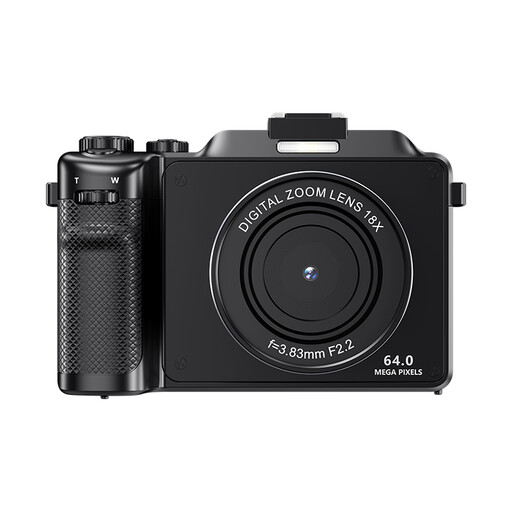
Komery X9 4K 64MP autofocus vlogging camera
The product name mentions photography and autofocus; check that the camera suits the framing and shooting distance you want.
The product name lists 4K, 64MP, 18X digital zoom, a flash and anti-shake. The product information warns that digital zoom can reduce image quality.
View at Joybuy
 No image available
DJI Osmo Pocket 3 Creator Combo
The product name positions this camera for vlogging and photography; consider whether you want to shoot video as well as take stills.
The product name lists a 1-inch CMOS sensor, 4K/120fps video, 3-axis stabilisation, face and object tracking, fast focusing and an included microphone.
View at Joybuy
 No image available
Songdian Pocket Camera 4K 44MP, pink
The product name mentions photography and video; check that the camera features suit your preferred composition and close-up distance.
The product name lists 4K, 44MP and 16X zoom. The colour is described as pink.
View at Joybuy
 No image available
Sony ZV-E10 with 16-50mm zoom lens, black
This set combines the ZV-E10 with a 16-50mm zoom lens; check that the lens suits the framing you want and the kit contents meet your needs.
This is the ZV-E10, not the separate ZV-E10 II. Compare the full model name when looking at different models.
View at Joybuy
 No image available
Sony Alpha A6100 with 16-50mm f/3.5-5.6 OSS II
The zoom lens listed may suit different types of framing; check that the kit contents match the shooting distance you have in mind.
The product name lists the Sony Alpha A6100 with a 16-50mm f/3.5-5.6 OSS II lens.
View at Joybuy
Frequently asked questions
Do I need a more expensive camera for a white background?
Not necessarily. Start by controlling the lighting, exposure and white balance; then assess whether your current camera is holding you back for the shot you want.
Does a system camera kit usually include a macro lens?
Don’t assume it does. Nikon describes the Z50II kit with a 16-50mm VR zoom; 1:1 macro capability applies to the separate NIKKOR Z MC 50mm f/2.8. Check the contents of your chosen model’s kit.
How can I keep the colour consistent across a series of pasta photos?
Keep the lighting as consistent as possible and check the white balance. Nikon explains that automatic white balance can produce a different result in certain lighting conditions from a setting based on a white card.
What cancellation period and warranty apply when buying a camera?
According to Business.gov.nl, consumers generally have 14 days to change their mind after an online purchase, starting the day after delivery; applicable exceptions may apply. Separately, the statutory guarantee entitles you to a product that meets legal requirements, according to the Dutch government. This information relates to consumer purchases.
Can I use someone else’s pasta photo on my blog or online shop?
Not without permission. According to the Dutch government, you may only publish someone else’s copyright-protected photos with the creator’s permission.


