What should you look for when choosing?
First check your console and the game mode you want to play, then check which controller and features you need. Finally, make sure the action works from where you’ll be sitting.
| What to consider |
What should you check? |
Who is this important for? |
| Controls when sitting at an angle |
Check whether the minigame uses motion controls, a pointer, the infrared camera or mouse controls. Try playing from your preferred seat and calibrate as needed, following Nintendo’s instructions. |
If I’m sitting at an angle on the sofa, I want to know whether the specific movement or pointer action works from there. Around 36% of consumers give their seating position top priority. |
| Compatibility with your console and game mode |
Make a note of your console, game edition and preferred game mode, then check which controllers and features it supports. |
I want to know before buying whether my controller works with both my console and the minigame I’ve chosen. Around 29% of consumers put compatibility first. |
| Enough controllers for your group |
Check how many players the game mode supports and whether each player needs a single controller or a pair. Count the controllers you already own. |
For a games night, I want to know how many people can play at once and which controllers each person needs. Around 21% of consumers put the number of usable player slots first. |
| Ease of use and extra equipment |
Check which wrist straps fit the controllers, how to charge them and whether the game mode requires extra hardware. |
I want to know in advance what setup and extra equipment the game mode I’ve chosen requires. For around 14% of consumers, ease of use and additional hardware are the main priority. |
Joybuy products for party minigames
This selection of Joybuy products includes gamepads for supported button-based minigames and Joy-Con sets for compatible Switch and Switch 2 game modes. Check compatibility with the exact game and game mode before choosing.
 Image unavailable
NAXSIR Wireless Gamepad for Switch, 04-66666666
A gamepad option for game modes that support a traditional controller; a gyroscope alone doesn’t prove that it will work with every motion-controlled minigame.
The product information lists Bluetooth, a 6-axis gyroscope, dual vibration motors and a turbo function. The product title specifies a 10 m range and 7-colour LED lighting.
View at Joybuy
 Image unavailable
KONIX JoyPad Controller Pair, Blue and Red
A pair of gamepads for game modes that support this controller layout and the stated console compatibility. Check the exact minigame before buying.
The product title lists compatibility with Nintendo Switch, Switch OLED and Switch 2. The product information lists Bluetooth, a 6-axis gyroscope, NFC, dual vibration and a turbo function. The title specifies 8 hours of battery life.
View at Joybuy
 Image unavailable
Gaming Controller with Dual Vibration & Gyro for Switch & PC
A traditional controller option for supported game modes. Check whether your chosen minigame supports the controller and its motion feature.
The product information lists Bluetooth, a 6-axis gyroscope, dual vibration and a turbo function.
View at Joybuy
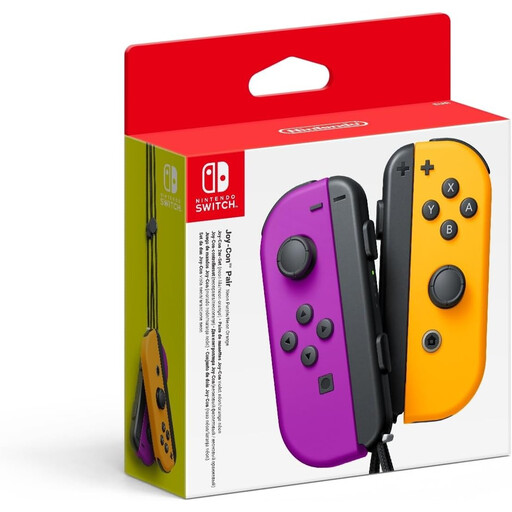 Image unavailable
Nintendo Switch Joy-Con Pair, Neon Purple/Neon Orange
A left and right Joy-Con for supported Switch minigames. The set can only be shared between players if the chosen game mode supports it.
The product information lists motion controls, the option to use Joy-Con separately and two wrist straps. When playing wirelessly, attach the compatible wrist straps as instructed by Nintendo.
View at Joybuy
 Image unavailable
Nintendo Switch 2 Joy-Con 2 Pair, Light Blue/Light Red
A Joy-Con 2 pair for supported Switch 2 game modes with separate controllers. Mouse controls only work in compatible games.
The product information lists motion and mouse controls, HD Rumble 2, a C Button and NFC on the right controller. According to the product information, the set comes with two wrist straps. Joy-Con 2 is only for Nintendo Switch 2.
View at Joybuy
Frequently asked questions
Will motion controls automatically work well from the side of the sofa?
No. A gyroscope or accelerometer doesn’t guarantee that a specific action will work from every seat. Check what the minigame detects and try it in your actual setup. If you have problems with Joy-Con motion controls, Nintendo recommends checking, among other things, whether the game uses motion controls and, if needed, calibrating the controller.
Can a Switch Pro Controller replace the controllers for all Nintendo Switch Sports minigames?
No. Nintendo states that Nintendo Switch Pro Controllers and Nintendo Switch 2 Pro Controllers aren’t compatible with Nintendo Switch Sports.
How do you set up separate Joy-Con controllers for wireless play?
Attach the matching Joy-Con or Joy-Con 2 wrist straps as instructed by Nintendo. Joy-Con and Joy-Con 2 wrist straps aren’t compatible with each other.
Do you always need a camera for Jamboree TV?
No, not for every game mode. Nintendo lists various features, including mouse controls, a microphone and a compatible USB-C camera. The camera features require a camera, which is sold separately. Check which mode you want to play and what hardware it requires.
How do you check how many controllers a party minigame needs?
Check the player count and controller layout for the specific game mode. Nintendo notes that the number of supported players can vary by mode. Remember to include any controllers already supplied with your console or set.


