
Motion minigame player
You want to know in advance whether each player needs a separate Joy-Con or Joy-Con 2, rather than just a gamepad that detects motion. Nintendo and PowerA specify different controller requirements for supported games.


Start by checking your console, game and game mode. For supported minigames with separate motion controls, Joy-Con on Switch and Joy-Con 2 on Switch 2 are the right options. For games with button controls, a compatible standard gamepad may be enough. For Joy-Con 2 mouse minigames, the playing surface is particularly important: Nintendo warns that mouse controls may not work properly on glass or a highly reflective table.
You want to know in advance whether each player needs a separate Joy-Con or Joy-Con 2, rather than just a gamepad that detects motion. Nintendo and PowerA specify different controller requirements for supported games.
For Switch 2 mouse minigames, you want a suitable tabletop and to understand the difference between light on the playing surface and the controller's operation. Nintendo warns that glass or a highly reflective surface can affect mouse controls.
You want enough suitable controllers for your chosen game mode, without buying extra controllers you don't need. Nintendo notes that the number of players can vary by game mode.
Choose this option: if your Switch game mode supports separate Joy-Con motion controls.
Keep in mind: check whether each player uses a Joy-Con. Original Joy-Con cannot be attached to or charged by Switch 2.
Choose this option: for Switch 2 game modes that support separate Joy-Con 2 motion controls or mouse controls.
Keep in mind: Joy-Con 2 does not work with the original Switch. A glass or highly reflective table may not be suitable for mouse controls.
Choose this option: if the specific game and game mode support a standard gamepad with button controls.
Keep in mind: motion sensors don't automatically make a gamepad suitable for games that only support Joy-Con.
First check the game mode and controller requirements, then consider the surface for mouse controls, and only then count how many more controllers you need.
| Consideration | What should you check? | Who is this important for? |
|---|---|---|
| Game and controls | Check the console, specific game, game mode and permitted controller options. | I want to avoid buying a controller that connects but can't control my minigame. Around 29% of consumers put compatibility first. |
| Controls in daylight | Check whether the game uses mouse controls and, if so, try a flat, low-reflection surface. | By large windows, I want to know whether my table is suitable for mouse controls, especially if it's made of glass or is highly reflective. Around 24% of consumers prioritise a suitable playing surface. |
| Number of players | Count the controllers you already have and check how many players and which controls the game mode supports. | If guests are joining in, I want to know how many suitable controllers the chosen mode requires before buying extra sets. Around 18% of consumers prioritise the number of local players. |
| Equipment needed | Check which controllers and charging options you already have. A compatible USB-C camera is only needed for certain Jamboree TV modes. | I want to take the accessories I already own into account and avoid buying equipment that isn't needed for my chosen mode. Around 18% of consumers start by checking the equipment they need. |
| Grip and buttons | Check that the specific controller supports the required controls before considering its grip or button layout. | If I mainly play button-based minigames, I want a grip and button layout that suits me without ruling out the controls the game requires. Around 11% of consumers prioritise grip and controls. |
A controller may detect motion but still not work in a game mode that requires separate Joy-Con controls. PowerA states that its Advantage Wireless Controller for Switch 2 is not designed for games that only support Joy-Con.
Before buying, check the controller requirements for the specific game and game mode.
Nintendo identifies glass and highly reflective tables as potential problems for Joy-Con 2 mouse controls. That's different from assuming that daylight affects every controller.
For mouse minigames, use a flat surface that isn't made of glass and isn't highly reflective.
Original Joy-Con can work wirelessly with Switch 2, but Nintendo says they can't be attached to or charged by that console.
Beforehand, check how you'll charge your original Joy-Con if you plan to use them with Switch 2.
Joy-Con and Joy-Con 2 are designed for supported Switch and Switch 2 game modes with separate controls. Pro Controllers are another option for supported button-based games.
The Advantage Wireless Controller for Switch 2 is a standard gamepad for games that support those controls.
The Ultimate 2 Bluetooth Controller is designed for supported Switch and Windows button-based games.
The Split Pad Pro variant reviewed is designed to provide a larger grip when playing handheld games on the original Switch.
This selection includes standard gamepads, a pair of Joy-Con for Switch and a pair of Joy-Con 2 for Switch 2. Check the requirements for your game and game mode for each product; the compatibility listed doesn't mean every controller supports every minigame.
 No image available
For Switch game modes that support a standard gamepad. The product name lists Bluetooth, a 10 m range, a 7-colour LED and vibration feedback.
 No image available
For supported button-based minigames where a controller pair is suitable. The product name lists compatibility with Nintendo Switch, Switch OLED and Switch 2, an 8h battery life and a vibration function.
 No image available
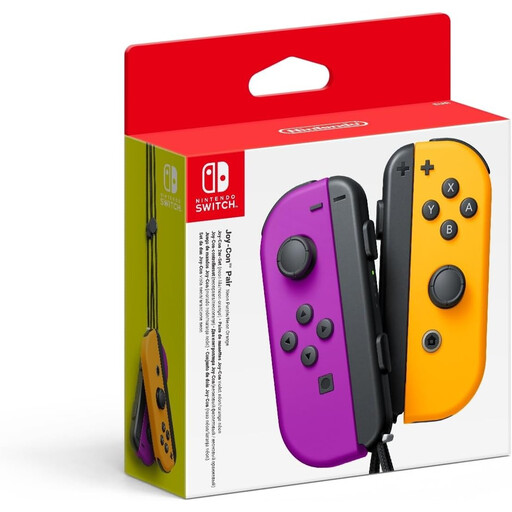
For Switch minigames that support separate Joy-Con motion controls. This is a pair of Joy-Con in neon purple and neon orange.
 No image available
For Switch 2 game modes that support a standard gamepad with button controls; it isn't automatically a substitute for minigames that only support Joy-Con. The product name identifies this model as an official black Nintendo Switch 2 Pro Controller.
 No image available
For Switch 2 minigames with separate motion controls or supported mouse controls. The product name lists a left and right Joy-Con 2; for mouse controls, a glass or highly reflective tabletop may interfere with operation.
No, Joy-Con 2 only works with Nintendo Switch 2. Original Joy-Con can be used wirelessly with Switch 2, but can't be attached to or charged by that console.
No, first check the game mode and count how many suitable controllers you already have. Nintendo lists different player numbers for the Super Mario Party Jamboree modes, with up to four players offline on one system.
Try a flat surface that isn't made of glass and isn't highly reflective. Nintendo identifies these surfaces as possible causes of problems with Joy-Con 2 mouse controls; make sure you use the wrist straps provided.
No, not for every mode. Nintendo says certain new modes use a compatible USB-C camera, which is sold separately, so check which mode you want to play first.