
Host of a large Switch group
You want as many guests as possible to play at once. So check the local player limit for each game mode and how many individual controllers are needed. Nintendo Netherlands says the number of players varies by game mode.


Start by checking the exact game and mode: extra controllers only help if that mode supports more local players and works with the controls you’ve chosen. Nintendo Netherlands lists a maximum of four offline players for the Mario Party mode in Super Mario Party Jamboree. For Everybody 1-2-Switch!, Nintendo lists a phone-based style for 2–100 players, so extra gamepads aren’t always needed.
You want as many guests as possible to play at once. So check the local player limit for each game mode and how many individual controllers are needed. Nintendo Netherlands says the number of players varies by game mode.
You want to play with lots of people without buying a gamepad for every guest. A phone-based game could be a good fit, but check the device requirements, language and player limit for the specific game. Jackbox Games, for example, describes joining in on your own device using a room code.
You want to avoid buying an extra controller that won’t work with your console, can’t be charged properly or lacks features needed for your chosen mini-game. Nintendo Netherlands distinguishes between the compatibility and charging options for Joy-Con and Joy-Con 2.
Choose the game and mode first, then decide whether individual Joy-Con, a full gamepad or phones are right for the controls. Nintendo Netherlands lists different player limits for different game modes; for Everybody 1-2-Switch!, Nintendo lists a phone-based style for 2–100 players.
| What to consider | What should you check? | Who is this important for? |
|---|---|---|
| Enough player slots | Check the local player limit for the exact game and mode before counting controllers. | If I want everyone to play at once, I’ll check the mode’s player limit first. Around 40% of consumers put playing simultaneously at the top of their list. |
| Controls and console | Check which controller features are required and whether the model is compatible with Switch or Switch 2. | If I’m buying a controller for a specific console and mini-game, I want to know that the required controls will work. Around 30% of consumers put compatibility at the top of their list. |
| Playing with phones | Check the player limit, required phone features and language for the game you’ve chosen. | If I want to use phones people already own instead of buying a gamepad for everyone, I’ll check the game’s requirements first. Around 20% of consumers put playing without extra gamepads at the top of their list. |
| Comfort and charging | Think about which controller the group will find comfortable to hold and how you’ll charge the set. | If I’m choosing controllers for regular games nights, I want them to suit the way the group plays and be easy to charge. Around 10% of consumers put comfort and charging at the top of their list. |
Extra controllers won’t automatically increase a game mode’s player limit. Nintendo Netherlands lists 1–4 players for the offline Mario Party mode in Super Mario Party Jamboree.
Choose the game and mode first, then work out how many more controllers you need.
You could end up buying controllers that won’t let more people join the mode you want to play.
Nintendo Netherlands says Joy-Con 2 only work with Switch 2. Original Joy-Con can be used wirelessly with Switch 2, but they need to be charged separately.
Check which console you own and what you already have before choosing a set.
To charge original Joy-Con with Switch 2, you’ll need an original Switch or a compatible charging accessory.
PowerA lists motion controls for the Enhanced Wireless Controller Rechargeable, but also says this model doesn’t support IR or HD rumble. Motion controls alone don’t prove that a specific mini-game will work.
Compare the controls required by the exact game with the features of the exact controller model.
Some party games use phones as input devices; Jackbox Games describes joining in on your own device using a room code.
First check whether everyone has a suitable device, then check the language, player limit and requirements for the game you’ve chosen.
Joy-Con for Switch and Joy-Con 2 for Switch 2 are options when a game requires separate controls or specific controller features.
The Ultimate 2C Bluetooth Controller is a full gamepad for Switch games that support this model.
The Enhanced Wireless Controller Rechargeable for Nintendo Switch is a full wireless gamepad for supported Switch games.
This selection includes Joy-Con for Switch and Switch 2, as well as full gamepads for supported Switch games. Check which console and controls each game requires.
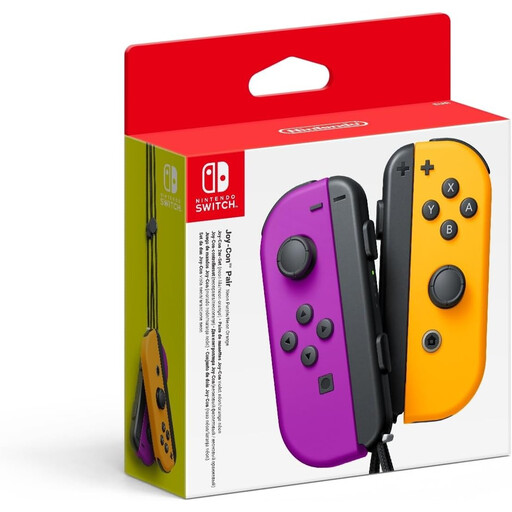 No image available
The two Joy-Con can be used separately in supported Switch games.
The product description lists motion controls, HD Rumble and two wrist straps.
 No image available
A full gamepad to consider if the Switch game you’ve chosen supports these controls.
The product description lists wireless use, motion controls, HD Rumble and amiibo functionality.
 No image available
Worth considering for a Switch or Switch 2 game that supports a full gamepad; check the requirements for the specific game.
The product information lists six programmable buttons, haptic feedback triggers, and wired and wireless connectivity options.
The product name lists PC, Nintendo Switch/Switch 2, Steam and Android.
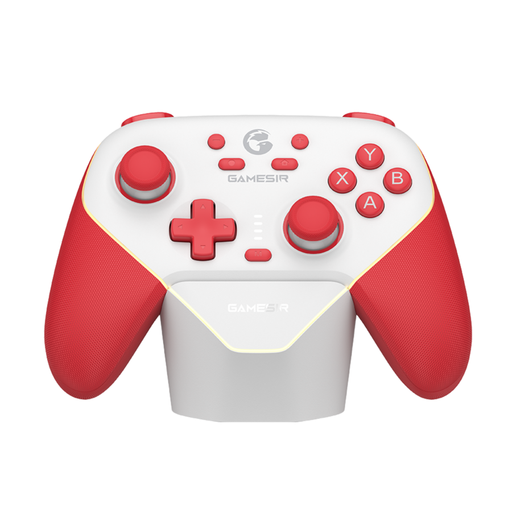 No image available
A full gamepad to consider for Switch games that support this type of control.
The product information lists Hall Effect sticks and triggers, programmable buttons, rumble motors and three connection modes.
 No image available
For Switch 2 games that support Joy-Con 2 or their specific features; these controllers don’t work with the original Switch.
The set includes left and right controllers. The product description lists motion controls, HD Rumble 2 and wrist straps.
No. Nintendo Netherlands lists 1–4 players for the offline Mario Party mode. The limit varies by mode, so check it before buying extra controllers.
Open the controller menu on your Switch and choose the preferred play style or order. Sync each Joy-Con, then press the SL and SR buttons on that controller when using it horizontally. Follow the game’s instructions too; Nintendo Netherlands recommends using wrist straps for motion-controlled games.
Yes. Nintendo Netherlands says original Joy-Con can be used wirelessly with Switch 2, but you can’t attach them to the console. You’ll need an original Switch or a compatible accessory to charge them. Joy-Con 2 don’t work with the original Switch.
Not with the phone-based controls described: Jackbox Games lets players enter a room code on their own compatible device. Check the requirements and player limit for the specific Jackbox game before buying.
You can do this with a game that supports phones as input devices. Nintendo Netherlands lists a phone-based style for 2–100 players in Everybody 1-2-Switch!; also check the phone features required and the game’s conditions.