
Housemates with a Switch
Want to play with several people on one system? Check whether each game requires separate Joy-Con, and whether you have a Switch or Switch 2. For example, Nintendo specifies separate Joy-Con for certain game modes.


Choose controllers based on your console or PC and the controls required by the specific game. Then check how many players can join in at once. A standard gamepad won’t automatically replace a Joy-Con for Joy-Con mini-games. Check the controller requirements and local player limit for each game and game mode before buying extra controllers.
Want to play with several people on one system? Check whether each game requires separate Joy-Con, and whether you have a Switch or Switch 2. For example, Nintendo specifies separate Joy-Con for certain game modes.
If you want to play game modes that use swinging or other motion controls, check exactly which controller the game requires. Nintendo specifies Joy-Con for certain motion-controlled mini-games in Super Mario Party Jamboree.
For local multiplayer on a PC or Xbox, the game, system and chosen controller all need to work together. Xbox Support and PlayStation Support outline platform and connection support for their controllers; you’ll also need to check how many controllers you need.
Start with the system and the exact game. Then check which controllers each player needs, and finally make sure the connection and power options suit your room set-up.
| What to consider | What should you look for? | Who does this matter most to? |
|---|---|---|
| System and game compatibility | Make a note of your console or PC, then check the controller requirements for the specific game and game mode. | If we want to avoid buying a controller that connects to the system but doesn’t work with the mini-game we want to play, compatibility comes first. Around 36% of consumers say this is their main concern when buying. |
| Controllers for every player | Count the controllers you already have, then check the player limit and the number of controllers needed per player for each game mode. | If we want everyone to be able to play at once, we first count the available controllers and check the player limit. Around 29% of consumers mainly want to make sure there are enough controls for the group. |
| Motion-controlled mini-games | Check whether the game mode requires Joy-Con; motion controls alone don’t guarantee that a gamepad will be accepted. | If we specifically want to play motion-controlled game modes, we check which controller the mini-game requires. Around 21% of consumers prioritise access to motion-controlled mini-games. |
| Connection and power | Check whether a cable will be practical and how the specific model is powered or charged. | When we share controllers, we want cables and charging to suit the space where everyone plays. This is the top priority for around 14% of consumers. |
Some motion-controlled mini-games require Joy-Con. The PowerA wired model we reviewed doesn’t support games that require Joy-Con exclusively.
Before buying, check the controller requirements for the exact game and game mode.
Joy-Con 2 only work with Switch 2. According to Nintendo, original Joy-Con can be used wirelessly with Switch 2, but can’t be attached to the console.
Check which console generation you have and how you want to play.
A Switch 2 comes with one left Joy-Con 2 and one right Joy-Con 2. In Super Mario Party Jamboree, the maximum number of players also varies by game mode.
Count the controllers you already have and check the limit for the game mode you want to play.
The PowerA model we reviewed has a 3 m cable and, according to the manufacturer, can only be used when the Switch is docked.
Think about where the dock and players will be, and whether the cable can be positioned safely and practically.
Joy-Con for Switch and wireless use with Switch 2; Joy-Con 2 are designed for Switch 2. A good fit for games that require separate Joy-Con.
The Xbox Wireless Controller is an option for games that support controller input on Xbox and Windows PC.
DualSense is designed for PS5 and can be used with compatible PC games, depending on the game’s support.
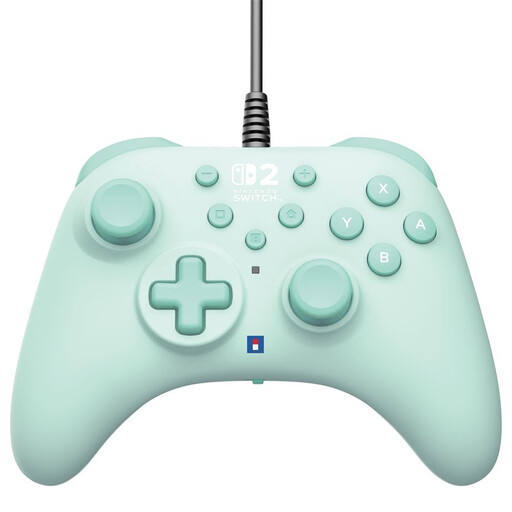
The Enhanced Wired Controller for Nintendo Switch we reviewed is a wired option for supported games when your Switch is docked.
According to 8BitDo, the Ultimate 2C Bluetooth is designed for Switch, while the separately named Ultimate 2C Wireless is aimed at Windows and Android.
This selection of Joybuy products includes wired and wireless controllers for supported Switch and Switch 2 games, as well as gamepads for supported Xbox and Windows games. Check that the controller and game mode are suitable for each game.
 No image available
May suit supported Switch games when a wired controller and docked set-up are suitable.
Wired via USB-A, with a 3 m cable; powered via USB. The product description lists programmable buttons and a turbo function.
 No image available
A wireless option for Switch games that support this controller and the input you need; check the requirements of the specific mini-game.
The product description lists Bluetooth, motion detection and a stated battery life of up to 40 hours. Compatibility is listed with Switch 2, Switch, Switch Lite and Switch OLED.
 No image available
Suitable for supported Xbox or Windows games if you want to use a standard gamepad; check the game’s compatibility.
The product description lists Xbox Series X|S, Xbox One and Windows 10. Connect via Bluetooth or USB-C; support for AA batteries is also listed.
 No image available
Suitable for Switch game modes that support separate Joy-Con; check whether the game requires these controllers.
The product description says each Joy-Con can be used separately and features motion sensors and HD Rumble.
 No image available
For supported Switch 2 game modes that use separate Joy-Con 2; these controllers aren’t compatible with the original Switch.
The set includes one left and one right controller, plus two wrist straps. Nintendo says each Joy-Con 2 can be used separately in supported play styles.
Yes. In the offline Mario Party game mode, 1–4 players can play on one system. Nintendo lists different limits for other game modes, so check the one you want to play.
Not necessarily: Nintendo specifies Joy-Con for certain motion-controlled mini-games in Super Mario Party Jamboree. Check the requirements for the exact game mode rather than relying on a motion sensor alone.
No. Nintendo says Joy-Con 2 only work with Switch 2. Original Joy-Con can be used wirelessly with Switch 2, but can’t be attached to the console. Also check which play styles the game supports.
Count the available controllers, check the number of players and select the right player setting in the game. For Super Mario Party Jamboree, Nintendo asks you to attach the wrist straps when playing with Joy-Con or Joy-Con 2. Also check that the controllers are sufficiently charged.
The offline game modes described for Super Mario Party Jamboree are played locally on one system. Nintendo specifies a Nintendo Switch Online membership and a copy of the game for each system for online play; that’s different from playing locally.