
Switch group with extra players
You want more people to join in on one system. Nintendo says the number of players depends on the game mode, so check whether your game supports using individual Joy-Cons.


The controller you need depends mainly on your system and the game mode you choose: these determine how many players can join in and which controls are supported. Joy-Con and Joy-Con 2 are not interchangeable between Switch and Switch 2; for Jackbox, players use their phones as controllers. Before buying, also check how the controller charges and that the specific product has the correct CE marking.
You want more people to join in on one system. Nintendo says the number of players depends on the game mode, so check whether your game supports using individual Joy-Cons.
You’re looking for a controller for motion- or mouse-controlled mini-games and want to know the difference between Joy-Con and Joy-Con 2. Nintendo says Joy-Con 2 works only with Switch 2.
You want to know whether extra gamepads will work with your system and game, or whether phones are used as controllers. Jackbox Games describes a way to play in which players use their phones.
Choose these when: your game mode supports individual Joy-Cons or motion controls.
Bear in mind: a pair of Joy-Cons counts as multiple player slots only if the game mode you choose supports it.
Choose these when: you play Switch 2 games that use Joy-Con 2 features, such as supported mouse controls.
Bear in mind: Joy-Con 2 does not work with the original Switch, and mouse controls may be less responsive on some surfaces.
Choose this when: your chosen game mode supports standard gamepads and you want each player to use a full controller.
Bear in mind: compatibility with a system doesn’t automatically mean a specific game or Joy-Con feature will work.
Choose these when: you’re playing a Jackbox game on a shared screen and want players to join in using their phones.
Bear in mind: phones replace gamepads for Jackbox, not for other party games; the host also needs a separate device.
| What to consider | Check before buying | Who is this important for? |
|---|---|---|
| System and game compatibility | Make a note of the system, game edition and game mode, then check which controllers and features are supported. | If I want to avoid buying a controller that doesn’t work with my system or game mode, I check both before buying. Around 36% of consumers give compatibility top priority. |
| Enough player slots | Check the maximum number of players for your chosen local game mode and count any controllers you already have. | If everyone wants to play at the same time, I want to know how many players the game mode actually allows. Around 29% of consumers focus mainly on having enough player slots. |
| The right controls | Check whether the mini-game requires standard buttons, motion controls or mouse controls, and whether the exact controller supports that feature. | If a mini-game requires a specific type of control, I don’t want to assume that a standard gamepad offers the same feature. Around 21% of consumers put the controls they need first. |
| Keeping everything ready to play | Check what’s included in the box, how the controller charges and which charging accessories you already have. | If I want to avoid extra purchases or a separate charging solution, I first check what’s needed to keep everything ready to play. Around 14% of consumers focus mainly on additional running costs. |
Nintendo says Joy-Con 2 does not work with the original Switch. Nintendo also says older Joy-Cons can be used wirelessly with Switch 2, but they cannot be attached to the console.
Check which generation of Switch you have and how you’ll charge the controllers you choose.
To charge older Joy-Cons when using Switch 2, you may need a Switch or a suitable accessory.
Nintendo says the number of players varies by game mode. Some Jackbox games use phones as controllers, so you won’t need extra gamepads for those games.
Choose your game and game mode first, check the maximum number of players, then work out how many more player slots you need.
PowerA says the Enhanced Wireless Controller Rechargeable has motion controls, but this model does not support HD Rumble, IR or amiibo NFC.
Check which control features your mini-game requires and compare them with the specifications of the exact controller model.
ACM ConsuWijzer distinguishes between statutory rights and any commercial guarantee. A paid service product is separate from these.
First, find out what your statutory rights with the seller are, then check the terms of any additional cover.
Joy-Con is designed for Switch and can be used individually in supported games. Joy-Con 2 is designed for Switch 2 and can offer mouse controls in supported games.
Microsoft lists traditional wireless controllers for supported Xbox consoles, Windows PCs and mobile devices.
Sony says the DualSense Nova Pink is compatible with PS5, PC, Mac and mobile devices.
PowerA positions the Enhanced Wireless Controller Rechargeable as a traditional controller for supported Switch systems.
8BitDo lists a Switch layout for the Ultimate 2C Bluetooth Controller and says it is compatible with Switch and Switch 2 after a firmware update.
This selection includes controllers whose product information mentions Switch, Switch 2 and/or PC. Support for a specific game or game mode still depends on that game. Before buying, also check the correct CE marking and documentation for the specific product; the Dutch Authority for Digital Infrastructure requires this for electrical and electronic equipment in the Netherlands.
 No image available
The product information lists Switch and Switch 2 as compatible systems; check whether your game mode supports a standard gamepad.
Wired USB connection, powered via the USB cable. The product description mentions programmable rear buttons and a turbo function.
 No image available
The product information lists Switch and PC and mentions gyro controls; check that your game and system support this controller.
The product information mentions wireless connectivity and gyro controls.
 No image available
In supported Switch games, each Joy-Con can be used individually; check the player limit for your chosen game mode.
The pair includes two Joy-Cons. The product information lists motion sensors, HD Rumble and up to 20 hours of play per charge.
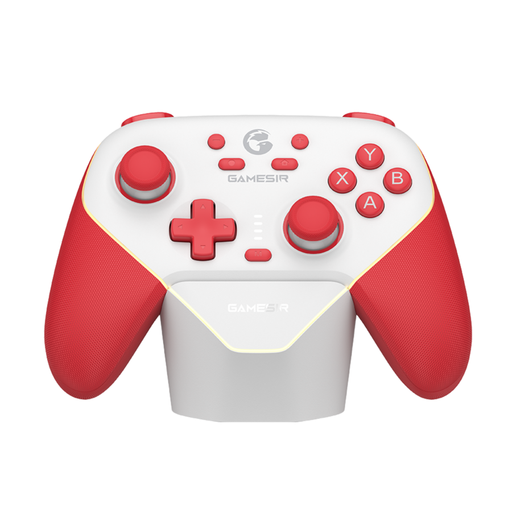 No image available
The product information lists Switch and PC; check that your specific game and game mode are supported.
The connection options listed are Bluetooth, wireless dongle and cable. The product information lists a 1000 mAh battery.
 No image available
This pair is designed for Switch 2, not the original Switch. Mouse controls work only in supported games and may be less responsive on some surfaces, such as glass.
The product information lists motion controls and two wrist straps.
No, it depends on the game and game mode. Nintendo says Joy-Cons can be used individually only in supported games, and the maximum number of players varies by game mode.
Nintendo says older Joy-Cons can be used wirelessly with Switch 2, but you can’t attach them to the console. You can charge them using a Switch or a suitable licensed accessory.
For the play method described, players use a phone or another suitable browser-enabled device to join with a room code. The host also needs a separate device for their own input.
No, a paid commercial guarantee is not the same as your statutory rights. ACM ConsuWijzer explains that you have statutory rights alongside any commercial guarantee; if a product is faulty, the seller must offer an appropriate solution. There is no single fixed time limit that applies to every controller.
According to the Dutch Authority for Digital Infrastructure, electrical and electronic equipment must have the correct CE marking. Check the marking and documentation for the specific product; a general rule does not confirm that every item for sale meets the requirement.