
Host for mini-games
You want to play with friends and family, so you’re matching your chosen game, the number of local players and the controllers you have available.


Start by choosing the mini-games you want to play together, then check how many people can play locally in each game and which controllers you’ll need. A Nintendo Switch 2 or Switch OLED lets you play on the TV or at the table. A PlayStation 5 or Xbox Series S is an alternative if you’ll be playing on a TV and your chosen game is available for that console. Having a built-in screen doesn’t, by itself, mean the display will be easy to see outdoors in direct sunlight.
You want to play with friends and family, so you’re matching your chosen game, the number of local players and the controllers you have available.
As well as playing on the TV, you sometimes want to use the built-in screen, for example at the table. The viewing angle and ambient light may also be worth considering.
You want to check in advance which game version and controllers will work with the games console you choose.
Choose this option: if you want to play on the TV and at the table, and use Switch 2 game modes such as those in Jamboree TV.
Bear in mind: Nintendo says the camera for certain Jamboree TV camera features is sold separately. Older Joy-Con controllers work wirelessly, but can’t be attached to the console.
Choose this option: if you want to switch between playing on the TV and at the table, and mainly play Switch games, including the original Super Mario Party Jamboree.
Bear in mind: the extra Jamboree TV modes for Switch 2 aren’t available on the Switch OLED. The OLED screen doesn’t guarantee visibility in direct sunlight.
Choose this option: if your group plays on a TV and your chosen local multiplayer game is available for PlayStation.
Bear in mind: you may need extra controllers to play together. The PS5 Digital Edition has no disc drive or built-in screen.
Choose this option: if you play on a TV and choose a suitable local multiplayer game for Xbox; Xbox says LEGO Party! supports local play for two to four players.
Bear in mind: the Series S doesn’t accept game discs and has no built-in screen.
Choose this option: if personal handheld play matters more to you than playing together on a TV or larger shared screen.
Bear in mind: Nintendo says the Switch Lite can’t be connected to a TV. Check whether each game requires separate Joy-Con controllers.
| What to consider | What should you check? | Who should pay particular attention? |
|---|---|---|
| Playing mini-games together | Check the number of local players and the controllers required for each game and game mode. | If I want to play with friends and family, everyone needs to be able to join in the mode I choose. Around 33% of consumers say playing together is their top purchase priority. |
| Playing during the day without a TV | Think about whether you’ll be playing in a bright room or direct sunlight. Also consider screen size, the stand and TV connectivity. | If I sometimes want to play at the table, I look for a built-in screen and a practical viewing angle. The screen type alone doesn’t tell me how easy it is to see in sunlight. Around 27% of consumers say playing without a TV during the day is their top priority. |
| What you need for your gaming set-up | Check what’s included with the console and whether you need extra controllers, a camera or a different version of the game. | If I want to plan the complete set-up for a gaming night, I need to know which extras I’ll need. Around 20% of consumers say equipment and additional purchases are their top priority. |
| Existing games and controllers | Check the exact game edition, accessory compatibility and how any separate controllers are charged. | If I want to keep using my existing games or controllers, I check this before making my choice. Around 20% of consumers say existing games and controllers are their top priority. |
Nintendo distinguishes between the original Switch game and the extra features for Switch 2. Certain camera features require a compatible USB-C camera.
Check the full game title, the console and the accessories needed for the game mode you want.
You may need a different game edition or an upgrade; the camera for the relevant features is sold separately.
Nintendo says the Switch Lite can’t be connected to a TV. Some games or features may also require separate Joy-Con controllers.
Choose the Lite only if handheld play is your priority, and check what controls each game requires.
Some games may require separate Joy-Con controllers and a way to charge them; this still won’t give the Lite TV output.
The screen specifications for Switch 2 and Switch OLED don’t offer a comparable guarantee for playing in direct sunlight.
Consider the difference between a bright room and being outside in the sun. Don’t base your choice for outdoor use on LCD or OLED alone.
The PS5 Digital Edition and Xbox Series S don’t play game discs. For local multiplayer, the game, the mode you choose and the number of controllers also matter.
Before buying, check whether your existing games are available digitally and how many controllers your chosen game mode requires.
You may need extra controllers or digital game purchases for your chosen set-up.
The differences below apply to the consoles and games mentioned. Always check the specific game and version before making your choice.
Nintendo’s Switch 2 and Switch OLED let you play on the TV or at the table, while the Switch Lite is designed for handheld play.
PlayStation 5 is a TV console for local multiplayer games available on the system.
Xbox Series S is a digital TV console that supports local multiplayer in games including LEGO Party!.
This selection includes handheld games consoles and Nintendo Switch systems for playing in different places. Check that your chosen party mini-games, local game mode and required controllers are available for each console and game.
 No image available
A handheld option for anyone who wants to play without a TV too. Check that your chosen mini-game and player mode are available for the system.
The description mentions Windows 11, access to PC gaming platforms, detachable controllers and a built-in touchpad.
 No image available
Ideal if you want to switch between TV, tabletop and handheld modes, and use Switch 2 game modes.
The description mentions Joy-Con 2 controllers, a built-in screen and an adjustable stand.
 No image available
A bundle option for playing in different places. Check that the included game is the one you want to play together.
The bundle description mentions a physical game card, a dock and split-screen for up to four players in TV or tabletop mode.
 No image available
A handheld option for playing on your own without a TV. Check that your chosen game suits this style of play.
The product name lists Tomodachi Life: Wo Träume wahr werden as a download and a Nintendo Switch Online trial. The description doesn’t mention TV output.
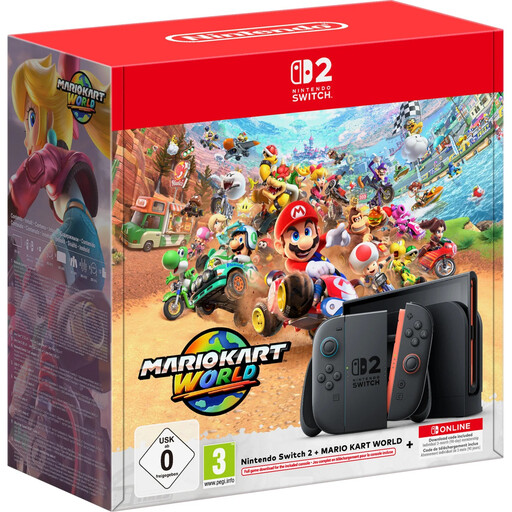 No image available
For anyone who wants to play on the TV and without one, and is looking for a bundle with a digital game.
The description mentions a 7.9-inch LCD screen, a dock, TV, tabletop and handheld modes, and Mario Kart World as a digital game.
It depends on the game and the mode you choose. Xbox says LEGO Party! supports local multiplayer for two to four players. For other games, check how many people can play locally and which controllers are needed.
No, not for every game mode. Nintendo lists new modes that include mouse controls and microphone features. CameraPlay requires a compatible USB-C camera, sold separately.
Yes. Nintendo says older Joy-Con can be paired wirelessly. They can’t be attached to the Switch 2, so also check how you can charge them for the way you plan to use them.
Check the PEGI age rating for a game; the Dutch government describes this as advice about potentially harmful content. For distance purchases, you’ll usually have a 14-day cooling-off period, although there are exceptions. ACM ConsuWijzer explains that, alongside the seller’s warranty, you also have a legal guarantee. What you can expect from a product depends, among other things, on normal use.