
Groups who enjoy playing mini-games together
You want several people to be able to join in together in the same place. So check the game's local multiplayer mode and how many controllers it requires.


Start with the games you want to play together, then check how many players and controllers each game mode requires. Nintendo Switch systems offer TV and tabletop modes; Nintendo says the Jamboree TV features only work on Switch 2. The Xbox Series S suits a permanent set-up with digital games, while the PS5 Digital Edition is most relevant if your chosen local multiplayer games are available on PS5. Microsoft and Sony each state that the models mentioned come with one controller. Remember to factor in the game itself and any extra controllers you may need.
You want several people to be able to join in together in the same place. So check the game's local multiplayer mode and how many controllers it requires.
You're looking for a small, permanent console or a system you can move after use and, if you like, play in tabletop mode.
Your choice starts with specific games or a collection you already own. Check the platform, game edition and compatibility before choosing a console.
Best for: anyone who wants to play local mini-games on the TV and in tabletop mode, or is looking for the extra Jamboree TV game modes.
Keep in mind: the standard bundle includes two Joy-Con 2 controllers, but check how many players and accessories each game mode requires. Some features need a compatible USB-C camera, sold separately.
Best for: anyone who wants to play existing Nintendo Switch party games and values TV, tabletop and handheld modes.
Keep in mind: this model doesn't support the Switch 2-exclusive Jamboree TV features. Check which game edition you need for the game mode you want to play.
Best for: anyone who wants a permanent TV set-up and can find their chosen party games in the digital Xbox library.
Keep in mind: Microsoft says the console comes with one controller and has no optical disc drive. Check local multiplayer support and whether each game needs extra controllers.
Best for: anyone with specific local multiplayer games for PS5 in mind.
Keep in mind: Sony says this digital edition comes with one DualSense controller and has no disc drive. You may need an extra controller and the games you want to play.
Start with the game modes and games you want to play, then compare the set-up, included controllers and any extras you may need.
| What to consider | What should you check? | Who should consider this? |
|---|---|---|
| Playing together locally | Check the number of local players each game supports and how many controllers the game mode requires. | If I want to play with friends or family in the same place, I want to know whether everyone can join in the game mode I've chosen. Around 36% of consumers prioritise playing together locally above all else. |
| Compact set-up | Measure the space for the console, dock, cables and controllers; check whether you need tabletop mode. | If I have limited space around the TV, I look at how much room the set-up needs and whether I can play somewhere else. Around 29% of consumers put a compact set-up first. |
| Games and editions you want | Check each game's compatibility with the console and which edition you need for the features you want. | If I want to play a favourite game or use a collection I already own, I want to know in advance whether it works on the console. Around 21% of consumers give the most weight to the games and editions they want. |
| Everything you need | Factor in the game itself and any extra controllers; also check whether you can use discs you already own. | If I want to get everything ready for a full evening of gaming, I look beyond the console alone. Around 14% of consumers put the total requirements first. |
What's included in a console bundle isn't necessarily the same as what a game requires in terms of controllers. You may need extra controllers or the game itself.
Check how many players and controllers each game mode requires, then compare that with what's already in the bundle.
You may need to buy a game and extra controllers for the gaming session you've planned.
The Xbox Series S 512 GB and PS5 Digital Edition don't have an optical disc drive, so you can't use game discs directly with them.
Check your existing game collection and the exact console model before choosing a digital edition.
If you want to play games you already own on disc, you may need to buy them digitally for a console like this.
Nintendo says the Jamboree TV features are only available in Super Mario Party Jamboree – Nintendo Switch 2 Edition on Switch 2.
Make a note of the game mode you want, then check the game edition, console and any accessories you may need.
Some features may require a compatible USB-C camera, sold separately.
Nintendo Switch models are worth considering if you want to switch between TV and tabletop modes for Nintendo games.
The Xbox Series S 512 GB is a digital console for a permanent TV set-up.
The PS5 Digital Edition is worth considering if the local multiplayer games you want are in the PlayStation library.
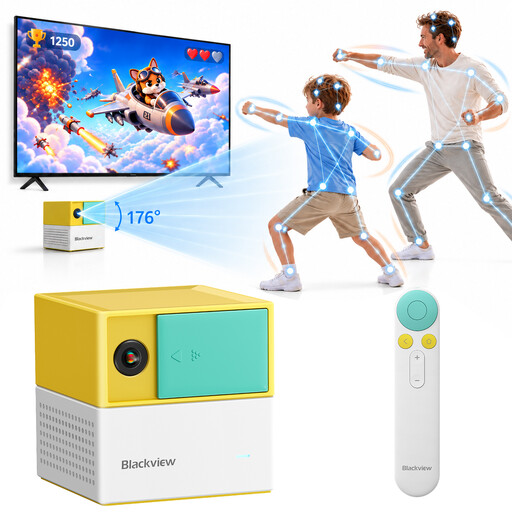
This selection of Joybuy products is for anyone looking for built-in family and educational games for multiple players. Check how many people can actually join in each game.
 No image available
The product description says you can play without a controller with up to four players. Check whether each built-in game supports the number of players you want.
The console features 22 built-in family and educational games across six game categories, plus AI motion tracking with 17 points.
There is no built-in battery. The product information advises adult supervision and recommends keeping small parts away from young children.
No. Nintendo says the Switch Lite can't be connected to a TV. For TV play, choose another Switch model that's compatible with it.
According to Nintendo, the standard bundle includes a dock, power supply and HDMI cable. Switch 2 supports microSD Express cards for expanding game storage; Nintendo says a system update via the internet is required to use them.
Not necessarily: local and online multiplayer are different game modes. Sony says a paid PlayStation Plus subscription is required for online multiplayer; check the requirements for local play in each game.
According to the Dutch government, in many cases you have 14 days to change your mind when buying at a distance. If a product is faulty, you may have the right to a repair or replacement; a manufacturer's warranty doesn't cover the full extent of your statutory rights.
No. PEGI describes its age rating as a recommendation based on the game's content, not a measure of its difficulty. Check the rating for the specific game.