What should you look for?
Nintendo Switch 2
A good fit if: you want the additional Jamboree TV modes, which are included with the Switch 2 Edition, according to Nintendo Netherlands.
Bear in mind: CameraPlay requires a compatible USB-C camera, sold separately. The camera’s brightness adjustment doesn’t prove that the game will work well without room lighting.
Nintendo Switch – OLED model
A good fit if: the standard Switch version of Super Mario Party Jamboree is enough for you, and you’d also like to use the built-in screen.
Bear in mind: the Jamboree TV modes exclusive to Switch 2 won’t work on this model.
PlayStation 5 with disc drive
A good fit if: you’d also like to play other PlayStation games and local multiplayer suits your group.
Bear in mind: Sony says you’ll need an extra DualSense controller to play together locally. Check how many players and controllers each game requires.
Xbox Series S
A good fit if: you want digital games and a game such as Jackbox Party Pack 10 suits your group. The game lists phone or tablet controls.
Bear in mind: the Series S doesn’t play discs. Microsoft doesn’t list Dutch as a game language for Jackbox Party Pack 10.
Choose the game and game mode first, then check the set-up, controls and language before deciding on a console or bundle.
| What to consider |
What should you check? |
Who should pay particular attention? |
| Playing the game you want |
Check the exact game edition, which systems it supports and whether the game mode offers local multiplayer. |
If I want to play with friends or family in the same room, I’ll first look for a game that lets our group join in together. Around 36% of consumers put finding the local party game they want first. |
| Playing in low light |
Check that everyone can see the screen and play area, and test camera or motion features in your own set-up. |
I want a dimly lit atmosphere without losing sight of the play area. For around 29% of consumers, a comfortable, clearly visible set-up is the main priority. |
| Getting the group ready to play |
Check how many controllers are included and whether there are any game, edition or camera requirements. |
I want to know in advance what I’ll need to play with the group. Avoiding extra purchases is the priority for around 21% of consumers. |
| Language and content |
Check the languages available for the exact game and its PEGI rating. |
If not everyone speaks the same language or children are playing, I’ll check that the game is easy to understand and appropriate. Around 14% of consumers put this suitability first. |
Games consoles at Joybuy
These products are suited to playing together on one console, with options including Nintendo Switch and Switch 2. Check which local game mode, controls and language work for your group in each game.
 No image available
Nintendo Switch 2 – Nintendo Switch Sports Resort bundle
The bundle is described as supporting local play for up to four players and includes Joy-Con 2 controllers and a digital game.
The game lists motion controls. Make sure you have enough clear space and secure the wrist straps.
The bundle also includes a three-month Nintendo Switch Online membership.
Joybuy
 No image available
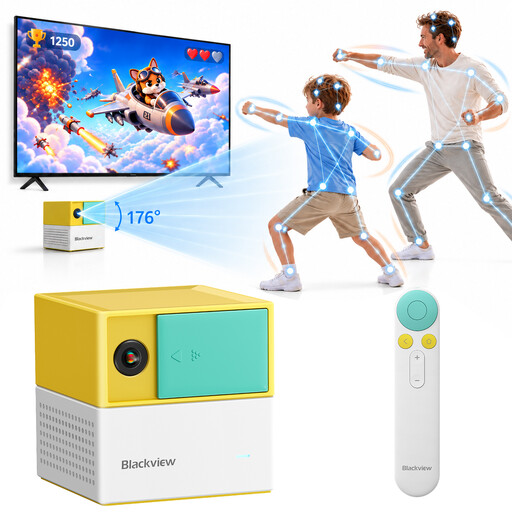
Blackview PlayPop 8 AI Motion Game Console
The product description mentions controller-free play, motion recognition and support for up to four players.
The title lists 17-point AI tracking; the description mentions 22 built-in family and educational games.
Check visibility in your own room: the listed tracking isn’t a guarantee that it will work in complete darkness.
Joybuy
 No image available
Nintendo Switch 32 GB console bundle with Mario Kart 8 Deluxe game card
The bundle includes Mario Kart 8 Deluxe on a game card.
The description says split-screen play is available for up to four players in TV or tabletop mode.
Joybuy
 No image available
Nintendo Switch 2 256 GB bundle with Mario Kart World download
The bundle lists Mario Kart World as a digital game and includes a dock for playing on a TV.
The description lists TV, handheld and tabletop modes, 256 GB of storage and a three-month Nintendo Switch Online membership.
Joybuy
 No image available
Nintendo Switch 2 console (EU)
The description lists TV, tabletop and handheld modes, as well as compatibility with Nintendo Switch games.
For the Jamboree TV modes, make sure you choose the Switch 2 Edition of the game.
Joybuy
Frequently asked questions
Does the room need to be completely dark for party games?
No. Sony recommends a well-lit room and a safe distance from the TV screen when using PlayStation. Make sure the screen, controls and play area are visible, and test camera or motion features in your own set-up.
Can I play every Switch party game with four people using the included Joy-Cons?
It depends on the game and game mode. Check how many players it supports and which controller set-up is compatible with the specific software before deciding whether you need extra controllers.
Do I need a camera or subscription for Jamboree TV?
A compatible USB-C camera is required separately for CameraPlay, but not for every Jamboree TV feature. Nintendo says a paid Nintendo Switch Online membership is required for GameChat. Check the requirements for the game mode you want to use.
What if the console doesn’t work properly after I buy it?
If a product is faulty, the seller is responsible for providing a solution under the rules set out by the Dutch government. The Netherlands has no fixed statutory guarantee period. A manufacturer’s guarantee or extended warranty doesn’t replace your statutory rights.
Is a PEGI 3 game automatically easy for young children?
No. PEGI ratings tell you whether the content is suitable for a particular age, not how difficult the game is. Also check the language and any online interaction in the specific game.


