
Switch host
You want guests to be able to join in straight away in the same room. Count how many Joy-Con each game and game mode needs; Nintendo, for example, specifies one Joy-Con per player for Super Mario Party.


Choose the game and console first, then check how many players can join in at once and what controls the chosen game mode requires. Nintendo specifies one Joy-Con per player for Super Mario Party, while the player limit for Super Mario Party Jamboree varies by game mode. A wireless controller won’t automatically work with every console or mini-game, so check the pairing and charging options before your games night too.
You want guests to be able to join in straight away in the same room. Count how many Joy-Con each game and game mode needs; Nintendo, for example, specifies one Joy-Con per player for Super Mario Party.
You’re choosing mini-games with motion controls or, on Switch 2, Jamboree TV modes with mouse controls. Nintendo says mouse controls only work with software that supports this feature.
You already have another console or a PC and are looking for extra controllers that work with both that system and your chosen local multiplayer game. Microsoft and PlayStation explain compatibility and pairing for their own systems; check that the game supports the controller too.
Start with the exact game and game mode: these determine which controller works and how many guests can play at once. Then compare any special controls and get ready to charge and pair your controllers.
Choose this option: if you’re playing Super Mario Party locally with guests. Nintendo specifies one Joy-Con per player, with up to four players on one system.
Bear in mind: a Pro Controller with motion controls doesn’t replace the specified Joy-Con. Count the Joy-Con you already have.
Choose this option: if you want to match your controller to the specific Jamboree game mode. For Mario Party and Minigame Bay, among others, Nintendo lists one to four offline players on a single system.
Bear in mind: player limits vary between game modes. Jamboree TV modes with mouse controls on Switch 2 require Joy-Con 2 and compatible software.
Choose this option: if your party game runs on a supported Xbox console or Windows PC and uses standard gamepad controls. Microsoft also lists certain mobile devices as compatible.
Bear in mind: compatibility with an Xbox or PC doesn’t mean the controller will work with a Nintendo or PlayStation console. Check the player limit in the game.
Choose this option: if your PS5 game supports multiple local players using DualSense controllers.
Bear in mind: PlayStation explains how to pair up to four DualSense controllers, but a game may have a lower player limit. Haptic feedback and adaptive triggers depend on the game.
| What to consider | What to look for | Who is this for? |
|---|---|---|
| System and game compatibility | Check the console, the exact game and the required controller version. | If I want to avoid buying an extra controller that won’t work with my game or system, I check both before buying. In this breakdown of shopping priorities, around 36% of consumers put compatibility first. |
| Controllers for all your guests | Count the controllers needed per player and check the player limit for the chosen game mode. | If I want guests to play at the same time, I count the controllers available and check how many players the game mode supports. In this breakdown of shopping priorities, around 29% of consumers mainly need enough controllers for their group. |
| Motion or mouse controls | Check the features of the exact controller and whether the game or game mode supports those controls. | If I want to play mini-games with motion or mouse controls, I check that the controller has the required feature and that the software supports it. In this breakdown of shopping priorities, around 21% of consumers make specialist mini-game controls their top priority. |
| Pairing and power | Check how to pair the controller and whether the model is rechargeable or uses batteries. | If I want to start the evening without interruptions to charge or pair controllers, I get them ready to play beforehand. In this breakdown of shopping priorities, around 14% of consumers put preparation and power first. |
The Pro Controller has motion controls, but Nintendo specifies one Joy-Con per player for Super Mario Party.
Check the controller requirements for the exact game and game mode before choosing extra controllers.
Features vary by version. For example, the PowerA Wireless Controller for Nintendo Switch on PowerA’s product page doesn’t support motion controls. Joy-Con 2 mouse controls only work with software that supports this feature.
Check the full model name and the required sensor or mouse feature, rather than relying on the Switch or Bluetooth label alone.
Nintendo says older Joy-Con can connect wirelessly to Switch 2, but can’t be charged on that console.
Charge them beforehand using a compatible Nintendo Switch or charging accessory.
Joy-Con for individual players on Switch, Joy-Con 2 for Switch 2 features, and Pro Controllers for games that support a full gamepad.
Wireless gamepads for supported Xbox consoles, Windows PCs and mobile devices listed by Microsoft.
DualSense controllers for supported local multiplayer games on PS5.
Alternative gamepads for Nintendo Switch, with features that vary by version.
Alternative controllers for Switch, including the Ultimate 2C Bluetooth Controller.
This selection includes controllers for Switch and PC games, Xbox, PS5 and Switch 2. Before buying, check that the exact game and game mode support the controller and the controls you want to use.
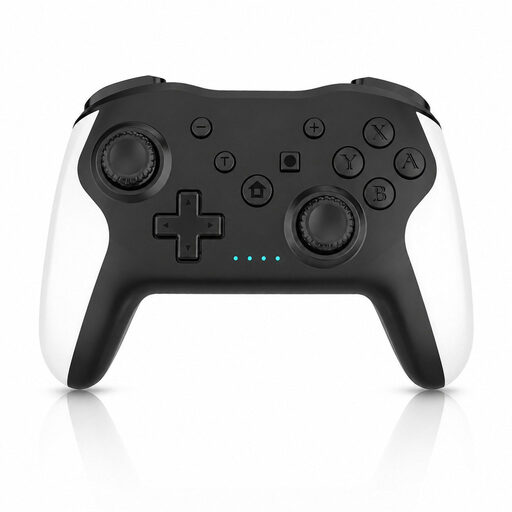 No image available
An option for Switch or PC games that support this controller; the product name lists gyro and dual vibration.
 No image available
Consider this controller for an Xbox or Windows PC games night if your chosen game supports it; check game compatibility separately.
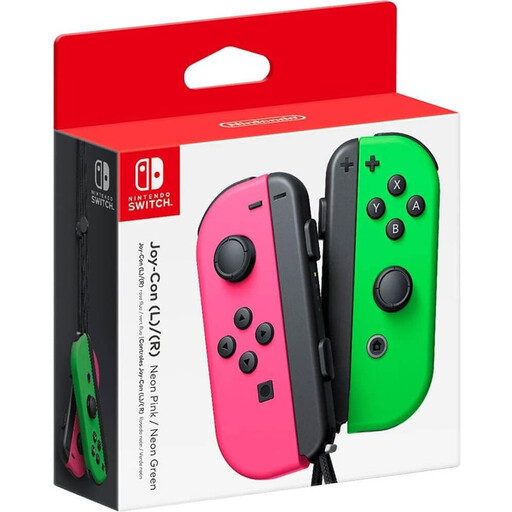 No image available
A pair of Joy-Con for Switch games that support these controllers. Nintendo specifies one Joy-Con per player for Super Mario Party; count the Joy-Con you already have.
 No image available
An option for local PS5 games that support DualSense. PlayStation explains that up to four controllers can be paired, but the game may have a lower player limit.
 No image available
Designed for Switch 2 games that support Joy-Con 2; the product name specifies a left and right controller. Mouse controls only work with compatible software, and Nintendo instructs users to attach the wrist straps when using them wirelessly.
No, the controller you need varies by game and game mode. Nintendo specifies one Joy-Con per player for Super Mario Party. For Super Mario Party Jamboree, check the player limit for your chosen game mode; for Jamboree TV on Switch 2, also check which special controls are required.
Pair the controllers in advance and test your chosen game. Nintendo explains how to pair them via ‘Controllers’ and ‘Change Play Style/Order’; PlayStation provides separate pairing steps for extra DualSense controllers. Also make sure the controllers are charged or have batteries, as specified for each model.
No, Nintendo says older Joy-Con work wirelessly with Switch 2, but can’t be charged on that console. Use a Nintendo Switch or a suitable charging accessory to charge them.
Nintendo instructs users to attach the Joy-Con 2 wrist straps when using them wirelessly. Don’t use older Joy-Con wrist straps as a substitute; Nintendo says they aren’t compatible with Joy-Con 2.