For a small desk, a set of Joy-Cons is handy if your Switch game supports one Joy-Con per player; Nintendo stresses that the available play styles vary from game to game. If each player needs a full gamepad, choose a controller that works with both your system and the game, and decide whether you can keep a cable out of the way. Check which generation of Switch you have, too: Joy-Con 2 only works with Switch 2.
Who is this guide for?
Switch players sharing controllers
You want to use one individual controller per player in a supported local party game, without extra cables cluttering your desk. Nintendo explains that the play style depends on the multiplayer options in the specific game.
PC or console players short on space
You need a full gamepad for each player and want to keep connections and cables manageable around a small desk. Check that your system and the game support your chosen controller and connection.
Switch players weighing up the features
You’re choosing between individual Joy-Cons and a traditional gamepad, and want to know whether your game requires motion controls or another Joy-Con feature. Nintendo describes different play styles for different games.
What should you look for when choosing?
First check that your system and game are supported. Then work out how many players can use the controllers you have, and consider cables and power.
| What to consider |
What should you check? |
Who is this important for? |
| Compatibility |
Check your console or PC, the game, and the supported controller and connection modes. |
When choosing a controller, I first want to know whether both my system and the game support the controls I need. Around 36% of consumers prioritise compatibility with their system and game. |
| Number of players |
Check how many players the game supports, which play style it requires and which controllers you already own. |
I want to let as many players as possible join in with the controllers I have, but only if the game supports shared controls. Around 29% of consumers prioritise how many players can use one set. |
| Desk space |
Check the wireless connection, whether a receiver is needed, the available USB ports and where a cable can run. |
My desk is small, so I don’t want a cable or loose connection getting in the way while we play. Around 21% of consumers prioritise a clear, usable desk surface. |
| Power and features |
Check the power source or batteries, how the controller charges and whether the game requires any particular features. |
I want to know how to power the controller and whether it supports the features my game needs. Around 14% of consumers prioritise power and retaining key features. |
Common buying mistakes
-
Assuming all Joy-Cons are interchangeable
Joy-Con 2 doesn’t work with the original Switch. Original Joy-Cons can be used wirelessly with Switch 2, but can’t be attached to that console for charging.
Before buying, check your console generation and how you’ll charge the controllers.
-
Choosing a wired Switch gamepad for playing without the dock
PowerA states that the Enhanced Wired Controller in question only works when the Switch is docked. It’s also unsuitable for games that require Joy-Con controls.
Check your set-up and the game’s control requirements before choosing a wired controller.
-
Assuming one controller or set will work for every game
Whether players can use Joy-Cons individually depends on the game. The number of connected controllers doesn’t automatically determine how many players the game supports.
Check the game’s player limit and play style, and count the controllers you already own.
-
Choosing an 8BitDo Ultimate 2C based on the series name alone
8BitDo offers separate versions: the Ultimate 2C Wireless and Ultimate 2C Bluetooth support different platforms and connection modes.
Compare the full model name and connection mode with your system. For Switch 2, 8BitDo says the Bluetooth version requires a firmware update.
Brands to compare
Nintendo
Nintendo offers Joy-Cons for supported Switch games and Joy-Con 2 for Switch 2.
- Nintendo describes horizontal play and motion controls for supported games.
- Joy-Con 2 doesn’t work with the original Switch. Original Joy-Cons work with Switch 2 wirelessly only and can’t be attached to that console.
Xbox / Microsoft
The Xbox Wireless Controller reviewed here is a full gamepad for supported Xbox and Windows games.
- Microsoft lists Bluetooth support for compatible Windows PCs. For the cable bundle reviewed here, Microsoft also specifies USB-C.
- The controller uses AA batteries. Check that the version you choose actually includes the cable bundle you want.
8BitDo
The Ultimate 2C series includes separate versions for different systems.
- According to 8BitDo, the Ultimate 2C Wireless uses 2.4 GHz or USB on Windows, and Bluetooth on Android.
- The Ultimate 2C Bluetooth is a different version, designed for Switch. For use with Switch 2, 8BitDo says a firmware update is required.
PowerA
The Enhanced Wired Controller reviewed here is a wired gamepad for a docked Switch.
- PowerA specifies a detachable 3 m cable for this model, which doesn’t need batteries.
- PowerA says this controller only works with a docked Switch. It doesn’t have motion controls, HD rumble, IR or amiibo NFC.
Sony / PlayStation
DualSense is the controller for PS5 and can be used with supported PC games via Bluetooth or USB.
- Sony describes how to use it with supported games on PC.
- Sony states that features outside PS5 vary by device, game and connection. Haptic feedback on PC requires USB and support from the game.
Joybuy products
This selection includes shared Joy-Con sets for Switch and Switch 2, as well as individual wireless gamepads for players who use a full controller. Check that your console and game support your preferred play style for each product.
 No image available
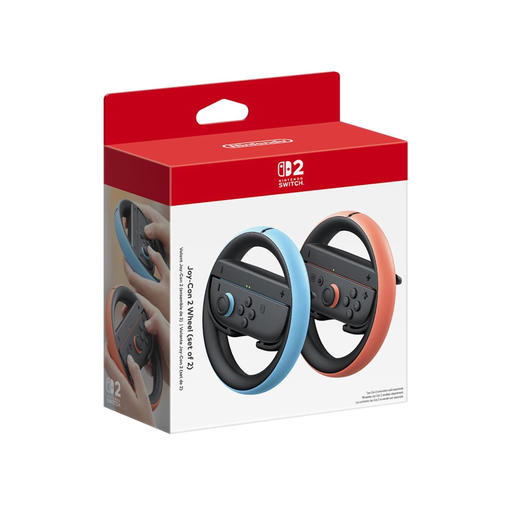
Nintendo Switch 2 Joy-Con Wheel Set - Black
An option for a Switch 2 game that supports individual Joy-Con controls; check whether the game allows horizontal play.
The product name specifies a black Joy-Con Wheel Set. This model is designed for Nintendo Switch 2, not the original Switch.
View at Joybuy
 No image available
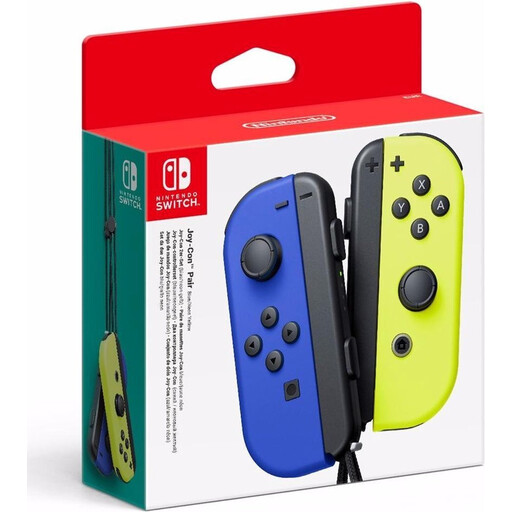
Nintendo Switch Joy-Con Pair - Neon Blue/Neon Yellow
A set for supported Switch games that let players use individual Joy-Cons.
The product listing specifies a left and right controller and wrist straps. The play style depends on the game.
View at Joybuy
 No image available
Nintendo Switch 2 Official Joy-Con 2 Pair - Light Blue/Light Red
An option for supported Switch 2 games that let players use individual Joy-Con 2 controllers.
According to the product listing, the set includes a left and right controller and two wrist straps. Joy-Con 2 doesn’t work with the original Switch.
View at Joybuy
 No image available
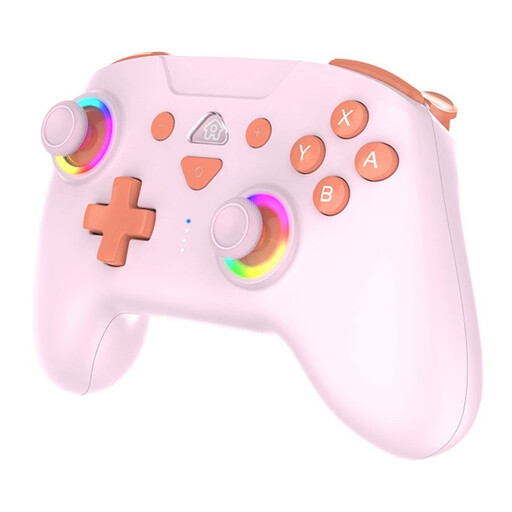
SUBSONIC Wireless Controller SW2 & SW with LED, Pink
An individual gamepad for one player using a full controller with a supported Switch or Switch 2 game.
The product listing specifies wireless use and a rechargeable battery. This is one controller, not a shared set for two players.
View at Joybuy
 No image available
PS5 DualSense Wireless Controller V3 - Cosmic Red
A full wireless gamepad for one player who needs a controller for PS5 games.
The product name specifies the V3 version in Cosmic Red. Use with other devices depends on support from the device and game.
View at Joybuy
Frequently asked questions
Can I give each player one Joy-Con?
Yes, if the Switch game supports horizontal play with individual Joy-Cons. The same principle applies to Switch 2 with Joy-Con 2; as Nintendo explains, the available play style depends on the software.
Does Joy-Con 2 work with a standard Switch, and do older Joy-Cons work with Switch 2?
According to Nintendo, Joy-Con 2 only works with Switch 2. Original Joy-Cons can be used wirelessly with Switch 2, but can’t be attached to or charged by that console.
What should I attach to Joy-Cons before playing?
Nintendo recommends attaching the wrist straps to original Joy-Cons when using them wirelessly. For a Switch 2 set, check whether the appropriate Joy-Con 2 wrist straps are included.
When buying online in the Netherlands, do I have a cooling-off period and a guarantee?
The Dutch government states that a 14-day cooling-off period applies in many cases when buying at a distance; check whether your purchase is covered by the rules and any exceptions. If there’s a fault, contact the seller to arrange a solution under the statutory guarantee.
Does a CE mark mean a wireless controller is suitable for every game?
No. According to Your Europe, CE marking only applies to products covered by specific EU rules; it doesn’t tell you whether a controller works with a particular game. Check system and game compatibility separately.


