Start with a secure mount above your work surface and check that the paper and your hand stay fully in shot. Also, make a test recording in the window light you’ll be filming in. A mirrorless camera gives you a choice of lenses to adjust the framing, while a compact gimbal camera may suit you if you also want to film handheld. A gimbal isn’t a substitute for a secure mount for a fixed overhead shot. Canon Europe points out that natural light changes with the conditions, so also check the white balance, power supply, storage and recording conditions for the exact model.
Who is this camera set-up for?
Artists who want to show off their colours
You want subtle pastel shades to look consistent between recordings, even as the light from your window changes. Canon Europe notes that natural light can vary in colour depending on the conditions, so it’s worth paying attention to the white balance and making a test recording.
Artists filming from above
You want to keep the paper and your moving hand in a fixed frame. Canon Europe recommends using a tripod to keep a camera in place, so consider the camera, angle of view and secure mount as one complete set-up.
Artists filming for long sessions
You want to record a drawing process for longer and know the recording limits, power requirements and storage needs. Nikon lists a maximum of 125 minutes of continuous recording for the Z 30 under applicable conditions; DJI specifies 107 GB of built-in storage for the Osmo Pocket 4.
What should you look for when choosing?
Mirrorless camera with interchangeable lens
A good fit if: you want to adjust the framing with a suitable lens from a fixed position and set the colour and exposure yourself.
Consider: check which lens is included and allow for a suitable mount, power supply and storage.
Compact camera with fixed lens and gimbal
A good fit if: you want to film short handheld clips as well as a fixed view of your work, and value a compact set-up.
Consider: the fixed angle of view limits your choice of lens, and a gimbal won’t solve the problem of positioning the camera above the paper.
| What to consider |
What should you check? |
Which consumers does this matter to? |
| Colour in changing window light |
Check whether you can adjust the white balance and exposure, and compare a test clip with your work in the light you’ll be filming in. |
If I want pastel colours to look consistent as the light from the window changes, I want to be able to control the colour settings. Around 40% of consumers say colour reproduction in changing window light is their main concern. |
| Full overhead view |
Measure the paper and available mounting height; test the framing with the lens or fixed angle of view, and check the mount. |
If I want to keep the whole sheet and my working hand clearly in shot, I’ll look first at framing and a stable set-up. Around 30% of consumers prioritise a fixed overhead view. |
| Long recording session |
Check the recording limit and conditions for the exact model, along with the power supply and storage required. |
If I want to record a long drawing session, I want to know how power and storage will work with my chosen recording mode. Around 20% of consumers say recording time is their main concern. |
| Complete set |
Check which lens and accessories are included in the bundle and what else you’ll need for your set-up. |
If I don’t want to have to source lots of separate parts, I want to know exactly what’s included in the set beforehand. Around 10% of consumers make a complete set their top priority. |
Common buying mistakes
-
Comparing only the 4K or 60p specification
A video format doesn’t tell you whether the whole sheet of paper will fit in shot from your mounting position, or whether pastel colours will be reproduced consistently in window light.
Test the framing and colour in your own set-up before you factor in extra video features.
Your final set-up may need a different lens, an overhead mount or an extra power supply.
-
Assuming the maximum recording time is guaranteed for every session
A stated continuous recording time is one thing; the power and storage you’ll need in your chosen video mode are another.
Check the conditions attached to the stated recording time, and look separately at the power supply and storage capacity.
Longer sessions may require extra power or storage.
-
Assuming bundle names mean the same thing is included
A mirrorless camera may be sold with different lenses; the Osmo Pocket 4, for example, is available in a Standard Combo and a Creator Combo.
Check the exact contents of the bundle before treating one version as a replacement for another.
A mount or another accessory you need may not be included in the set you choose.
Camera brands to compare
Sony
The ZV-E10 II is a video-focused APS-C camera with an interchangeable lens, suited to anyone who wants to choose their framing through the lens.
- Sony Netherlands specifies 10-bit 4:2:2 video up to 4K 60p for this model.
- These features don’t guarantee faithful pastel colours without suitable exposure and white balance. Also check which lens is included with the version you choose.
Nikon
The Z 30 is a compact mirrorless camera with an interchangeable lens, suited to anyone considering longer continuous recordings.
- Nikon lists 4K UHD 30p and up to 125 minutes of continuous recording.
- The maximum recording time isn’t a guaranteed run time. Check the recording conditions, power supply and chosen lens against your own drawing session.
Canon
The EOS R50 V is a video-focused camera with an interchangeable lens and features for anyone who wants to set colour profiles deliberately.
- Canon lists 4K 60p and Canon Log 3 for this model.
- These features are most useful if you want to set them yourself and possibly edit your footage. Check which lens is included and the conditions for your chosen recording setting.
DJI
The Osmo Pocket 4 has a fixed lens and gimbal, and may suit you if you want to film moving clips as well as a fixed view of your work.
- DJI specifies a 1-inch CMOS sensor, a fixed lens with a 20 mm-equivalent angle of view and 107 GB of built-in storage.
- The wide-angle lens and gimbal don’t guarantee a suitable overhead view; test the distance, framing and mount.
Panasonic
The LUMIX G100D range offers a compact Micro Four Thirds mirrorless camera for anyone who wants the option to change lenses.
- Panasonic lists 4K 30p and USB-C charging for the DC-G100DW kit.
- Check the exact version and the lens included in the kit you’re considering.
Cameras for video recording
This Joybuy selection includes cameras for video recording, including models with interchangeable lenses and compact action and gimbal cameras. For an overhead view, check separately whether the angle of view and mount are suitable for your work surface.
 No image available
DJI Osmo Pocket 4 Creator Combo
May suit you if you’re looking for a compact gimbal camera and also want to film moving clips. Check separately whether the fixed angle of view frames the paper well from your mounting position.
The product title lists a 1-inch CMOS sensor, 4K/240fps, 3-axis stabilisation, 107 GB of built-in storage and a handle with a 1/4″ thread. Check the bundle contents and choose a suitable mount for fixed recording above your work surface.
View at Joybuy
 No image available
Sony ZV-E10 + 16-50mm Zoom Black
May suit you if you want to adjust the framing from a fixed position with a zoom lens. You’ll still need a secure overhead mount for a steady view of your work.
The product description lists a 16–50mm power zoom lens and 4K video at 30 fps. Check whether this lens can fit the whole sheet in shot from your available mounting distance.
View at Joybuy
 No image available
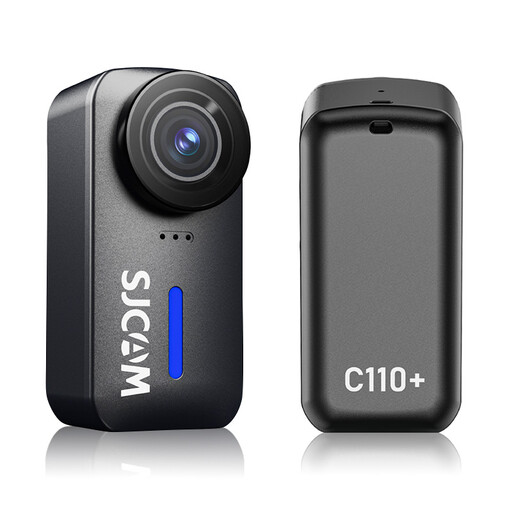
SJCAM C110+ 4K Action Camera
May suit you if you’re considering a compact camera with adjustable colour and exposure options. Test the colour reproduction with a recording in your window light.
The product description lists 4K video at 30 fps, adjustable white balance and exposure compensation. The product title specifies a 170° angle of view; check that it won’t show more of the table than you want from a safe mounting distance.
View at Joybuy
 No image available
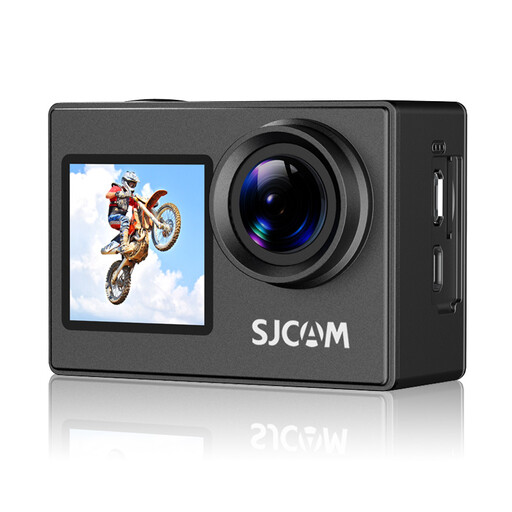
SJCAM SJ4000 Dual Screen Action Camera
May suit you if you want to adjust the image settings. Make a test recording to see how pastel colours and the whole sheet of paper appear in your set-up.
The product title lists 4K video, a 170° angle of view and EIS stabilisation. The product description mentions white balance presets and exposure compensation; check the framing and secure mount separately.
View at Joybuy
 No image available
SJCAM SJ20 Action Camera
May suit you if you’re planning a longer recording and want to adjust the colour settings. Check which recording settings apply to the stated recording time.
The product title lists 4K at 30 fps, 6-axis stabilisation and day and night lenses. The product description states up to 480 minutes at 1080p/30 fps and mentions white balance presets; this recording time applies to that specified mode.
View at Joybuy
Frequently asked questions
How can I prevent pastel colours from changing in my video?
Make a test clip in the window light you’ll be filming in and check the white balance and exposure on the paper. Canon Europe explains that the colour of natural light changes with the conditions, so a setting won’t automatically make changing light consistent.
Do I need image stabilisation for an overhead recording?
Image stabilisation isn’t a substitute for a secure mount for a fixed overhead recording. Secure the camera above your work surface and check the framing; a gimbal is designed to stabilise camera movement.
Which items should I check besides the camera body?
Check whether the lens is included with the set and what mount, power supply and storage you’ll need for your recording. If you buy as a consumer in the Netherlands, you’re entitled to a product that meets acceptable standards. The Government of the Netherlands says you should contact the seller if there’s a fault.
Can I return a camera bought online within 14 days?
For an eligible online consumer purchase, you generally have a statutory 14-day cooling-off period from delivery. Check the terms and exceptions that apply to your purchase; the cooling-off period is separate from your statutory rights if a product is faulty.
Can I publish a drawing video online if other people appear in it?
If you’re only filming your own work for personal or household use, the GDPR generally doesn’t apply, according to the Dutch Data Protection Authority. Privacy rules may be relevant if other identifiable people appear in the footage; check the applicable rules before publishing it.


