For a fixed overhead brush lettering lesson, choose a camera based on the framing and focus at your working height, not resolution alone. A mirrorless camera is a good fit if you might want a different lens or angle of view later; a webcam suits recording via a computer, while a gimbal camera is for anyone who also films moving footage. First, check that your brush tip and lettering are clearly visible. Then assess the mounting, lighting and sound as separate parts of your setup.
Who is this choice for?
Teacher filming at a worktable
You mainly film from above and want your hand to avoid obscuring the brush tip and new lettering for long periods. Match the mounting height to the angle of view. MOJOGEAR lists lighting and mounting, as well as the camera, as parts of an overhead filming setup.
Creator of close-up demonstrations
You want to show small brushstrokes and details in the paper at a larger scale. So test the focus and framing of the exact lens at the working height you plan to use.
Creator of narrated lessons
You record your instructions and demonstrations in one session. Before you start, check that the power supply, recording time and microphone setup will suit the length of your lesson. MOJOGEAR’s overhead filming guide also includes sound in the setup.
What should you look for when buying?
Make a short test recording at your planned working height. This will show whether the paper, your hand and the smallest letters all fit clearly in the frame.
Mirrorless camera with interchangeable lens
A good fit if: you want a fixed overhead setup and the option to choose a different angle of view or lens later.
Consider: the lens, mount, power supply and, if needed, microphone all need to suit your setup. A camera body on its own is not a complete kit.
Webcam connected to a computer
A good fit if: you already record via a computer and want to check the image from your workspace.
Consider: your recording depends on your computer workflow, the mounting and the framing of the fixed lens.
Compact gimbal camera
A good fit if: you want to film moving demonstrations as well as lessons from a fixed position.
Consider: stabilisation for moving footage is no substitute for a secure, fixed mount above the paper.
Your existing smartphone
A good fit if: you want to try out the angle of view, working height and lighting your lesson needs first.
Consider: check focus, storage, power and audio recording on your own device.
| What to consider |
What to look for when buying |
Who is this important for? |
| Stable overhead view |
Test the angle of view, working height and mounting. Make sure you can move your hands freely. |
I want my hand and brush tip to stay visible without having to reframe constantly. Around 36% of consumers prioritise a stable overhead view and usable framing. |
| Fine brushstrokes |
Check the focusing distance and framing with the exact lens at your planned working height. |
I want small letters to be clearly visible without losing the whole work surface from view. Around 29% of consumers give fine details top priority. |
| Lesson length and narration |
Check the power supply, storage, recording time under the conditions you expect to use it in, and your microphone or voice-over workflow. |
I want to record a full lesson with clear narration. Around 21% of consumers prioritise uninterrupted recording and narration. |
| Simple setup |
Check what the exact kit includes and which mount, lights or microphone you already have. |
I want to get started with minimal extra equipment. Around 14% of consumers make a simple setup their first consideration. |
Common buying mistakes
-
Comparing resolution alone
A high video resolution does not guarantee that a small brushstroke will appear large enough in the frame from your recording distance.
Make a test recording of your smallest lettering with the exact lens at your planned working height.
-
Assuming a gimbal is an overhead tripod
The gimbal on the DJI Osmo Pocket 3 is designed to stabilise movement. That is different from having a fixed, repeatable position above the paper.
Check how you can securely mount the complete camera above the table.
-
Assuming the camera body is a complete lesson setup
When filming from above, the lens, mount, lighting and sound all matter too, and the contents of mirrorless camera kits vary.
Make a note of what you already have and check the exact kit contents before choosing a setup.
-
Assuming consumer guarantees apply to a business purchase
According to Ondernemersplein, the statutory guarantee rules for consumers do not automatically apply to sales between businesses.
Check who you are buying on behalf of and, for a business purchase, confirm the applicable guarantee and service arrangements.
Camera brands and models to consider
Canon
The EOS R50 is a mirrorless camera with an RF and RF-S lens mount, suited to a fixed lesson setup where you may want to choose a different lens later.
- Canon lists Dual Pixel CMOS AF II and 4K 30p; according to Canon, recording sessions of more than 30 minutes are possible.
- The body does not have in-body image stabilisation. The lens you choose and the mounting will both affect how clearly small letters appear at your working height.
Sony
The ZV-E10 II offers a mirrorless setup with E-mount lenses, giving you the option to choose a different framing later.
- Sony lists 4K 60p and supplies the named lens kit with an E PZ 16–50 mm F3.5–5.6 OSS II zoom lens.
- Check whether the exact kit lens shows brushstrokes large enough in the frame at your mounting height.
Panasonic
The LUMIX G97 is a Micro Four Thirds option for anyone who values longer, fixed-position lessons and audio monitoring.
- Panasonic lists 4K 30p with no set time limit, as well as headphone and microphone sockets.
- According to Panasonic, the camera may stop recording at high ambient temperatures. A lens is not included with every version.
Elgato
The Facecam Pro is a webcam option for lessons you record via a computer.
- Elgato lists manual or automatic focus and control of settings such as white balance through Camera Hub.
- With a fixed lens, you will need to test it at your available mounting height and with your paper size.
DJI
The Osmo Pocket 3 is a compact option if you want to film moving footage as well as fixed-position lessons.
- DJI lists a three-axis gimbal and a focusing range starting at 0.2 m.
- Gimbal stabilisation is no substitute for a fixed mount above the paper. Check the framing at your working distance.
Joybuy products
The options below are compact gimbal and action cameras. For a fixed brush lettering lesson, a secure mount and a test of the framing at your working height remain important.
 No image available
DJI Osmo Pocket 4 Standard Combo
A compact gimbal camera to consider if you want to film moving footage as well as fixed-position lessons. Check the mount is suitable for filming above paper.
The product title lists a 1-inch CMOS sensor, 4K/240fps, 107 GB of built-in storage and a rotating 2-inch screen. According to the product description, 4K/240fps is only available in slow-motion mode.
Joybuy
 No image available
Osmo Pocket 4 Creator Combo
This compact gimbal camera could be a good fit if you also want to record moving demonstrations. Test separately how to mount it securely above your work surface.
The product title lists a 1-inch CMOS sensor, 4K/240fps, 107 GB of built-in storage and a handle with a 1/4-inch thread. Check the recording mode when using 4K/240fps.
Joybuy
 No image available
DJI Osmo Pocket 3 Creator Combo
The included microphone could be useful if you want to record narration as you write. You will also need a suitable mount for a fixed lesson filmed above the paper.
The product title lists 4K/120fps, three-axis stabilisation and an included microphone. The stated stabilisation is no substitute for a fixed mount above the paper.
Joybuy
 No image available
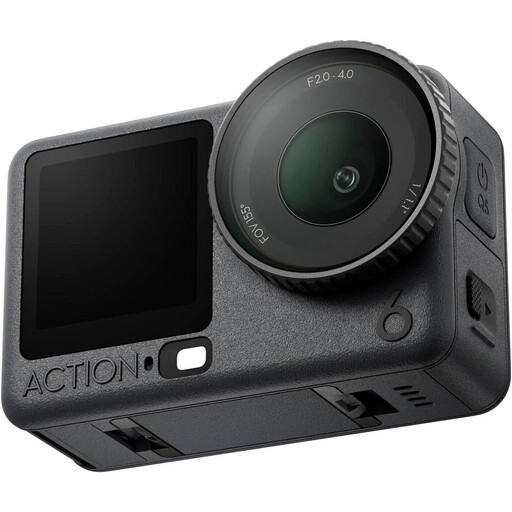
DJI Osmo Action 6 Adventure Combo
The product name identifies this as an action camera. Before choosing it for a fixed overhead setup for a brush lettering lesson, assess the mount and framing at your working height.
Joybuy
 No image available
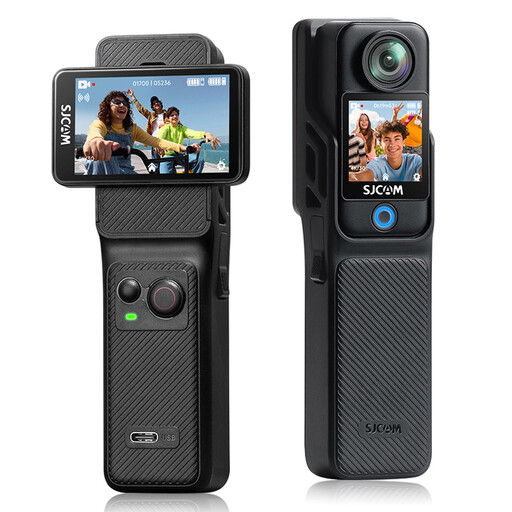
SJCAM C400 4K Action Camera with 6-Axis EIS and Dual Touchscreens
Check whether this action camera’s angle of view frames your paper appropriately. A wide shot may make small letters appear smaller.
The product title lists 6-Axis EIS and two touchscreens, including a 2.29-inch screen. Test how clearly your smallest letters appear at your planned working height.
Joybuy
Frequently asked questions
How can you check the camera before recording a full lesson?
At your intended working height, make a short recording of the whole sheet and your smallest letters. Review it to check focus, shadows and whether your hand is visible. Also test whether the recording lasts long enough for your lesson.
Does a mirrorless camera automatically come with a lens for filming small lettering?
No. The camera body alone does not determine whether small letters will appear clearly at your working distance. Canon and Sony list the lens or lens kit separately, so check the exact package contents and test the included lens at your working height.
What guarantee applies if you buy the camera for your online shop?
When you buy as a consumer, statutory guarantee applies based on what you can reasonably expect from the product. Ondernemersplein states that these consumer protections do not apply to sales between businesses. For a business purchase, check the contract and the service offered.
Can you publish a lesson video for your online shop featuring recognisable employees or customers?
If you film recognisable people on behalf of a business and publish the footage, the GDPR applies, according to the Dutch Data Protection Authority, and you need a valid legal basis. Consent is one possible example, but it is not the only legal basis. Also consider whether people are genuinely recognisable.
Can you use existing music in a commercial lesson video?
Do not assume that copyright-protected music is free to use. The Dutch government states that you need the creator’s permission. BumaStemra also distinguishes between personal use and music in commercial content. Check the rights for the music and the channel you plan to publish on.


