
Teacher with a permanent writing desk
You film the same work surface repeatedly and want to be able to recreate the framing, focus and lighting. The distance from the camera to the paper also affects your choice of camera and mount.


Start by checking whether the camera can capture your entire work surface in focus from the available mounting height, and whether it can be positioned safely above the table. Test this with your paper, brush and a moving hand. A webcam suits a fixed computer setup, while a mirrorless camera offers more choice of lenses and framing but needs extra consideration when it comes to the lens, mounting and recording workflow. Even lighting, control over white balance and clear speech are important with both options.
You film the same work surface repeatedly and want to be able to recreate the framing, focus and lighting. The distance from the camera to the paper also affects your choice of camera and mount.
You switch between showing brushstrokes and speaking on camera. Flexible framing and clear speech may matter more than resolution alone.
You want to use the footage directly in a computer-based workflow, so you’ll also need to check the webcam’s connection and mounting options.
Best for: lessons you record or stream directly via a computer, with a fixed camera position above your desk.
Bear in mind: your computer, USB connection and lighting. A webcam with fixed focus doesn’t offer the same choice of lenses as a mirrorless camera.
Best for: anyone who wants to adjust the framing using a chosen lens, or switch between filming the work surface and themselves.
Bear in mind: the exact combination of camera body, lens and mounting height. The lens, mount, power supply, storage and possibly a microphone may all add to your setup.
| What to consider | What to look for | Who should pay particular attention? |
|---|---|---|
| Sharp focus across the whole work surface | Measure the mounting height and test whether the entire writing area fits in the frame and remains in focus at your preferred distance with the exact camera and lens combination. For the Facecam 4K, Elgato specifies a focus range of 30–120 cm at 4K. | If you want to keep the tip of your brush, your lettering and your moving hand in shot, pay particular attention to the framing from your usual workspace. Around 33% of consumers prioritise being able to see the work surface clearly. |
| Recording a complete lesson | Make a test recording for the planned lesson length and check the power supply, storage, heat management and how you’ll review the recording. Canon says the EOS R50 supports 4K 30p and recording for more than 30 minutes. | If you don’t want to repeat a demonstration, check that your chosen settings and setup are suitable for the planned lesson length. Around 27% of consumers prioritise being able to record an entire lesson reliably. |
| Making paper and ink easy to see | Film a test strip with your hand moving and assess the shadows and colour. Canon Europe describes white balance as a way to adjust colour reproduction in challenging lighting conditions. | If you want the paper and ink to look consistent throughout your demonstration, test the lighting in your actual writing setup. Around 20% of consumers prioritise control over lighting and colour. |
| Speech and computer workflow | Record video and speech at the same time. Check the connections on the exact model and consider whether you’ll work directly on a computer or transfer files. Elgato says that the Facecam 4K is limited to 1080p via USB 2.0. | When you explain as you write, you’ll want your voice to be clear and the recording easy to work with. Around 20% of consumers prioritise speech and their computer workflow. |
The stated resolution doesn’t tell you whether the whole sheet of paper will be in focus from your mounting height, or whether distracting shadows will appear in shot.
Test the framing and working distance with the exact camera and lens combination, and review a recording with a moving hand too.
According to Elgato, video output from the Elgato Facecam 4K is limited to 1080p via USB 2.0.
Before you buy, check your computer’s port and the instructions for the exact model.
Background noise and unclear speech can make spoken instructions less useful.
Before you start, record a short video and speech test in the same room, then listen back to it.
If the audio recording doesn’t work out, you may need to record the lesson again or add the commentary afterwards.
The EOS R50 is a mirrorless camera that lets you choose a lens to suit your work surface and any shots of the presenter.
The ZV-E10 II is a video-focused mirrorless camera with interchangeable E-mount lenses.
The Facecam 4K is a webcam for a fixed desk and computer setup.
This selection includes webcams for a computer setup and cameras offering more flexible framing for teaching from home. Check that each model’s mounting options, connection and working distance suit your table.
 No image available
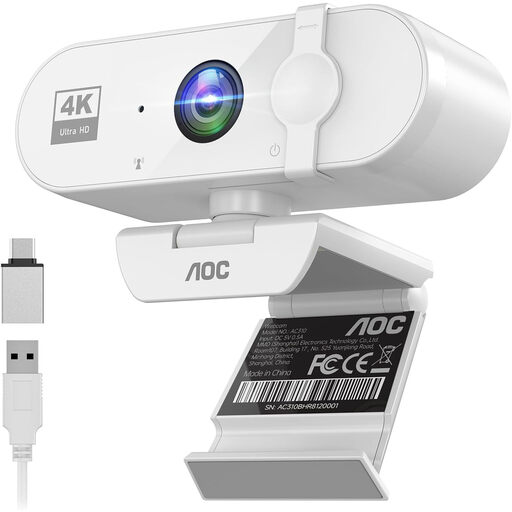
A webcam for a computer setup. Check that the included mount suits your preferred position above the table.
The product description lists 4K video at 30 fps, a 99° field of view, 180° tilt, 360° rotation, USB, tripod mounting and a built-in microphone with noise cancellation.
 No image available
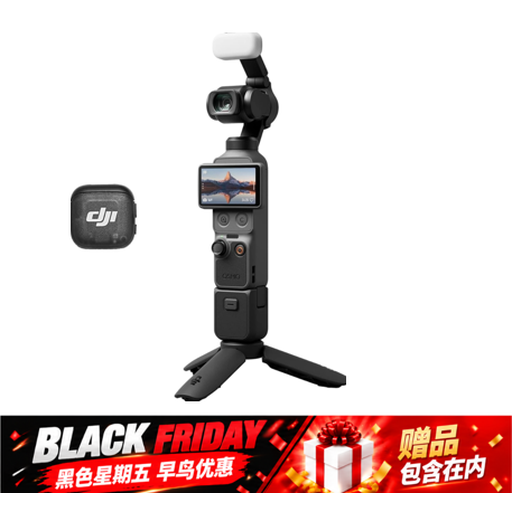
A pocket-sized video camera for anyone considering a compact camera setup. Check what mount you’ll need to film above the table.
The product title lists a 1-inch CMOS sensor, 4K/240 fps, 3-axis stabilisation, 2× lossless zoom, 14-stop dynamic range, 107 GB of built-in storage and a handle with a 1/4-inch thread.
 No image available
A webcam for a computer setup. Check that it can be mounted on your monitor, laptop or desk.
The product description lists autofocus, two built-in microphones with noise cancellation, a privacy cover and a USB-A connection.
 No image available
A mirrorless camera with a zoom lens for anyone who wants to adjust the framing. Test from your intended mounting height to check that the whole writing area fits in shot and remains in focus.
The product information lists a 24.2 MP APS-C sensor, 4K video at 30 fps, a tilting screen and an E PZ 16–50 mm zoom lens. According to the product description, an SD memory card and adapter/charger are not included.
 No image available
A webcam for a computer-based workflow. Check that the available software and camera angle suit your teaching setup.
The product information lists 4K, a 1/2-inch sensor, autofocus, adjustable white balance, and DeskView and Whiteboard modes.
No. First, check whether the brush tip and lettering are clear in your final framing. Canon lists 4K 30p for the EOS R50, while Sony lists up to 4K 60p for the ZV-E10 II. The higher stated frame rate alone doesn’t prove that it will improve a steady writing demonstration.
Measure your work surface and the available space above the table, then make a short test recording with your hand in shot. Check the framing, focus, shadows, paper colour and speech before choosing a camera or extra lens.
For this model, Elgato recommends using a microfibre cloth and advises against paper tissues and cleaning products.
For online consumer purchases, there is generally a statutory cooling-off period of up to 14 days after delivery, subject to legal exceptions. ACM ConsuWijzer also states that the statutory guarantee applies if a product, when used normally, fails to meet the standards you could reasonably expect. It is not automatically limited to a fixed two-year period. Check who the seller is and which terms and conditions apply to your purchase.
That depends on who is filming and how the footage will be used. The Dutch Data Protection Authority says that recognisable people are personal data. The GDPR may apply if you publish footage beyond a limited private setting, and you’ll need a valid legal basis. Keep participants out of shot, or check which legal basis applies to your situation before recording and publishing.