
New to oval racing
You’re looking for a wheel and pedal set for a simulator such as iRacing and want to know whether to choose a complete bundle. iRacing Support explains the Windows system requirements and how to calibrate connected controls.


First, choose a wheel set that works with your game and platform. For iRacing, you’ll need a compatible Windows PC, and the wheel and pedals must be calibrated, as explained by iRacing Support. A complete set can be a straightforward way to get started, while a direct-drive set puts more emphasis on adjustment and expansion. Compare the pedals and mounting hardware included, and don’t treat quoted torque figures as proof of better oval-racing performance. A headset issue won’t be fixed by changing your wheel: set up the audio output and in-game voice chat instead.
You’re looking for a wheel and pedal set for a simulator such as iRacing and want to know whether to choose a complete bundle. iRacing Support explains the Windows system requirements and how to calibrate connected controls.
You want to adjust the feedback and braking controls while practising. Compare the pedal type and the specific wheel set, as iRacing Support notes that controls need to be calibrated.
You want to hear spotter or voice chat messages while driving. iRacing Support explains how to configure audio output and voice chat in the simulator.
First, check the platform version and what’s included in the set. Then compare the pedals and feedback settings, and configure your headset audio separately. For iRacing, iRacing Support explains the Windows system requirements, how to calibrate controls and how to configure audio output.
| What to consider | What to look for when buying | Who is this important for? |
|---|---|---|
| Platform and game | Check the exact platform version and game support. Also check whether both the wheel and pedals are included. | I want to make sure the set works with my PC or console and the game I’ve chosen. Around 36% of consumers say platform compatibility is their top buying priority. |
| Feedback and braking | Check the pedal type and adjustment options for this specific set; calibration may be required. | If I want to adjust the wheel feel and braking controls while practising, I compare these features across different versions. Around 29% of consumers say adjustable wheel feel and braking are their top priority. |
| Spotter and headset | Check the in-game audio output for your spotter and voice chat, and make sure no other programmes are using the audio device exclusively. | I want to hear messages and chat through my headset during oval races, so I also check the audio settings. Around 21% of consumers prioritise clear spotter and chat audio. |
| Complete setup | Check whether the wheel, pedals and mounting hardware are included. Also consider the requirements of your computer or console and game. | I want to know in advance what I’ll need to practise and whether the set can be mounted to my desk. Around 14% of consumers say the total cost and mounting options are their top buying priority. |
A base and a bundle can contain different components. Buying a base on its own may mean you still need to source a wheel, pedals or mounting hardware.
Compare the parts list for the version on offer and check that the set includes everything you need for your setup.
The model name alone doesn’t always tell you which version you need. The Logitech G923 has separate platform versions, and Fanatec states that the CSL DD isn’t compatible with PlayStation.
Before buying, check the full model name and platform details for the exact version you’ve chosen.
Spotter and voice chat audio are controlled through the game’s audio settings. Choosing the wrong output device, or having another programme use the audio device exclusively, can disrupt the sound.
Test your headset, spotter and chat in the simulator before considering other wheel hardware.
The G923 is a complete wheel and pedal set, available in separate platform versions.
The T248R is a hybrid force feedback set for PC, PS4 and PS5.
The R5 Racing Bundle is a direct-drive PC set with a wheel, pedals and table clamp.
The CSL DD WRC Ready2Race bundle is a modular set with a wheel, pedals and table clamp.
This Joybuy selection includes racing wheel sets for PC and/or consoles, from entry-level sets to direct-drive versions. Check each model for platform compatibility and the components included.
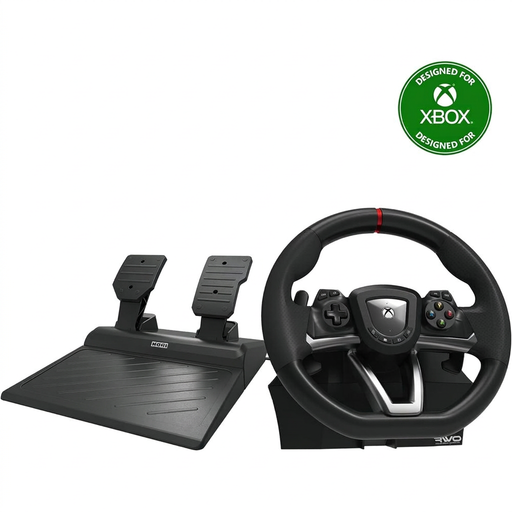 No image available
A wheel set with pedals for practising on PC or Xbox, with the option to mount it to a desk.
The product description lists a 270° steering angle and a desk clamp.
 No image available
A set with pedals for practising on PC, PS4 or PS5.
The product description lists a 270° steering angle, vibration feedback and programmable settings.
 No image available
A wheel and pedal set for practising on PC or Xbox, with force feedback.
The product description lists a maximum 900° rotation, TRUEFORCE force feedback and a progressive brake spring. Check that the platform version is compatible with your system.
 No image available
A wheel and pedal set for practising on PC or Xbox, with a desk clamp for mounting.
The product description lists a 240° steering angle and a quick clamp for tables and desks up to 4.5 cm thick.
 No image available
A direct-drive wheel set for practising on PC, PS4 or PS5, with adjustable pedal resistance.
The product description lists Direct Axial Drive, 5 Nm of constant torque and two sensor pedals with adjustable resistance.
No. The iRacing settings described configure audio output separately from the wheel. Choose the right output device for voice chat, and check the spotter and other audio output settings. iRacing Support also warns that another programme using the audio device exclusively can disrupt the sound.
Calibrate the controls in iRacing the first time you use them, or after connecting new controllers. iRacing Support notes that you may also need to recalibrate if you switch USB ports.
No, this depends on the simulator and what’s included with the wheel set. iRacing requires a membership. According to iRacing, the cars and tracks for ranked Rookie series are included, while additional cars and tracks may be available separately. Also check whether your chosen set includes the wheel, pedals and mounting hardware.
ACM ConsuWijzer explains that online purchases generally come with a statutory cooling-off period of up to 14 days after delivery, subject to applicable exceptions. Your statutory guarantee is separate from a manufacturer’s warranty: if a product doesn’t perform as you could reasonably expect under normal use, the seller is responsible for providing an appropriate solution.