What should you consider when buying?
Three monitors
Choose this if: your permanent gaming room setup has space for side screens and a view diagonally alongside the car is important to you.
Bear in mind: you’ll need extra screens and mounting, and you’ll have to set the viewing distance and angles.
One 49-inch super-ultrawide
Choose this if: you want a wide 32:9 setup without separate side screens.
Bear in mind: the physical width and the demands the chosen resolution places on your PC; check the full model code, too.
One 34-inch ultrawide
Choose this if: you want more horizontal space than a standard screen offers, but only want to fit one monitor in your cockpit.
Bear in mind: this screen doesn’t have separate angled side panels like a triple-screen setup.
| What to consider |
What should you check? |
Who is this important for? |
| View alongside the car |
Compare one wide screen with angled side screens from your racing seat; set the field of view using your measured viewing distance and screen dimensions. |
If I want to see traffic alongside my car more clearly in my screen layout, I’ll first compare the visible space from my cockpit. Around 36% of consumers give seeing alongside the car their top priority. |
| Space and triple-screen mounting |
Measure the distance to the centre screen, screen widths and side-screen angles; also check there’s room for the rig and mounts. |
With a permanent cockpit, I want to know whether three screens will fit and can be adjusted properly before choosing them. Around 29% of consumers give a mounted triple-screen setup their top priority. |
| Width of a single screen |
Check the aspect ratio, full model code and physical width in relation to your steering wheel and seating position. |
If I don’t want to set up three separate monitors, I’ll compare how a single screen fits in my space. Around 21% of consumers prefer one wide screen. |
| Picture and PC performance |
Compare the resolution and connections with your PC, and check the frame rate you can achieve in the sim; a quoted Hz value doesn’t guarantee it. |
I want to choose a resolution and refresh rate that suit my PC, without relying solely on a high manufacturer’s figure. Around 14% of consumers give this combination their top priority. |
For screen setup, iRacing Support recommends taking measurements from your normal racing position. AMD Eyefinity requires three screens with the same resolution. The same brand and model is recommended, but the instructions say it isn’t essential.
Joybuy products for a single wide screen
This selection features ultrawide and super-ultrawide monitors for oval racing with a single screen. Measure the space in your cockpit and check that your PC can handle the resolution you choose.
 No image available
Philips Evnia 49M2C8900/00 49-inch DQHD 240Hz QD-OLED
A 49-inch 32:9 screen for anyone who wants to practise oval racing on one wide screen.
The product description lists 5120 × 1440 and 240 Hz. Bear in mind the warning about burn-in when displaying static images for long periods.
According to the description, the monitor weighs 13,96 kg. Lift and install it with two people, and use a stable, suitable surface.
Joybuy
 No image available
CRUA 49-inch Curved Ultrawide Gaming Monitor
A single 49-inch 32:9 screen for anyone who doesn’t want to set up three separate monitors.
The product name lists 5120 × 1440, 165 Hz, 1500R and a VA panel.
The description calls for a desk or VESA mount that can support at least 15 kg, and recommends installation by two people.
Joybuy
 No image available
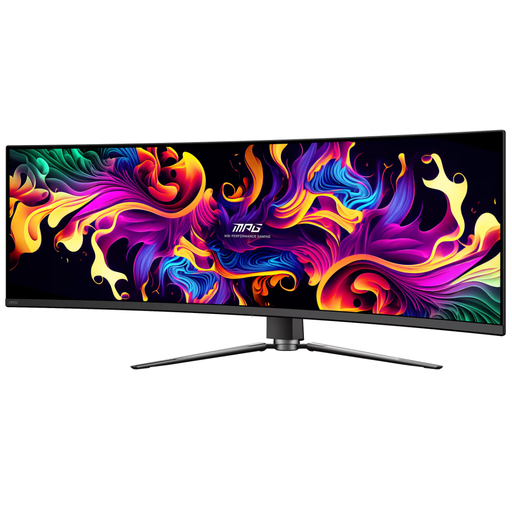
MSI MPG 491CQP QD-OLED 49-inch
A 49-inch 32:9 option for anyone who wants to play oval racing on a single super-ultrawide screen.
The product information lists 5120 × 1440 and 144 Hz. The description warns against displaying static images for long periods because of the risk of OLED burn-in.
Joybuy
 No image available
AOC AGON PRO AG346UCD 34-inch
A 34-inch 21:9 monitor for anyone looking for extra horizontal space from a single screen.
The product name lists 3440 × 1440, 175 Hz via DisplayPort and 100 Hz via HDMI. A 21:9 screen doesn’t have separate angled side panels.
Joybuy
 No image available
Philips Evnia 34-inch UWQHD 180Hz Adaptive Sync
A 34-inch ultrawide for anyone who wants to set up one screen and gain extra horizontal space.
The description lists 3440 × 1440, 21:9 and a VA panel. According to the product information, the stand is height-adjustable, swivels and tilts.
A 21:9 screen doesn’t have separate angled side panels.
Joybuy
Frequently asked questions
How do I set the field of view in iRacing after installing my monitors?
From your normal racing position, measure the distance from your eyes to the centre screen and the screen width. With three screens, also measure the bezel width and the angle between the screens. Use these measurements in your monitor settings and the iRacing field-of-view calculator, as described by iRacing Support.
Do three iRacing monitors have to be exactly the same model?
No. According to the iRacing instructions for AMD Eyefinity, using the same brand and model is recommended but not essential; all three screens must have the same resolution. Check which configuration method you’re using.
Who should I contact if a monitor stops working too soon during normal use?
Contact the seller. ACM ConsuWijzer explains that your statutory guarantee exists alongside any manufacturer’s warranty, and that you can go to the seller if a product is faulty. There isn’t one fixed statutory guarantee period that automatically applies to every monitor.
Should I check the energy label when buying in the Netherlands?
Yes, check the energy label information for the specific model. The European Commission classifies computer monitors as electronic displays that require energy labelling. Don’t assign an energy rating to a model without checking its relevant label.
Is a wider screen enough to spot cars alongside me?
No, don’t rely on what you can see on screen as your only aid. iRacing describes the spotter as a source of alerts about cars and clear space when passing. Use this feature alongside a suitable screen layout and field-of-view setting.


