First, measure the available width, viewing distance and mounting space, then choose a setup your PC can handle. A single 34-inch ultrawide gives you more horizontal screen space than a conventional 16:9 display. Three screens can extend your view to the sides, but require more space, ports and adjustment. A 27-inch monitor is an alternative if an ultrawide won’t fit in your cockpit.
Which setup is right for you?
Racer with limited cockpit space
From your usual driving position, measure the space available for the screen, stand or arm, and cables. iRacing recommends measuring the distance from your eyes to the centre screen; Xiaomi lists the G34WQi’s external dimensions, including its stand. So start by checking the fit, not by choosing the largest screen size.
Oval racer who values a side view
If you want to see nearby cars while practising, weigh up a wider view or three screens against the space and adjustment they require. iRacing describes settings for a triple-screen setup; it also says a spotter can provide an additional warning about whether you’re clear when making a pass.
Racer with a less powerful PC
Don’t choose a monitor based solely on its maximum Hz rating. Check that your graphics card, ports and chosen settings can handle the resolution and refresh rate. iRacing explains that meeting the minimum system requirements only delivers minimum performance.
What should you consider when choosing?
For oval racing in a compact cockpit, the key considerations are fit, side visibility and what your PC can handle. Compare the setups from the same driving position, and check the dimensions of the specific model.
One 27-inch monitor
Choose this if: an ultrawide is too wide for your cockpit. The Philips 27M2N3500NL/01 is one example of a 27-inch QHD screen; Philips specifies a maximum refresh rate of 180 Hz.
Bear in mind: the narrower screen limits how much of your surroundings you can see at a suitable field of view.
One 34-inch ultrawide
Choose this if: a wide screen fits your mounting and cockpit space. The Xiaomi G34WQi is one example, with 3440 × 1440 pixels; Xiaomi lists its width, including the stand, as 811,3 mm.
Bear in mind: an ultrawide is not the same as three separately positioned and configured screens.
Three monitors
Choose this if: seeing cars alongside you is important and your cockpit, graphics card ports and available adjustment space can accommodate three screens. iRacing offers settings for things like screen angles and distances.
Bear in mind: you’ll need three screens and must position and align them carefully. For NVIDIA Surround, iRacing strongly recommends using the same resolution; according to iRacing, the make or model does not have to match.
| Consideration |
What should you check? |
Who is this important for? |
| Physical fit |
Measure the available width and depth from your driving position. Check the external dimensions, including the stand, and the VESA size if you’re using an arm. |
If I have limited cockpit space, I want to know whether the screen will fit with its stand, arm and cables. Around 36% of consumers say physical fit is their main concern. |
| Side visibility |
Compare screen width and viewing distance. For a triple-screen setup, also check the screen angles and the ports required. |
If seeing cars alongside me is my priority, I want to know which setup will suit my cockpit and driving position. Around 29% of consumers say side visibility is their main concern. |
| PC and ports |
Check that your PC supports the desired resolution and refresh rate through the connection you plan to use, especially with an ultrawide or triple-screen setup. |
If my PC is limited, I want to choose a screen setting that my graphics card and ports can handle. Around 21% of consumers say PC capability is their main concern. |
| Maintenance and use |
For an OLED model, check its maintenance features and any limitations on specific picture modes. Compare the energy labels of the models you’re considering. |
If static menus are often on screen, I want to know what maintenance an OLED display needs and which usage considerations matter to me. Around 14% of consumers say maintenance and use are their main concern. |
Common buying mistakes
-
Assuming a large screen will fit
The diagonal measurement doesn’t tell you whether the casing, stand and cables will fit in your cockpit. Your viewing distance also affects how you set an appropriate field of view.
Measure from your usual driving position and compare the dimensions of the exact model, including the stand depth and VESA size if you plan to use a monitor arm.
-
Assuming the maximum Hz rating equals better racing performance
A monitor’s maximum refresh rate doesn’t tell you how many frames your PC can produce in the simulator. A quoted response time and a specific motion blur reduction mode are also not automatically comparable measurements.
Check which resolution and refresh rate are supported by each connection, and what your PC can handle with your settings. LG states that the 1 ms MBR mode on the 34G600A-B reduces brightness and limits the use of certain features at the same time.
-
Treating an ultrawide as equivalent to three screens
An ultrawide and three separately positioned screens are different setups. With a triple-screen setup, factors such as screen angles, distances and connections all matter.
Compare the options based on your cockpit and the side visibility you want. iRacing strongly recommends matching resolutions for NVIDIA Surround, but doesn’t require the make and model to match.
A triple-screen setup requires three screens, space to position them and possibly different connections from a single-screen setup.
-
Confusing a manufacturer’s warranty with all your statutory rights
A warranty offered by a manufacturer or seller is not the same as your statutory rights if a product doesn’t meet the standards you could reasonably expect.
Read the warranty terms and assess any fault in light of your statutory rights with the seller. ACM ConsuWijzer explains that the law does not prescribe a fixed statutory warranty period of exactly two years.
Brands worth considering
Xiaomi
The G34WQi is one example of a curved 34-inch 21:9 screen. Its stated external dimensions may help you assess the space in your cockpit.
- Xiaomi lists a resolution of 3440 × 1440 pixels, a maximum refresh rate of 180 Hz and VESA 75 × 75 mm for the G34WQi.
- The stated width, including the stand, is 811,3 mm. The G34WQi and the separate G34WQi 2026 are different model names.
Philips
The Evnia models mentioned offer a 27-inch QHD option and a curved 34-inch WQHD option.
- Philips lists a maximum refresh rate of 180 Hz for both the 27M2N3500NL/01 and the 34M2C3500L/00.
- The screen sizes and resolutions differ; the specifications alone don’t prove an advantage for oval racing or a particular cockpit fit.
LG
The UltraGear 34G600A-B is one example of a 34-inch OLED ultrawide.
- LG lists a resolution of 3440 × 1440 pixels and a maximum refresh rate of 160 Hz for this model.
- According to LG, the 1 ms MBR mode reduces brightness and can’t be used at the same time as certain features. LG also describes maintenance for temporary image retention.
Dell
The S3422DWG is one example of a curved 34-inch WQHD gaming monitor that isn’t OLED.
- Dell lists WQHD and 144 Hz for this model.
- These specifications alone don’t demonstrate an advantage for oval racing, cockpit fit or comparison with the other models mentioned.
Joybuy products for a single ultrawide screen
These product options are 34-inch ultrawides for a single-screen setup. Before buying, check that the dimensions and connections suit your cockpit and PC, and that the specific unit carries the required CE marking.
 No image available
LG UltraWide 34U601B-B WQHD VA monitor
An option to consider if you want to fit a single 34-inch ultrawide in your cockpit.
34 inches, 21:9, 3440 × 1440, 1800R curvature and 120 Hz.
View at Joybuy
 No image available
Gawfolk 34-inch curved UWQHD gaming monitor
An option to consider if a single curved ultrawide suits your screen setup.
34 inches, 3440 × 1440, 144 Hz and 1500R curvature.
View at Joybuy
 No image available
INNOCN 34-inch curved ultrawide gaming monitor
An option to consider if you’re looking for a curved 34-inch ultrawide with the stated high refresh rate.
3440 × 1440, 200 Hz and 1500R curvature.
View at Joybuy
 No image available
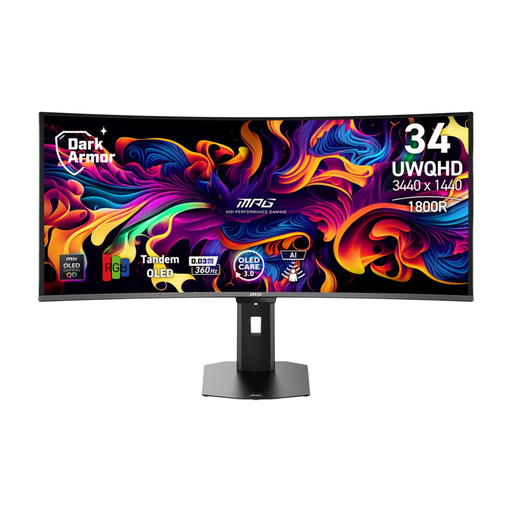
MSI MPG 341CQR QD-OLED X36 monitor
An option to consider if you’re looking at a 34-inch ultrawide with QD-OLED technology.
21:9, 3440 × 1440 and 175 Hz.
View at Joybuy
 No image available
Alienware AW3425DWM 34-inch curved gaming monitor
An option to consider if you want to use a single curved 34-inch ultrawide.
21:9, 3440 × 1440, 180 Hz and VA panel.
View at Joybuy
Frequently asked questions
How do you set the field of view after mounting the screen?
From your usual driving position, measure the distance from your eyes to the screen and the screen width. Enter these measurements in the simulator’s field-of-view settings. For an iRacing triple-screen setup, also measure the angles between the screens.
Do three monitors have to be the same model for iRacing?
No. According to iRacing, the make and model don’t have to match. However, iRacing strongly recommends using three screens with the same resolution for NVIDIA Surround. Also check that your graphics card has enough suitable outputs.
What can you do about temporary image retention on an LG OLED monitor?
LG describes Image Cleaning as a feature for temporary image retention and says it can run automatically under the usage conditions described. Check the manual for the exact model, as the menus may differ between models.
What CE marking should a monitor sold in the Netherlands have?
The Dutch government states that electrical appliances placed on the EU market must have the required CE marking. Check the specific unit; a brand or product name alone doesn’t confirm that a particular unit meets the requirements.


