Start by checking the light at your planned start time and the distance to the screen. Then choose between mains power and a battery, based on the power available and how long the screening will last. A projector with a higher stated light output may help in ambient light, but it won’t automatically make the picture visible in direct sunlight. Also check that your film source and audio will work with the setup you have in mind.
Who is this suitable for?
Organisers planning an early-evening screening
If you want to show a film while there’s still some daylight, consider the start time, screen position and power setup together. RTINGS explains that a brighter image may remain visible for longer in certain conditions, but viewing conditions matter.
Organisers without a socket near the screen
If you want to position the projector away from a power socket, a battery-powered projector may be a good choice. Compare its stated battery life with the length of the film and the event. XGIMI and Nebula list battery life for their models under specific conditions.
Organisers with limited setup space
If you have only a short distance to work with, measure the available space first and check the projection distance for the exact model. Manufacturer specifications vary by model; the maximum image size alone won’t tell you whether it’s achievable at your garden venue.
What should you look for when choosing?
| What to consider |
What to check before buying |
Who is this important for? |
| Visibility at the start time |
Note the ambient light and the image size you want; compare lumen ratings only when they use the same unit and measurement basis. |
If the film starts while it’s still light, I want the picture to remain visible to the group. Around 28% of consumers say visibility is their top priority. |
| Projection distance and screen position |
Measure the distance from the lens to the screen and check the projection ratio or distance table for the exact model. |
With limited space, I want to know in advance whether the desired image width will fit. Around 22% of consumers focus mainly on distance and positioning. |
| Power and battery life |
Compare the full screening time with the battery life at your intended settings; if using mains power, plan a safe cable route. |
If there’s no socket near the screen, I want to know whether the battery will last for the whole screening. Around 22% of consumers say power is their main concern. |
| Clear audio |
Test the speech from the furthest seat and check how the exact model can connect to an external speaker, if needed. |
For a group, I want everyone to be able to follow the dialogue, even at the back of the garden, and to know in advance whether I’ll need extra audio equipment. Around 17% of consumers prioritise clear speech. |
| Film source and connections |
Test your own file and playback device; check the model’s video input and audio output requirements. |
If I want to play my own film, I want to make sure the picture and sound will work with my chosen source. Around 11% of consumers focus mainly on playback compatibility. |
Common buying mistakes
-
Comparing different lumen ratings directly
ANSI lumens, ISO lumens and other stated measurements don’t automatically use the same basis. Comparing the numbers alone can therefore be misleading.
Check the unit and definition for the exact model, and consider these alongside the ambient light and screen size.
-
Assuming the maximum battery life equals the playback time
Manufacturers state maximum battery life for specific settings. Actual battery life may depend on factors including brightness and volume.
Test or check the battery life using the settings you plan to use for the full film and event.
For the XGIMI MoGo 4, XGIMI lists a separately sold PowerBase stand for a longer stated playback time.
-
Assuming ‘outdoor’ means protection in all weather
An IPX3 test for a specific model doesn’t guarantee that it can be used in continuous rain, and the rating doesn’t automatically apply to other models from the same brand.
Check the manual and protection rating for the exact model. Choose a sheltered spot and plan how you’ll bring the equipment indoors if the weather changes.
-
Planning for the projector alone
Your film source, audio, screen and connections also need to be suitable for the screening. If the content is copyrighted, you may need permission to show it outside a strictly domestic setting.
Test the file, screen and audio together before the event, and check the rights for the film and any music you use.
Relevant projector brands to consider
Epson
A mains-powered option worth considering if a bright picture for a group and HDMI connections are important. Epson lists a colour light output of 3.600 lumens and two HDMI ports for the EB-FH08.
- The manufacturer’s specifications make the stated light output and connections easy to check for this model.
- The EB-FH08 isn’t battery-powered; its stated light output alone doesn’t tell you how visible the image will be in a particular garden setting.
XGIMI
The MoGo 4 is a compact, battery-powered projector option for a screening that starts later in the evening. According to XGIMI, this model has a built-in battery, 1080p and 450 ISO lumens.
- XGIMI states that the built-in battery provides up to 2.5 hours of video playback.
- The stated playback time is a maximum; ISO lumens can’t be compared directly with ANSI lumens unless they use the same measurement basis.
Nebula
For those who move their projector around frequently, Nebula describes the Mars 3 as having a handle, a built-in battery and an IPX3 test rating.
- Nebula states that it provides up to five hours of playback in eco mode at 300 ANSI lumens and 25% volume, under the stated playback conditions.
- Battery life depends on the settings and conditions; IPX3 doesn’t mean the projector is suitable for use in continuous rain.
BenQ
The GP520 is a mains-powered option worth considering if its stated light output and automatic picture adjustment are relevant to you. BenQ lists 2.600 ANSI lumens and ambient light sensors.
- The manufacturer describes automatic brightness adjustment using the ambient light sensors.
- These manufacturer-stated features aren’t an independent assessment of picture quality in a garden; also check the power supply and projection distance for your setup.
Joybuy product picks
Joybuy product picks for a temporary garden film setup; check that the power supply, image size and audio suit your location for each model.
 No image available
V1 Outdoor Mini Projector, 720P
Battery power may suit a setup without a socket near the screen; check that the stated wireless viewing time is long enough for the full screening.
The product title lists 720P, a 10400mAh battery, 4K support, dual-band Wi-Fi and Bluetooth 5.0.
View at Joybuy
 No image available
XGIMI Vibe One, Match Night EU Edition
The built-in battery and included projection screen with stand may suit a portable setup; check that the battery life and image size will be suitable for your event.
The product title lists Full HD 1080p, 250 ISO lumens, JBL audio, Google TV and an included screen with stand. The edition also lists an EA SPORTS FC 26 Game Code. ISO lumens can’t be compared directly with ANSI lumens unless they use the same measurement basis.
View at Joybuy
 No image available
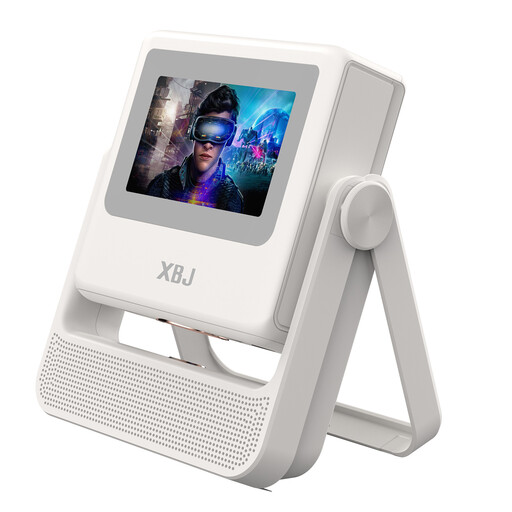
XBJ A5Pro Outdoor Smart Projector, white
The product title mentions automatic focus and keystone correction for a temporary setup; check the required distance from the screen and the power supply available at your location.
The title lists native 1080P, 4K decoding, Wi-Fi 6 and Android OS. The product description warns you to protect the projector from water and not to expose it to rain or moisture.
View at Joybuy
 No image available
HP CC360 FHD Smart Projector, Football World Cup edition
The product title mentions wireless projection and autofocus; check in advance that your chosen film source is compatible and that the projector can be positioned suitably in relation to the screen.
The title lists FHD, Wi-Fi, Bluetooth, automatic focus and 4K support. The product description recommends keeping the projector away from water.
View at Joybuy
 No image available
XGIMI MoGo 4, Match Night EU Edition
The built-in battery may suit a screening without a socket near the screen; compare the stated battery life with the length of the full film and event.
The product title lists Full HD 1080p, 450 ISO lumens, Harman Kardon audio, Google TV and a battery with a stated life of 2.5 hours. The edition also lists an EA SPORTS FC 26 Game Code. ISO lumens can’t be compared directly with ANSI lumens unless they use the same measurement basis.
View at Joybuy
Frequently asked questions
How can you tell if a projector will produce a large enough image in the space available?
First, measure the distance from the lens to the screen, then check the projection ratio or distance table for the exact model. A stated maximum screen size doesn’t prove that the image will be achievable or bright enough in your space.
How can you lay power cables safely for an outdoor screening?
Use undamaged cables and keep them out of walkways; fully unwind any cable reel you use. The Fire Service recommends this to reduce the risk of trips and other hazards. Protect the projector according to the manual and bring it indoors if it isn’t suitable for use in the rain.
Can you simply show a film at a neighbourhood event?
Not necessarily if the film, music or images are protected by copyright. According to the Dutch government, you can’t use copyrighted work without the creator’s permission; the exception for a strictly domestic setting doesn’t automatically apply to a neighbourhood or club event. Also check the rights for music or other material in your own recordings.
Do you need an event permit for a neighbourhood garden gathering?
That depends on the local authority, the location and the type of event. An event in a public place may require a permit or notification, so check your local rules rather than assuming that every neighbourhood garden is subject to the same requirements.
What should you consider if identifiable local residents appear in the film?
If an organisation films identifiable people and uses or publishes the footage, the Dutch Data Protection Authority says it needs a lawful basis under the GDPR. For the specific film, establish who made the footage, why it’s being shown and who will see it; don’t automatically assume that a neighbourhood event counts as personal use.


