
Vandaag of morgen in huis

Kwaliteit gegarandeerd

Welkomstaanbiedingen ontgrendelen: GRATIS bezorging | Tot 80% korting | Gratis 30 dagen JoyPlus-proefperiode
Download de app
Finding a gift for the whole family sounds easy, until you have to choose between dozens of electronic gadgets, creative kits and accessories. A product may look appealing, but disappoint in practice because of complicated installation, expensive consumables or unclear safety information.
If you’re looking for original gifts for the whole family, it’s therefore worth looking beyond the price or product photo. Above all, check what the gift is designed for, which components are included and how much effort it takes to use every day.
Terms such as ‘smart’, ‘AI’, ‘4K’ or ‘unlimited storage’ do not automatically mean that a product is right for the recipient. With a smart bird feeder, for example, cloud storage may become paid after a trial period. A digital photo frame may require an app before photos can be shared.
So always check the practical specifications:
An instant camera for children may seem like a complete birthday gift, but the thermal paper will need replacing afterwards. Printers for creative hobby gifts often also use special paper or stickers. With a baby monitor featuring a camera, power consumption, installation and app settings may be more important than an additional camera function.
Work out how much the gift will cost after a few months. A slightly more expensive product with local storage or a standard connection may be more practical to use.
Electronics with small accessories are not automatically suitable for young children. The Songdian cameras, for example, state that small parts and accessories must be kept out of reach of children under three. The FACEGLE E88 mini drone specifies a recommended age of 12+ and recommends adult supervision.
Always check:
With a digital photo frame, screen size is only one factor. Also look at the resolution, brightness, viewing angle and storage capacity. According to the product information, the ARZOPA D10 has a 10.1-inch screen, a resolution of 1280 × 800, 32 GB of storage and support for iOS and Android. The ARZOPA D14 offers a larger 14-inch screen with 1920 × 1200 pixels and the same 32 GB of storage.
A Wi-Fi photo frame is useful for parents or grandparents who want to receive new photos remotely. However, check whether the app is compatible with the recipient’s phone and whether cloud storage comes with any conditions.
For students, home workers and creative users, connections are often decisive. A document camera, for example, usually works via USB and requires software. According to the product description, the CZUR Fancy S Pro supports Windows and Mac, can capture documents up to A3 size and offers 1080p at 60 fps or 4K at 15 fps.
When choosing a document camera or scanner, check:
For gifts for children, ease of use is important. An instant camera with dual cameras, LED fill light and instant printing can be great for creative moments, but paper and recharging are part of the experience. With a mini drone, flight time per battery is often limited. The FACEGLE E88 is listed in the product information as offering approximately 6 to 8 minutes per use.
With a smart bird feeder, battery capacity, installation and storage are all relevant. According to the product information, the JOOAN model has a 5200 mAh battery, a solar panel, a capacity of 2 litres and support for an 8 to 256 GB SD card. The listed cloud storage comes with a 14-day free trial; payment may be required afterwards.
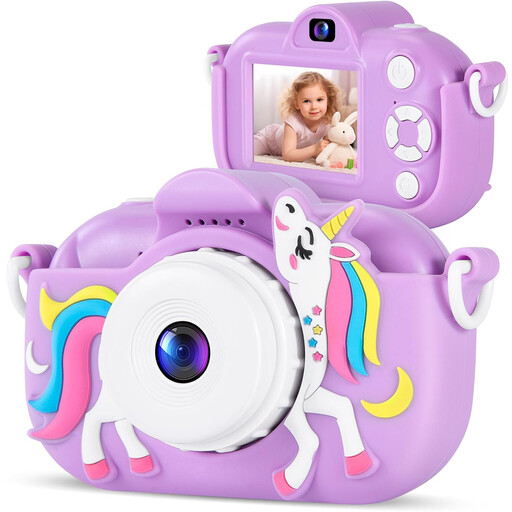
Why it suits this profile: An accessible gift for children who want to photograph their surroundings. The simple buttons and compact design are suitable for short creative activities under supervision.
The product information mentions a 1080p camera, simple controls and a protective silicone cover. Small accessories and charging still require adult supervision.
1080p video, rounded design, soft cover, music and playback functions, plus a design that is described as easy to learn.
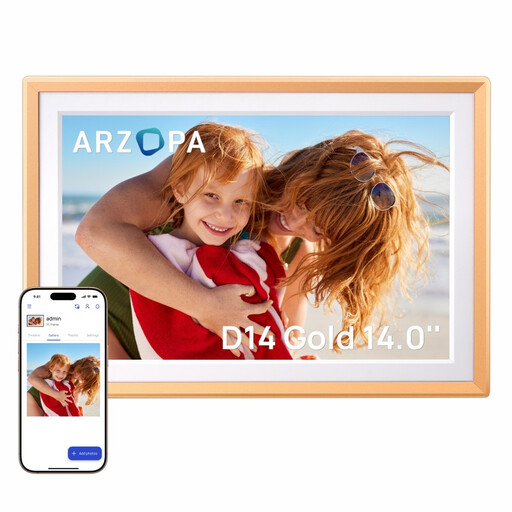
Why it suits this profile: A thoughtful gift for parents or grandparents who want to display family photos and videos around the home.
The specifications list 32 GB of storage, Wi-Fi sharing via an app and support for JPG, PNG, WEBP, MP4 and 3GP. Check the app and Wi-Fi environment beforehand.
14-inch touchscreen, 1920 × 1200 resolution, automatic rotation, built-in speakers and support for iOS and Android.
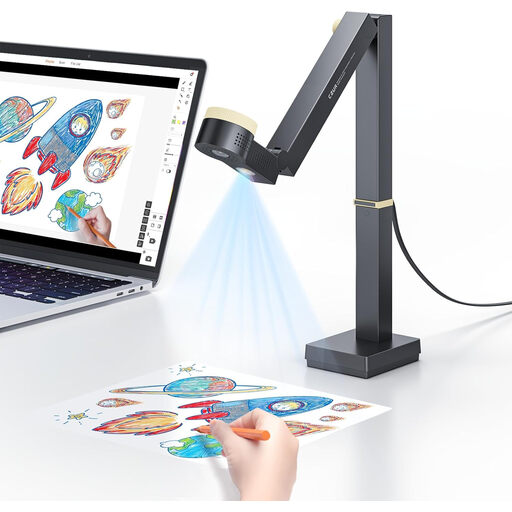
Why it suits this profile: Designed for teachers, students, home workers and creative users who want to display documents, presentations or objects digitally.
The product description calls it a document camera, webcam and scanner in one. According to the information, a separate scanning mat is required for scanning.
12 MP autofocus, support for A3 documents, 1080p at 60 fps, 4K at 15 fps and a flexible arm.
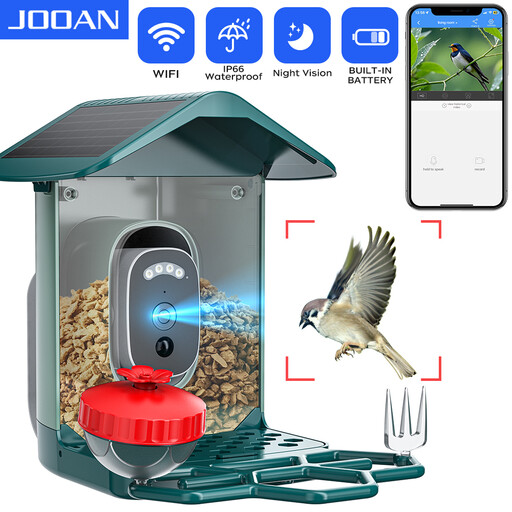
Why it suits this profile: An original choice for families and nature lovers with a garden, balcony or suitable mounting spot.
The product information lists both SD card storage and cloud storage. An SD card must be purchased separately and the cloud trial lasts 14 days.
2K video recording according to the product title, solar panel, 5200mAh battery, 2-litre capacity and mounting on a tree or wall.
Not every gift needs to be electronic. For creative users, creative hobby gifts such as metal cutting dies for scrapbooking are suitable for cards, photo albums and paper decorations. However, check whether the recipient already has a compatible die-cutting or embossing machine; the cutting die alone is not sufficient for every technique.
For a birthday or Christmas, these options are also practical:
With a baby monitor, always consider positioning, cable management and privacy. The manufacturer of the Momcozy Smart WiFi Baby Monitor states that the device is not a substitute for adult supervision. Wi-Fi features also require a properly secured home network.
We’ve put together a complete, up-to-date list of products that fully meet these strict selection criteria and the applicable European safety regulations.
They are gifts that several family members can use or enjoy together. Ideas include a Wi-Fi photo frame, games console, instant camera, smart bird feeder or document camera. Above all, choose based on the family’s ages, available space and interests.
That depends on how photos are stored and shared. Check whether cloud storage remains free, whether a subscription applies and whether an SD card can be used. Also consider power consumption and whether the photo frame needs to remain connected continuously.
That varies by model and age. Check the recommended age, small parts, paper rolls and charging method. Use a camera for young children under supervision and keep accessories out of reach of children under three.
