Which setup is right for you?

Teacher filming their hands as they fold

You mainly want to show the paper and each fold from a fixed position. The capture area needs to be large enough for the sheet used in your lesson. IPEVO lists a maximum capture area of 440 × 330 mm for the V4K PRO 120.

Teacher who teaches online

You already work with a computer and want to capture or share a view of your table without constantly switching cameras. Logitech describes a Show Mode on the MX Brio for showing desk work.

Creator making a range of lesson videos

You want to combine views of the table with on-camera explanations, so you’ll need to consider your choice of lens, framing and clear audio. Canon and Sony offer interchangeable-lens cameras, while OBS Studio explains how to set up video and audio sources for recordings.

What should you look for when choosing?

Document camera above the paper

Good for: lessons focused mainly on folding at one table and recording via a computer. IPEVO specifies autofocus from 10 cm and a maximum capture area of 440 × 330 mm for the V4K PRO 120.

Bear in mind: the connection, cable, software and microphone need to suit your computer and recording space. These specifications apply to the model listed.

Webcam connected to your computer

Good for: anyone who already teaches or records via a computer and wants to switch between showing themselves and their work on the desk. Logitech describes a downward-facing Show Mode for the MX Brio.

Bear in mind: tilting a webcam down doesn’t guarantee a full, directly overhead view of a sheet of paper. Check the mounting, distance from the table and any shadows cast by your hands.

Interchangeable-lens camera with a suitable lens

Good for: anyone who wants to capture more than just views of the table. Canon lists RF and RF-S lens compatibility for the EOS R50; Sony lists an E-mount for the ZV-E10 II, as well as a version with a 16–50 mm lens.

Bear in mind: check whether your chosen kit includes a lens and whether it can frame the table from the available distance. You’ll also need to check the mounting and audio separately.

What to consider What to check before buying Who is this important for?
Keeping the whole sheet and your hands in shot Measure your largest sheet and the available camera height. IPEVO lists a maximum capture area of 440 × 330 mm and focusing from 10 cm for the V4K PRO 120; check the framing with a test recording. I want the whole sheet and my hands to stay visible while I fold. Around 40% of consumers give the view of the table top priority.
Recording or teaching via a computer Check the connection, cable length and whether your recording or teaching software recognises the camera. OBS Studio explains how to set up a video capture device; test your chosen setup beforehand. I want to use the camera easily with my existing computer-based lessons or recordings. For around 30% of consumers, their computer workflow comes first.
Clear instructions and a visible sheet of paper Test how your voice sounds from the intended distance and check whether the camera or your hands cast shadows on the paper. The manufacturers list built-in microphones for the IPEVO V4K PRO 120 and Logitech MX Brio; a test recording will show how they perform in your room. I want my instructions to be easy to follow without the paper disappearing from view. Around 20% of consumers prioritise clear instructions and a good view of the work surface.
Capturing other types of lesson footage too Check whether a lens is included, whether it fits the camera mount and whether its angle of view suits the distance to your table. Canon lists RF/RF-S compatibility for the EOS R50; Sony lists an E-mount for the ZV-E10 II. I want to use other camera angles as well as views of the table. Around 10% of consumers put this versatility at the top of their list.

Common buying mistakes

  • Choosing based on 4K alone

    A high resolution doesn’t tell you whether the whole sheet will fit in the frame. The capture area and focusing range are separate features, and the stated figures can also vary between versions.

    Measure your paper and the available camera height. Check the specifications for the exact version and make a test recording with both hands in shot.

  • Assuming a tilted webcam gives you a full overhead view

    Logitech describes Show Mode as a way to share desk work, not as a guarantee that your whole table or origami sheet will be visible from directly above.

    Before choosing a webcam, test its angle of view with your largest sheet and your hands in the positions you plan to use.

  • Assuming a camera body is a complete filming setup

    Canon and Sony list interchangeable lenses. The Sony ZV-E10 II is also available with a 16–50 mm lens; check which version you’re looking at.

    Check the full model and kit name, and make sure the lens suits the distance to your table.

  • Recording a full lesson without testing the audio

    The video source and microphone you choose may need to be set up separately in your recording software.

    Make a short test recording and check the picture, your voice, the framing and any shadows before recording your lesson.

Brands to consider

IPEVO

Document cameras for demonstrations on a work surface. The V4K PRO 120 is one model to consider for an origami lesson at a table.

  • IPEVO specifies a maximum capture area of 440 × 330 mm, autofocus from 10 cm and a USB connection for the V4K PRO 120.
  • Check the exact model, computer connection and sound quality with your own setup; listed specifications aren’t a real-world test.

Logitech

Webcams for lessons based around a computer. According to Logitech, the MX Brio has a Show Mode for showing desk work.

  • Logitech lists Show Mode and 4K at 30 fps for the MX Brio.
  • This feature doesn’t tell you whether a whole sheet will be visible from directly above. The mounting and distance from the table still matter.

Canon

Interchangeable-lens cameras for anyone who wants to capture more than views of the table. The EOS R50 is one example with an interchangeable lens.

  • Canon lists RF and RF-S lens compatibility and 4K recording for the EOS R50.
  • The body alone doesn’t determine the angle of view; check the lens and how the camera will be mounted above the table.

Sony

Interchangeable-lens cameras for anyone who wants to capture lessons from different angles. The ZV-E10 II is one model to compare.

  • Sony lists an E-mount for the ZV-E10 II and a kit version with a 16–50 mm power zoom lens.
  • Check which version is on offer and whether the lens suits the available distance and the framing you want.

Cameras and webcams at Joybuy

This selection includes cameras and webcams for recording origami instructions. Check each model to make sure its mounting, angle of view and connection suit your table and computer.

Osmo Pocket 4P Standard Combo in black

Osmo Pocket 4P Standard Combo, black

An option if you’re looking for a camera for lesson videos. Make a test recording to check that the table and your hands are clearly visible from your chosen position.

Version: Standard Combo.

Joybuy
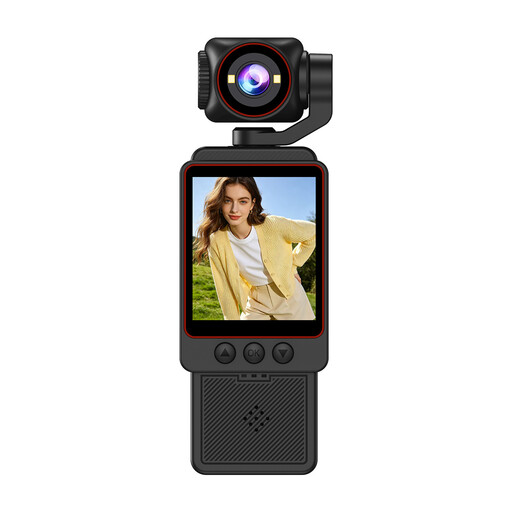
Small Video Camera with 1080P HD video and SD card

Small Video Camera, 1080P HD, with SD card

An option if you’re looking for a dedicated video camera. Check that the whole sheet and your hands stay in shot at your chosen recording distance.

The product name lists 1080P HD video and an SD card included.

Joybuy

KINSI Mini Vlog Camera 4K with rotating lens and mini tripod

KINSI Mini Vlog Camera 4K, rotating lens and mini tripod

An option if you want to adjust the camera angle. Check that the moving lens and mini tripod suit the position you need above the table.

The product name lists 4K video, 64 MP, a 330° rotating lens, a 1.72-inch touchscreen, a mini tripod and Type-C.

Joybuy

Philips 4000 Series 4K UHD Webcam, EU Version, model SPL6408BT/00

Philips 4000 Series 4K UHD Webcam, EU Version, SPL6408BT/00

An option for recording via a computer. Check that the webcam shows the whole sheet from your planned position and can be mounted securely on your computer.

The product name lists 8 MP, autofocus, two built-in microphones and a privacy slider.

Joybuy

Philips 2K QHD PC Webcam, EU Version, model SPL6308S/00

Philips 2K QHD PC Webcam, EU Version, SPL6308S/00

An option for a computer setup. Check that the clip fits your screen or laptop and that the angle of view covers your work surface.

The product name lists QHD resolution, a noise-cancelling microphone and mounting on a monitor or laptop.

Joybuy

Frequently asked questions

How can you check whether a document camera will capture your whole origami sheet?

Compare your paper size with the stated capture area for the exact model. IPEVO lists a maximum of 440 × 330 mm and focusing from 10 cm for the V4K PRO 120. Make a test recording at the planned height with your hands in shot.

Can you use a USB camera and microphone in the same recording?

Yes, as long as your recording software can use your chosen video camera and microphone and you set up both sources correctly. OBS Studio explains how to set up a webcam or video capture device, as well as separate audio settings. Make a short test recording first.

Can you publish an origami lesson if pupils are recognisable in the footage?

That depends on how you use the recording and who appears in it. The Dutch Data Protection Authority treats identifiable people as personal data. To publish outside a limited private context or for business use, you need a legal basis under the GDPR.

Can you use other people’s music or photos in your lesson video?

As a general rule, only use copyright-protected music and photos with the creator’s permission. The Dutch government also states that a private copy for personal use must not be distributed or made public.

What can you do if a camera you bought online doesn’t work properly?

According to ACM ConsuWijzer, online purchases generally come with a statutory 14-day cooling-off period after delivery, although exceptions apply. This is separate from your statutory guarantee: if a product doesn’t do what you could reasonably expect under normal use, the seller is responsible for providing an appropriate solution.
