
Teacher demonstrating folds from above
You want the paper and your hands to stay visible at the same time, so focus on autofocus, framing and how the camera is mounted.


A webcam is a good fit for an origami lesson you’re recording on a computer. Choose a standalone camera if you want to film without a computer, or need more flexibility over the lens and positioning. Test it from your planned recording distance to check that the whole sheet and your fingers stay in focus, and also check the sound and how much of your shared room is captured.
You want the paper and your hands to stay visible at the same time, so focus on autofocus, framing and how the camera is mounted.
You want to film your work area without unnecessarily capturing your room-mate or personal belongings.
You want to record your lesson independently and put the camera away afterwards. Weigh up a compact camera against a mirrorless camera with a choice of lenses.
A good fit if: you teach from a fixed workspace using a computer. Insta360 describes DeskView on the Link 2 as a temporary desk view.
Trade-off: DeskView isn’t the same as Overhead Mode. According to Insta360, the latter requires a special mount and is only available on the original Link.
A good fit if: you want to film independently and deliberately choose a lens and support to suit your paper size and recording distance.
Trade-off: You’ll need a more involved setup, including a lens, support, storage and audio equipment. Sony lists a 16–50 mm power zoom lens in the ZV-E10 II lens kit; the right framing also depends on the lens and camera position.
A good fit if: getting set up and putting the camera away quickly matters more than choosing a lens. Canon lists a built-in stand for the PowerShot V10, while DJI specifies a minimum focusing distance of 0.2 m for the Osmo Pocket 3.
Trade-off: Check that the stand and camera angle show the whole sheet of paper. Stabilisation doesn’t replace suitable, secure positioning.
| What to consider | What should you check? | Who is this important for? |
|---|---|---|
| Keep the paper and fold lines in focus | Test the focus, framing and camera height with the size of paper you use. | I want to see the fold lines and all my fingers clearly, without any of the action going out of shot. Around 36% of consumers say paper detail is their top buying priority. |
| Framing and privacy | Check the preview to see how much of your shared room will be captured. | When I film in a shared bedroom, I want to show only my work area, not my room-mate or personal belongings. For around 29% of consumers, framing and privacy are their top buying priorities. |
| Clear spoken instructions | Make a test recording from your usual speaking distance, with the usual background noise. | I want to be able to hear the spoken folding instructions clearly, even with the room at its usual noise level. Clear audio is the top priority for around 21% of consumers. |
| Recording independently | Decide whether you’ll have a computer available during the lesson. With a standalone camera, also check which memory card and mount you’ll need. | I want to be able to record a lesson without a computer and put the equipment away afterwards. Recording independently is the top priority for around 14% of consumers. |
Insta360 distinguishes between DeskView’s temporary desk view and Overhead Mode. According to the manufacturer, the latter requires a special mount and is only available on the original Link.
Check the framing and focus with the paper and desk you’ll actually use.
A different mounting option or adapted workspace may be needed to get another camera angle.
A resolution specification doesn’t tell you whether the camera can focus from your chosen distance or capture the whole sheet with your hands in shot.
First check the working distance, framing and stability of the camera position. Then compare resolutions.
Depending on the camera you choose, you may need an extra support or a different lens to achieve the distance and framing you want.
How clearly you can be heard also depends on how far you are from the camera and the background noise in your shared room.
Record yourself explaining a folding step under normal conditions and listen back before deciding whether you need extra audio equipment.
An external microphone means extra equipment, so check that it’s compatible with your chosen camera.
Worth considering for computer-based lessons if you want to use a temporary desk view.
Represents the fixed USB webcam option, with a tripod mount.
Represents the standalone mirrorless camera option, with a choice of lenses.
A compact standalone option for anyone who wants to set up and pack away quickly.
A compact standalone camera for anyone who also films away from a fixed teaching space.
These Joybuy products include webcams for recording on a computer and standalone cameras for filming without a webcam setup. Choose according to the camera angle, whether a computer is available and which parts of the setup you need.
 No image available
A webcam option for a lesson you’re recording on a desktop or laptop.
The product name lists 4K UHD, 8MP, autofocus, two built-in microphones, a privacy cover and a black EU version.
 No image available
A webcam option if you want to record a lesson using a computer.
The product name lists 2K QHD, a noise-cancelling microphone and a clip-on mount for use with a desktop or laptop.
 No image available
A compact standalone camera for anyone who wants to record a lesson without a webcam setup.
The product name lists a 1-inch CMOS sensor, 4K/120fps video, three-axis stabilisation and an included microphone. DJI specifies a minimum focusing distance of 0.2 m for the Osmo Pocket 3; check that the framing shows your whole work area from your chosen recording distance.
 No image available
An option for filming independently, with a zoom lens to help you adjust the framing.
The product name lists a 16–50 mm zoom lens. Check which framing and camera position work with your paper size and recording distance.
 No image available
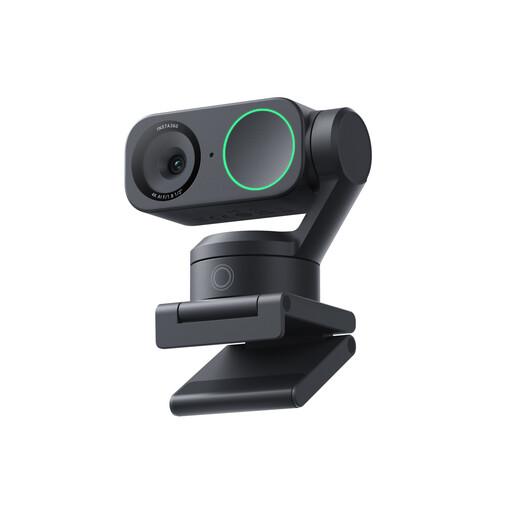
A webcam option for an origami lesson you’re recording on a computer.
Insta360 describes DeskView on the Link 2 as a temporary desk view. According to Insta360, Overhead Mode requires a special mount and is only available on the original Link, so test the camera angle and framing with your work area.
It depends on the model and how it’s mounted. Insta360 describes DeskView on the Link 2 as a temporary desk view; according to the same guide, Overhead Mode needs a separate mount and is only available on the original Link. Check the view with your own paper and desk.
Make a short test recording with the whole sheet and both hands in shot, then listen back to your spoken instructions. If you’re using a standalone camera, also check which card and mount you’ll need. Canon lists microSD for the PowerShot V10, and DJI lists microSD for the Osmo Pocket 3.
Keep the lens and camera body clean, and store the camera and accessories so your workspace stays clear. The Consumentenbond recommends keeping the camera clean and looking after its battery as part of camera maintenance. Follow the instructions for your chosen model when cleaning it.
Online purchases generally come with a statutory cooling-off period of up to 14 days after delivery, although there are exceptions. Separately, a product must meet the standard you could reasonably expect with normal use. According to ACM ConsuWijzer, the seller is responsible for offering a suitable solution if the product is faulty.
Not automatically. The Dutch Data Protection Authority distinguishes between images kept strictly private and those shared with a wider audience. You need a valid legal basis to publish identifiable people; according to the regulator, this is usually consent. If possible, keep your housemate out of shot and discuss publication with them beforehand.