Joybuy products
This selection of Joybuy products includes speakers for direct source connections, network control and passive stereo setups.
 No image available
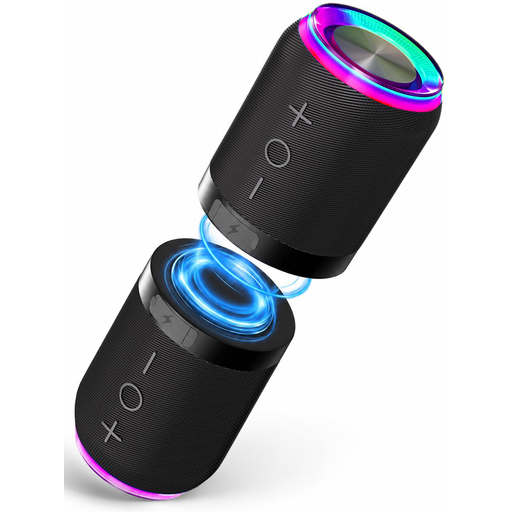
Bluetooth speaker set with magnetic coupling, set of 2 (IPX6)
A set of two speakers you can position separately if you want a left-right stereo setup.
The product name lists Bluetooth, AUX and a TF card as playback options. According to the product description, the two parts can be separated.
View at Joybuy
 No image available
Edifier ES300 Wi-Fi and Bluetooth speaker
An option to consider if you want to play music from a network source or via Bluetooth and app control is important to you.
The product name lists Wi-Fi, Bluetooth, AirPlay 2, USB and AUX. It also mentions 60 W and 12 hours of battery life; check which connections work with your source.
View at Joybuy
 No image available
Edifier G1500 Hecate computer speakers
Consider this model only if its connections and compact, computer-focused setup suit the lounge.
The product name lists Bluetooth 5.3, USB and a 3.5 mm AUX input. The product description mentions two drivers for stereo and a music mode.
View at Joybuy
 No image available
HiVi-Swans DIY3.1 passive bookshelf speakers, one pair
A pair to consider for a passive stereo setup if you already have a suitable amplifier or want to choose one separately.
The product name lists a pair of 6.5-inch passive bookshelf speakers. You’ll need a suitable separate amplifier to use them.
View at Joybuy
 No image available
HiVi-Swans D3.1MKII passive bookshelf speakers, one pair
A pair to consider if you want to put together a passive stereo setup and can arrange the required amplifier.
The product name lists a pair of 6.5-inch passive bookshelf speakers. You’ll need a suitable separate amplifier to use them.
View at Joybuy
Frequently asked questions
Should you buy one speaker or two for a stereo pair?
Check what the offer includes. Sonos describes a stereo pair as two speakers of the same model, so a single Era 100 doesn’t make a pair. Other systems may be sold as a set.
Can you connect streaming speakers to the lounge’s guest network?
Check the exact model and network. KEF warns that security or sign-in requirements on guest and public networks may prevent the LSX II LT from connecting. Don’t assume the same warning applies to every other model.
How can you position speakers without overlooking other users?
Assess the available space and listen from the usual seating areas. Bowers & Wilkins explains that a speaker close to a rear wall can produce more bass, sometimes at the expense of the stereo image. In a shared space, agree on things such as when music can be played.
What warranty and cancellation rights apply to online purchases?
For a consumer purchase in the Netherlands, you’re entitled to a product that conforms to the contract. According to the Government of the Netherlands, there’s no fixed statutory warranty period, and the seller is your point of contact if there’s a fault. For distance purchases, a 14-day cooling-off period applies in many cases, with some exceptions. Check the terms for your specific purchase.
Can you play orchestral recordings in a shared lounge without permission?
It depends on who uses the lounge. According to Auteursrecht.nl, music can be played without the rights holders’ permission within a strictly domestic setting; outside this, permission is needed for protected music. The name ‘lounge’ alone doesn’t determine which situation applies. If the space is used by, for example, an organisation or association, first establish which rules and licences apply.


