What should you consider when choosing?
One microphone close to the speaker
Suitable when: there’s one main narrator who can sit close to a fixed microphone.
Bear in mind: the interviewer’s voice won’t automatically be recorded just as clearly.
Two separate microphones
Suitable when: both the interviewer and narrator need to be clearly heard.
Bear in mind: you’ll need enough inputs or a supported multi-microphone setup, as well as room for the equipment and cables.
Standalone recorder with built-in microphones
Suitable when: you want to record without a computer and can position the recorder close enough to the speaker.
Bear in mind: having a recording function doesn’t guarantee that both voices will sound clear in a small booth.
Oral History recommends using two microphones when both the interviewer and interviewee need to be clearly heard. The percentages below reflect different purchasing priorities and can help you weigh up what matters most for your recording.
| Priority |
What to look for |
Who it matters most to |
| Clear narrator audio |
Check the microphone placement and monitoring; make a test recording and listen back to it. |
If I’m mainly recording one narrator, I want to be able to place the microphone close by and check in advance whether the booth picks up any unwanted noise. Around 36% of consumers prioritise clarity. |
| Recording both voices |
Decide how many microphones you need and check that the recording chain can handle both signals at the same time. |
If both questions and answers need to be included in the interview, I want to know that each speaker will be easy to hear. Around 29% of consumers prioritise clear audio from both speakers. |
| Keeping an archive file |
Check which file format the entire recording chain can save in and how much storage is available. |
If the interview needs to be listened to or edited again later, I want to keep the original file. Around 21% of consumers put archiving first. |
| Simple recording setup |
Choose between recording via a computer and using a standalone recorder; test the input and listen back to a short clip. |
If I want to set up as little equipment as possible before the conversation, I want to be able to check the whole recording chain easily. Around 14% of consumers value a straightforward setup above all. |
Joybuy products for interview recording
These product choices are intended for recording two speakers with separate transmitters, or for a fixed USB setup for one speaker. Before buying, check that the connections will work with your recorder or computer, and make a test recording in the booth.
 No image available
DJI Mic Mini 2S (2 TX + 1 RX + charging case)
The two transmitters make this set worth considering if you want to record the interviewer and narrator separately. Check that your recording device can handle both signals at the same time. The title lists 2 TX, 1 RX and a charging case.
View at Joybuy
 No image available
RØDE Wireless Micro Camera Kit (2 microphones)
This set may suit an interview with two speakers. Check that the camera or smartphone receiver matches the recording source you’ll be using in the booth. The product title lists two microphones, a camera receiver, a smartphone receiver and a charging case.
View at Joybuy
 No image available
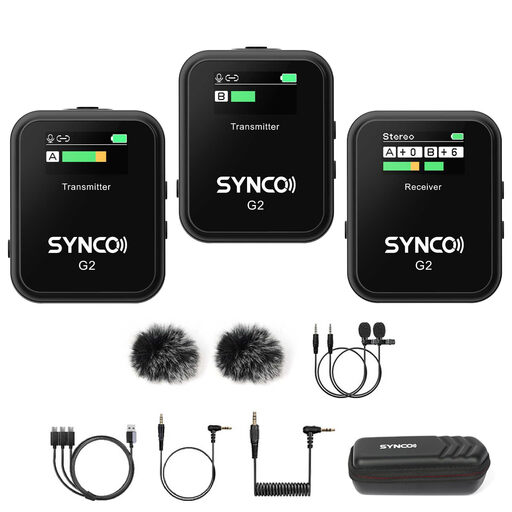
SYNCO G2(A2) 2.4G dual-channel lavalier microphone
This set is worth comparing if you want to record two speakers using lavalier microphones. Check that the receiver connects to your recording device. The product title lists 2.4G and dual-channel.
View at Joybuy
 No image available
DJI Mic 3 (2 TX + 1 RX + charging case)
The title lists two transmitters and one receiver, making this set worth comparing for a two-speaker recording. Before use, check that the receiver works with the input on your recording device.
View at Joybuy
 No image available
Razer SEIRÉN V3 MINI Quartz USB microphone
This compact USB microphone may suit a fixed computer setup with one speaker. Check that its directional pickup works with the seating position in your booth. The title lists tap-to-mute control.
View at Joybuy
Frequently asked questions
Is one microphone enough for the interviewer and narrator?
It may be enough if the narrator’s story is the main focus and the microphone is close to them. If the questions also need to be clearly understood, it’s best to plan for one microphone per speaker and check that the setup can record both signals at the same time.
How do I test my microphone setup before a long interview?
Record a short clip and listen back to it before the interview begins. Check which input is active and, where possible, identify any sources of unwanted noise. If you’re using a standalone recorder, also check that storage and power are taken care of.
Which file should I keep for an oral history archive?
Keep the original audio file and check that the entire recording chain can capture it in your chosen format. Oral History recommends WAV or BWF as an archive format for audio. Keep the source file separate from edited versions prepared for publication.
Am I entitled to exactly two years’ warranty in the Netherlands?
No. According to the Dutch Government, there is no fixed statutory warranty period in the Netherlands. You’re entitled to a product that works properly, and its expected lifespan is also taken into account. If a product is faulty, contact the retailer.
Can I record, keep and publish an identifiable interview without making any arrangements?
Don’t assume that you can. Under the GDPR, the data controller must establish an appropriate legal basis for processing personal data in advance; consent is one possible legal basis. For an oral history project, discuss the purpose, storage, access and publication arrangements in advance. The Dutch Data Protection Authority describes a limited exception for personal or household use only; whether it applies depends on the project and its intended use.


