Who is this guide for?

Interviewers recording one seated storyteller

You want to capture the storyteller’s voice clearly and up close, even if the community hall isn’t completely quiet. The Oral History Society and the University of Leicester’s East Midlands Oral History Archive both highlight the importance of placing a microphone close to the speaker.

Interviewers who want to capture both voices

You want to record both questions and answers clearly without constantly moving one microphone. The Oral History Society also describes a two-microphone set-up.

Volunteers recording interviews independently

You want to record interviews without a phone and manage the files afterwards. With a standalone recorder, where you place it and how you prepare the storage and power supply still matter, as Zoom explains in its H1essential guide.

What should you look for when choosing?

Wired lapel microphone

Suitable when: one storyteller is usually seated and you can clip the microphone close to their voice.

Trade-off: the cable limits movement; check that the connector is compatible with your recording device.

Two wireless clip-on microphones

Suitable when: the interviewer and storyteller both need their own microphone at the same time and cables would get in the way.

Trade-off: check the receiver and your recording device’s connector, and remember to charge the equipment.

Handheld microphone

Suitable when: speakers take turns and the microphone is deliberately held close to whoever is speaking.

Trade-off: you need to point the microphone correctly each time and use compatible recording equipment.

Standalone handheld recorder

Suitable when: you want to record without a phone and can place the recorder close to the people speaking.

Trade-off: built-in microphones also pick up sound from the room; check storage and power in advance.

What to consider What should you check? Who is this important for?
How clearly the storyteller can be heard Can you place the microphone close to their mouth? Make a test recording in the part of the hall where you plan to record. If I mainly want to capture one storyteller clearly despite noise in the hall, I’ll choose based on proximity and a test recording. Around 36% of consumers prioritise being able to hear the storyteller clearly.
Recording both voices Decide whether you need to hear both the interviewer and storyteller, and check how the system connects two microphones. If I want to keep both the questions and answers, I’ll look for one microphone for each speaker and the right receiver. Around 29% of consumers prioritise recording both voices.
Recording without a phone Check the recorder’s placement, storage and power supply, then listen back to a short test recording. If I want to record without a phone and manage the files afterwards, I want to be able to prepare the recorder and everything it needs in advance. Around 21% of consumers prioritise recording independently.
Connections and equipment Compare your device’s input with the microphone’s connector or the receiver it requires. If I want to use my existing recording equipment, I’ll check that the connections match first. Around 14% of consumers prioritise a compatible connection and a complete set-up.

Common purchasing mistakes

  • Choosing a recorder with 32-bit float recording and putting it in the middle of the hall

    The recording mode won’t bring the recorder closer to the speaker or remove the sound of other people in the room. Place the recorder close to the participants or use a suitable microphone nearby.

    Make a test recording where you plan to record before the interview, then listen back to it.

  • Assuming one microphone will capture both voices equally well

    A microphone clipped to the storyteller won’t also be close to the interviewer. Decide in advance whether you need the questions to be clear too, and test both voices.

    To record two voices separately, you may need a second microphone or a different recording set-up.

  • Checking only the shape of the plug

    A 3.5mm TRS connection and a TRRS connection aren’t automatically interchangeable; the Shure SM58 has an XLR connection. Compare the complete output with the input on the device you’ll be recording with.

    Depending on the equipment you choose, you may need a compatible adapter, cable or recorder.

Brands to consider

Sennheiser

The XS Lav Mobile is a wired lapel microphone for a device with a compatible 3.5mm TRRS connection.

  • Sennheiser specifies an omnidirectional capsule and a 2 m cable.
  • This version includes one microphone; recording two voices may require additional equipment. TRRS won’t automatically work with every 3.5mm microphone input.

RØDE

The Wireless Micro Camera Kit is a wireless two-transmitter set-up for a compatible camera or USB-C smartphone.

  • RØDE lists two clip-on transmitters and receivers for a camera and a USB-C smartphone.
  • Check the connection, charge and operation with a test recording. Automatic level control doesn’t guarantee a successful recording in a noisy hall.

Zoom

The H1essential is a standalone handheld recorder with built-in microphones and an input for a lapel microphone, for example.

  • Zoom specifies 32-bit float files, built-in X/Y microphones and MIC/LINE IN.
  • Prepare your storage and power supply, and remember to position the microphone carefully.

Shure

The SM58 is a dynamic cardioid handheld microphone for use with compatible XLR recording equipment.

  • Shure specifies a cardioid polar pattern and a built-in pop filter.
  • The microphone has an XLR output and doesn’t record independently. When speakers take turns, you’ll need to point it at them or pass it around.

Tascam

The DR-05XP is a standalone recorder with built-in stereo microphones.

  • Tascam specifies integrated omnidirectional condenser microphones and a 32-bit float mode.
  • A recorder placed further away from the speakers won’t automatically remove the sound of the room; placement still matters.

Joybuy products for interviews

These product choices focus on clip-on and wireless microphone set-ups for interviews with one or two people. Before buying, check that the supplied receiver and connection are compatible with your recording device.

RØDE Wireless Micro Camera Kit with two microphones

RØDE Wireless Micro Camera Kit, two transmitters, camera and USB-C receiver, charging case

The two transmitters give the interviewer and storyteller a microphone each; check which receiver is compatible with your recording device.

The kit name lists receivers for a camera and USB-C smartphone, as well as a charging case.

View at Joybuy

DJI Mic 3 with two transmitters, one receiver and a charging case

DJI Mic 3, 2 TX + 1 RX + Charging Case

The listed set includes two transmitters and one receiver; check that the receiver connects to the device you’ll be recording with.

View at Joybuy

Verbex ST5 dual-mic Type-C microphone

Verbex ST5 dual-mic Type-C

The title lists two microphones and a Type-C connection, making this a possible option for recording two people.

Check that the Type-C connection is compatible with your recording device.

View at Joybuy
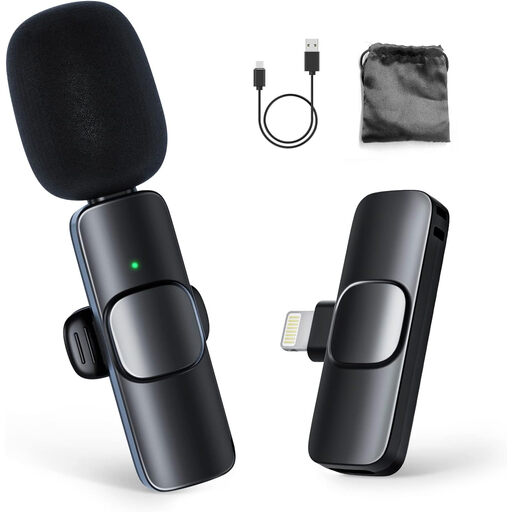
Moman CP1A wireless lapel microphone, 1TX and 1RX

Moman CP1A Wireless Lavalier Microphone, 1TX + 1RX, iPhone

The set lists one transmitter, making it suited to recording one speaker up close; a separate microphone set-up is needed to record two voices individually.

The product name mentions iPhone; check that the connection is compatible with your device.

View at Joybuy

Verbex K9-Black wireless mini microphone with Type-C connection

Verbex K9-Black Wireless Mini Microphone, Type-C

The product name lists a wireless microphone with a Type-C connection. Check that the connection is compatible with your recording device.

View at Joybuy

Frequently asked questions

Should you put a microphone on the table for a seated oral history interview?

Not necessarily. For a one-to-one interview indoors, the Oral History Society recommends using a lapel microphone. If you use a table microphone, place it close to the storyteller and test the recording in the hall.

What should you check just before a long interview?

Make a test recording and listen back to it. Check the microphone position, recording device, storage you’ll need and power supply; test both voices if you want to capture them both.

Will any lapel microphone with a 3.5mm plug work with a phone?

No. TRS and TRRS are different connections; if your device requires TRRS, a TRS microphone may need a compatible adapter. Also check that your phone has the microphone input you need.

Which parts of your recording set-up should you check?

Check that you have the right cables, any adapters, storage media and power supply for your set-up. Sennheiser and Shure describe different microphone connections; Zoom also explains how to prepare the memory card and power supply for the H1essential.

Can an organisation record and keep identifiable life stories without preparing for privacy requirements?

When an organisation makes identifiable recordings of people, those audio recordings are personal data. According to the Dutch Data Protection Authority, processing them requires a lawful basis under the GDPR, and the organisation must tell people what it does with their data and why. Consent is one possible lawful basis, but it isn’t automatically the only one or the right one in every situation. The GDPR doesn’t set a specific retention period for personal data.
