What should you look for when buying?
One lavalier microphone per speaker
Choose this option: if both people need a microphone close to their mouth or want to move around during the conversation.
Bear in mind: positioning and clothing rustle; for a wireless set, also check the number of transmitters, the receiver and the battery charge.
Dynamic speech microphone
Choose this option: if one speaker can stay close to the microphone in a fixed position, or if you want to connect separate microphones to individual inputs.
Bear in mind: USB requires a compatible computer; XLR requires a suitable recorder or audio interface. The connection won’t eliminate echo.
Portable recorder with external microphones
Choose this option: if you record in different locations without a computer and want to connect and monitor both voices separately.
Bear in mind: check the number of inputs and factor in the microphones, cables, power supply, memory card and headphones you’ll need.
| Concern |
What to look for when buying |
Consumers concerned |
| Clear speech |
Can you position the microphone close to the storyteller and listen to a test recording through headphones? |
When I record in an untreated room, I want to hear the storyteller clearly without relying on a microphone positioned far away. Around 36% of consumers prioritise clear speech. |
| Two voices |
Check the number of microphones or transmitters, inputs and recording channels for the two people speaking. |
When I want to capture both the storyteller and my questions clearly, I look for a set-up with a microphone close to each of us. Around 29% of consumers prioritise recording two clear voices. |
| Recording on location |
Check that the receiver is compatible with your camera, phone or recorder, and how you can monitor the recording as you go. |
When I visit storytellers in different locations, I want a set-up that works with the device I bring. Around 21% of consumers prioritise portable, straightforward recording. |
| Preservation and a complete set-up |
Check which recorder, cables, power supply, memory card and headphones you still need; if you’re archiving the recording, ask what file format the project requires. |
When I want to preserve conversations for later, I want to know in advance which recording equipment and components will suit the job. Around 14% of consumers prioritise preserving recordings and having a complete set-up. |
The Oral History Society recommends uncompressed WAV recording in its archiving guidance. Check the requirements of the project or receiving institution before choosing a recorder.
Joybuy products for interviews
These product picks focus on wireless clip-on microphones for interviews with two speakers.
 No image available
DJI Mic Mini 2S (2 TX + 1 RX + Charging Case)
The two transmitters suit a set-up with a microphone close to each person speaking.
The product information lists internal recording, 32-bit float and compatibility with cameras, smartphones and PCs. Check that the receiver and connection are right for your device.
View at Joybuy
 No image available
RØDE Wireless Micro Camera Kit (2 transmitters, Black)
With two transmitters, each person speaking can wear their own microphone close by.
The set lists a camera and USB-C receiver. According to the product information, the transmitters have built-in microphones, clips and magnetic attachments; check which connection works with your recording device.
View at Joybuy
 No image available
DJI Mic 3 (2 TX + 1 RX + Charging Case)
The version with two transmitters suits a conversation where both people need their own microphone.
The product title lists two transmitters, one receiver and a charging case. Check that the receiver is compatible with the device you want to record on.
View at Joybuy
 No image available
Verbex K31Pro-Black Dual Microphone
The set lists two clip-on microphones for a two-speaker set-up.
The title mentions compatibility with iOS and Type-C interfaces. Check that the connection is suitable for your recording device.
View at Joybuy
 No image available
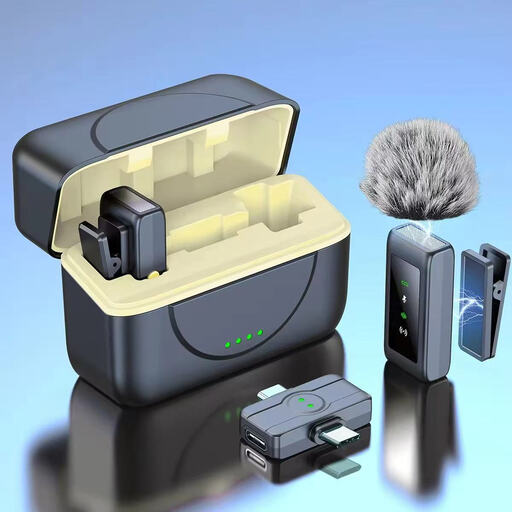
Verbex K80 Dual-Mic Universal Interface
The product information lists two clip-on microphones for recording two speakers.
The set is described as having a universal interface and magnetic charging case. Check that the connection works with your phone or other recording device.
View at Joybuy
Frequently asked questions
Is a dynamic microphone always better than a condenser microphone in this room?
No. Start by considering the distance and place your chosen microphone close to the speaker, then listen back to a short test recording. A directional pickup pattern won’t eliminate echo or distracting sounds on its own.
How can I check my recording set-up before the interview starts?
Record a short sample of both voices and listen back through headphones. Check for rustling, loose cables and sufficient power, and make sure the recording device is actually recording; keep walkways clear of cables.
What extra equipment might I need alongside a separate microphone?
It depends on the connection and the equipment you already have. Check whether you also need a second microphone, recorder or audio interface, cables, stand, headphones, memory card or power supply.
Can I record, keep and publish an identifiable oral history interview?
An identifiable audio recording may contain personal data. If the GDPR applies to how you process it, you need a valid legal basis; consent is one possible basis. According to the Dutch Data Protection Authority, consent must be freely given, specific and informed if you rely on it. Publication is a separate use that should be considered in advance. Whether the exception for strictly personal or household use applies depends on what you do with the recording.
What should I check if the recording will go to an archive later?
Ask the receiving institution in advance which file format and consent or usage arrangements it requires. The Oral History Society recommends uncompressed WAV recording in its guidance; this is not a general Dutch legal product specification.


