
Vandaag of morgen in huis

Kwaliteit gegarandeerd

Welkomstaanbiedingen ontgrendelen: GRATIS bezorging | Tot 80% korting | Gratis 30 dagen JoyPlus-proefperiode
Download de app
Want to listen to music while running, cycling or walking without completely shutting out your surroundings? Open-ear headphones could be a good choice. The speakers sit on or beside your ears, leaving your ear canals clear. Many people find this more comfortable than traditional earbuds.
However, many models look similar in online adverts. A low price, long battery life or terms such as “bone conduction” don’t tell you everything about how practical a pair will be. Before ordering wireless open-ear headphones, look out for these common pitfalls.
Open-ear models generally let more surrounding sound through than in-ear headphones. That doesn’t mean you’ll always hear traffic, cyclists or conversations clearly. Wind, busy surroundings and excessive volume can still mask environmental sounds.
So don’t rely on open-ear headphones instead of staying alert in traffic. Keep the volume low enough and follow the manufacturer’s safety instructions.
An IP rating consists of numbers and letters. The first digit relates, among other things, to protection against dust; the second indicates protection against water. IPX4, for example, is designed to protect against splashes, while a higher water-resistance rating may offer more protection. No rating automatically makes a product suitable for swimming.
Check whether the model is designed for sweat, rain, showering or submersion. For example, the Mojawa RunPlus product description lists IP68 and use while swimming, while the Soundcore C40i, with IPX4, is better suited to everyday use and light exposure to moisture.
Headphones for running shouldn’t shift when you move your head. With open-ear earbuds and clip-on headphones, the ear hook, clip or neckband determines how securely they fit. A poor fit can also make the sound harder to hear clearly or put uncomfortable pressure on your ear.
So don’t just look at the Bluetooth version or AI features. Check the wearing style, weight and controls, and whether the model is designed for sport.
Clip-on headphones usually clip around or onto the outer ear. This design leaves the ear canal clear and is compact for everyday use. The Sony LinkBuds Clip is one example; according to its specifications, this model has Bluetooth 5.3, a microphone and IPX4 splash resistance.
A model with an ear hook often offers extra stability while you move. Bone conduction headphones use transducers that, by design, make contact with the area near your cheekbones. This creates a different listening experience from a conventional speaker positioned beside the ear. Always check the exact product description: some models use “bone conduction” as part of the product name or concept without providing extensive technical details.
Splash resistance may be enough for walking or commuting. A higher IP rating is more practical for intense training in the rain. Bear in mind that the charging port, charging station and included accessories may also have limitations.
According to its specifications, the Soundcore AeroFit 2 has IP55, Bluetooth 5.4, two microphones and a charging station. The Soundcore C40i lists IPX4, along with two microphones and a charging station. This information makes it easier to choose Bluetooth headphones that suit the way you use them.
Compare the stated battery life with how you plan to use your headphones. A pair for everyday use may not need the same battery capacity as a model with built-in storage or extensive sports features. Also check how the product charges: via USB-C, a charging case or a charging station.
For calls, microphones, button controls and speaker placement all matter. Headphones with a microphone can be useful for phone calls while out walking, but wind and traffic can affect how clearly you’re heard outdoors. Brands may provide their own test results, but don’t treat them as a guarantee of performance in every situation.
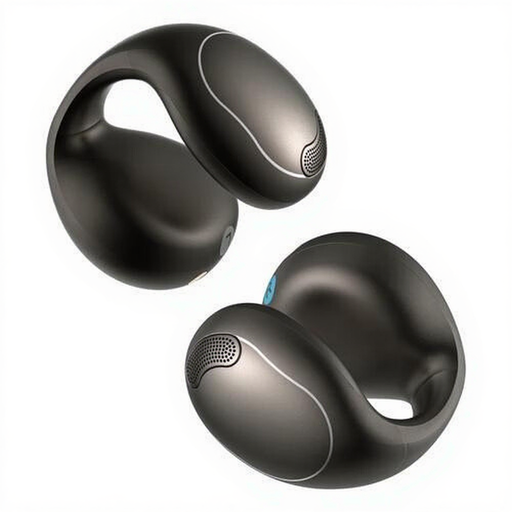
Why it suits this profile: This model is designed for calls, music, sport and everyday use. Its open-ear fit and button controls make it easy to use.
The specifications list the wearing style, IPX4 protection and two microphones. This makes it easier to assess whether the headphones are right for you before buying.
Bluetooth 5.4, two microphones, button controls and an included charging station.
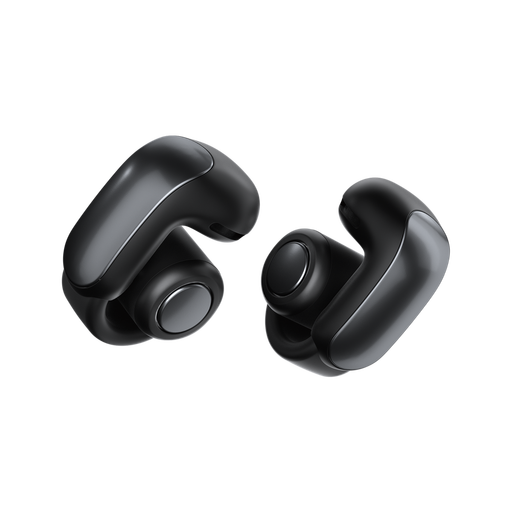
Why it suits this profile: The open design is intended for people who want to enjoy music while staying connected to their surroundings, at home, on the go or out for a walk.
The product information lists Bluetooth 5.3, IPX4 and a stated playback time of up to 7 hours. This makes the main usage limits clear.
Open-ear design, Bluetooth 5.3, a microphone and a charging case, according to the stated specifications.
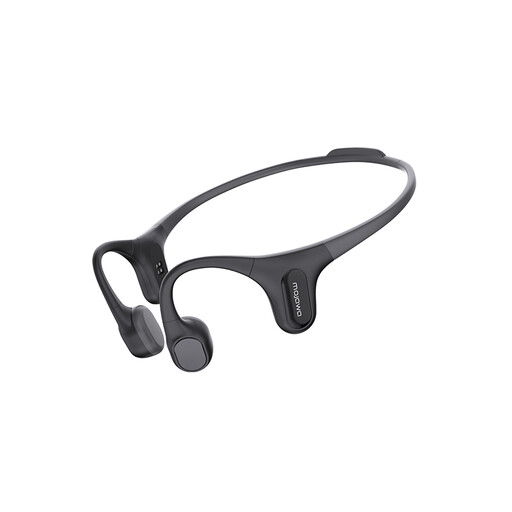
Why it suits this profile: According to its name and product information, this model is designed for running, gym workouts and swimming. Its built-in 32GB storage can be useful when you want to train without your phone.
The stated IP68 rating and MP3 storage give you a clearer idea of its suitability for intensive use than a general term such as “sports headphones” alone.
Bone conduction design, 32GB MP3 storage, a microphone and IP68, according to the product details.
We’ve put together a complete, up-to-date list of products that meet these strict selection criteria and the applicable European safety regulations.
They can be, as long as they stay securely in place and can withstand sweat or splashes. An ear hook, clip or neckband can provide extra stability when running. Test the fit while moving gently first, and don’t turn the volume up too high.
With open-ear models, the speaker usually sits beside or on the ear, leaving the ear canal clear. Bone conduction headphones transmit vibrations through contact points on the head. The fit and sound vary from one model to another, so check the technical description rather than relying on the product name alone.
It depends on the volume, Bluetooth features, microphone use and charge level. Manufacturers usually state a maximum playback time under specific conditions. Compare that figure with how you plan to use the headphones, and check whether a charging case or station is included.
