What should you look for?
In a quiet room, your first decision mainly depends on whether you’re mixing existing tracks only or also recording with a microphone at the same time.
Open-back, wired
Suitable if: you’re mixing existing tracks in a quiet room and sound leakage isn’t a concern.
Bear in mind: an open-back design offers little isolation and can let sound escape; by itself, it doesn’t prove that a mix will translate well to speakers.
Closed-back, wired
Suitable if: you’re monitoring during a microphone recording or want less sound to escape.
Bear in mind: check the seal on your own head. Beyerdynamic describes the DT 700 PRO X’s stereo image as more compact than that of the open-back DT 900 PRO X. This comparison applies to those two models; it isn’t a general ranking.
Semi-open, wired
Suitable if: you specifically want to compare a semi-open design too, and can assess the particular model for yourself.
Bear in mind: the term semi-open doesn’t, by itself, tell you how much isolation or sound leakage you’ll get in your setup.
| What to consider |
What to look for when buying |
Who considers this important? |
| Instrument balance and stereo image |
Compare familiar recordings and check a test mix on another playback system; don’t treat a stated frequency range as proof of neutral sound. |
When assessing the double bass, drums and their relative placement, I don’t want to rely only on a stated frequency range. I also want to use familiar recordings and a second playback system. Around 42% of consumers put instrument balance and stereo image first. |
| Sound leakage and isolation |
Consider whether you record while listening, and check the seal and leakage at your usual listening volume. |
If I’m recording vocals or instruments with a microphone at the same time, I want to know how much sound escapes and whether the ear cups fit well. Around 25% of consumers give isolation and reduced leakage top priority. |
| Comfort during long sessions |
Try the fit yourself if possible and check whether the ear pads are replaceable; keep an eye on your volume and listening time too. |
During long sessions, I want to know how the ear pads and headband feel on my head; claims about weight or comfort are no substitute for trying them on. Around 17% of consumers put wearing comfort first. |
| Connection, cable and maintenance |
Compare the plug with your device’s output and check the cable length, included adapter and replacement parts for the model you’ve chosen. |
If I’m connecting the headphones to a laptop or audio interface, I want to check the plug, cable and any adapter in advance. Around 16% of consumers give connectivity and practical cable use top priority. |
Joybuy products
These Joybuy product options relate to wired listening, connectivity or wearing comfort. Check whether the specific version suits your mixing setup; these features alone don’t prove that a model is suitable as studio reference headphones.
 Image unavailable
Sennheiser MOMENTUM 4 Wireless, black
The 3.5 mm audio cable described may be suitable for wired listening at a desk; this feature doesn’t prove that the model is tuned as a studio reference.
The product description lists passive use without a battery and an included 3.5 mm audio cable.
The product description also mentions a padded headband and deep ear pads.
View at Joybuy
 Image unavailable
Jabra Evolve2 75 headset
The stated USB-C cable provides a wired connection option; check that the connection is compatible with your equipment before choosing this model for your mixing setup.
The product description lists Bluetooth, a USB-C cable for a wired connection and optimisation for Microsoft Teams.
The product description mentions an adjustable headband and ear cups.
View at Joybuy
 Image unavailable
Sony WH-CH720N
The stated closed-back construction and active noise cancellation are features to consider if you’re looking for those functions; by themselves, they say nothing about the model’s tuning for studio reference.
The product specifications list Bluetooth, active noise cancellation and an adjustable headband with soft ear pads.
View at Joybuy
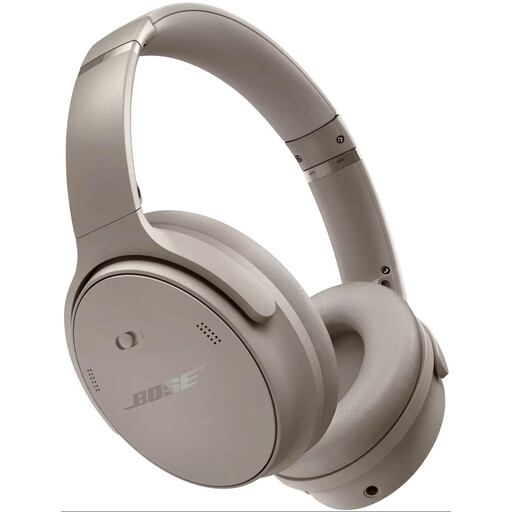 Image unavailable
Bose QuietComfort Headphones, Sandstone
The lightweight design described is worth considering if you have longer listening sessions; it doesn’t prove that the model is tuned for mix referencing.
The product description lists Bluetooth and active noise cancellation.
View at Joybuy
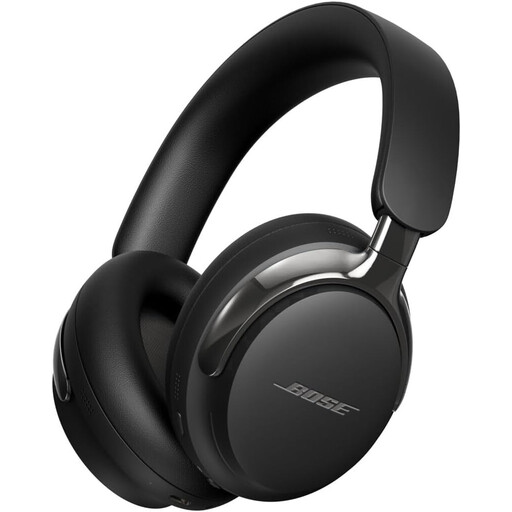 Image unavailable
Bose QuietComfort Ultra Headphones (2nd Gen), black
The detachable cable with USB-C and 3.5 mm connections may be useful if you want to listen wired; check that the connection suits your device and workflow.
The product description lists Bluetooth and a detachable cable with USB-C and 3.5 mm connections.
View at Joybuy
Frequently asked questions
How can I check that the double bass and stereo placement sound right beyond my headphones?
Compare your mix with familiar recordings on the same headphones, and listen to it on another playback system too. Sonarworks explains that headphones make you experience stereo and bass differently from speakers; this advice doesn’t guarantee a particular mix result.
Can I use the same headphones for mixing and recording next to a microphone?
Yes, but if a microphone is active while you’re listening, first compare a well-fitting closed-back model to limit sound leakage. If you’re only mixing existing tracks in a quiet room, you can compare open-back models too.
What should I check before connecting to my laptop or audio interface?
Compare your device’s output with the plug and any included adapter for the exact model. Also check that the cable length suits your workspace; the stated impedance alone doesn’t prove that every output in your setup is suitable.
How can I reduce the risk to my hearing during long mixing sessions?
Keep the volume low and take regular breaks. The World Health Organization’s guideline states that, at an average sound level of 80 dB, listening for up to 40 hours a week can be safe; at 90 dB, it recommends four hours a week. This is health advice, not a feature that a headphone model can meet on its own.
What rights do I have as a Dutch consumer when buying online or if a product is faulty?
For an applicable online distance purchase, you generally have a 14-day cooling-off period; exceptions may apply. According to the Dutch government, if a product is faulty, the seller is your point of contact for a solution. There is no fixed statutory guarantee period in the Netherlands; your rights also depend on the product and circumstances.


