
Taking part in an online mentoring session
You’re speaking to a mentor remotely and want to hear them clearly and make yourself understood. Pay attention to the microphone and connection, and test the headset in a practice call.


For an online mentoring session in a dimly lit room, a headset with a suitable microphone and connection is a sensible place to start. Easy-to-reach mute controls can help if you don’t want to search for a button on screen. Then compare the fit and, if you’d like to move around, the freedom of movement offered by a wireless model. Before your session, check that your meeting app is using the right microphone. A personal headset won’t improve the lighting, and it may not be suitable for recording several people in the room.
You’re speaking to a mentor remotely and want to hear them clearly and make yourself understood. Pay attention to the microphone and connection, and test the headset in a practice call.
You want to be able to mute the microphone or adjust the volume during the call without searching on screen for a button. Compare where the controls are and whether they’re easy for you to use.
You don’t want to be tied to your seat during the session. Compare a wireless headset with a wired one, and check that the connection works beforehand.
| What to consider | What should you check? | Who is this important for? |
|---|---|---|
| Making yourself understood | Check the microphone and its position; make a test recording in the room where you’ll be joining the session. | If I want my mentor to hear my answers clearly, I look at the microphone and test it beforehand. Around 26% of consumers say making their own voice clearly audible is their top priority. |
| Mute and volume controls | Check where the controls are and test whether muting works in your meeting app. | If I don’t want to search on screen in a dimly lit room, I want to be able to find the mute button or volume control easily. Around 26% of consumers prioritise having controls close to hand. |
| Connection and meeting app | Check the connection on the exact model you’re considering, then select the right microphone and speaker in the app. | If I want to be sure the headset works with my device, I check the connection and meeting app settings beforehand. Around 21% of consumers say compatibility is their top priority. |
| Comfort | Compare adjustability and mono or stereo designs; try the fit for yourself if possible. | If I’m wearing the headset for the whole session, I want it to fit comfortably. Around 16% of consumers put comfort first. |
| Freedom of movement | Compare wired and wireless models; if you choose wireless, check the connection and battery charge before the session. | If I want to move around during the call, I don’t want to be tethered by a cable. Around 11% of consumers say freedom of movement is their top priority. |
A noise-cancelling microphone and sound-isolating ear cushions do different things: the first affects how your voice is picked up, while the second affects what you hear. A product description isn’t a measure of how well it will perform in your room.
Check which feature the description refers to, and test both listening and recording in the room where you’ll be joining the session.
Different versions in the same range can vary in connection, wearing style and controls. A similar model name doesn’t tell you which plug or features the version you’ve chosen has.
Compare the full model name with your device’s port and the meeting app you use.
A personal headset is designed for the person wearing it and may not be suitable for picking up the voices of other people in the room.
Decide in advance whether only you will be speaking or whether several people need to be heard. If it’s the latter, compare a shared audio solution.
The H390 USB headset and H151 with a 3.5 mm plug offer different wired connection options for a personal headset for calls.
The Ayda USB-ENC is an on-ear headset to consider if you’re comparing wired computer connections and muting via the microphone arm.
The wired Evolve2 30 SE and wireless Evolve2 65 offer different options; these product ranges also have separate connection and platform versions.
The wired Blackwire 3200 series is worth considering if you want to compare wearing styles and connections across different versions.
These wired headsets with microphones are suitable for online calls via a computer, and have USB or 3.5 mm connections. Check which connection your device has and test that your meeting app is using the right microphone.
 No image available
A wired option for computer-based mentoring sessions, with in-line mute and volume controls.
The product description lists an adjustable microphone arm and a mute indicator. The cable limits your freedom of movement.
 No image available
The wired microphone is adjustable, so you can position it for an online call.
The product description lists a USB connection and an adjustable microphone arm. The cable limits your freedom of movement.
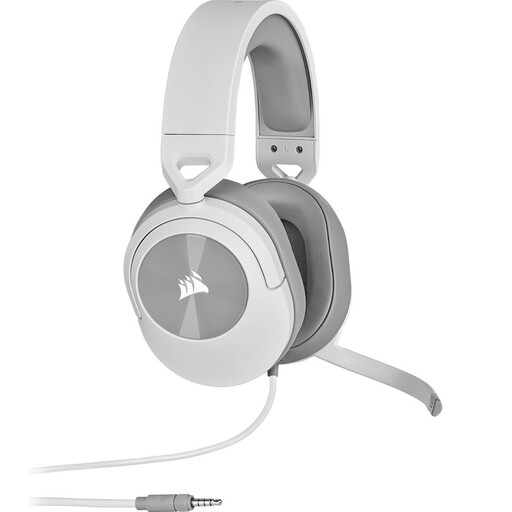 No image available
According to the product description, this wired 3.5 mm headset has a microphone that flips up to mute.
The volume control is on the ear cup. The description lists a Y-splitter included for PCs with separate headphone and microphone ports; check which connection your device has.
 No image available
A wired option for a device with a suitable 3.5 mm connection and microphone support.
The product description lists an adjustable microphone and in-line volume and mute controls. For separate audio inputs, it says a splitter is needed; this isn’t included.
 No image available
This wired headset has a 3.5 mm connection and a microphone with a mute button for online calls.
According to the product description, the volume control is on the ear cup. The description lists a splitter for PCs with separate audio inputs; check your device’s connection.
A headset is designed for the sound of your call, not the lighting for a video call. Choose controls you can find easily and test the sound beforehand.
Connect or pair the right version, then select the intended microphone and speaker in your meeting app. Make a test call; for the Evolve2 30 SE, Jabra recommends positioning the microphone close to your mouth. If you’re using mobile USB-C, also check that your device and app support audio.
Follow the instructions for your model. Keep the connection clean and make sure the cable doesn’t get trapped; cleaning instructions may vary by model.
According to the Dutch government, a 14-day cooling-off period applies to many distance purchases. Check the terms and exceptions that apply to your specific purchase.
No. According to the Dutch government, there is no fixed statutory guarantee period in the Netherlands: you’re entitled to a product that works properly for as long as you could reasonably expect it to. If there’s a problem, the seller must provide a solution; a manufacturer’s guarantee is separate.