What should you consider when choosing?
Start with your usual listening spot: two suitably positioned speakers can give you a distinct left-right soundstage, while one speaker takes up less space. Then check that your sources can connect and that the complete setup fits the space available.
| What to consider |
What to check |
Who is this important to? |
| Stereo image from your listening spot |
Check whether the exact model can be used as a pair and whether both speakers can be suitably positioned in relation to your seat. |
If I usually listen from one regular spot, I want to be able to position vocals and instruments to the left and right. Around 33% of consumers put stereo imaging first. |
| Positioning, bass and neighbours |
Check the actual positions available and, where possible, listen at your usual volume. Take the room and any arrangements with neighbours into account. |
If the open-plan layout makes positioning difficult, I want to assess how the setup sounds from my listening spot without turning up the volume to compensate. Around 27% of consumers prioritise positioning and controlled bass. |
| Connecting to your sources |
List your devices and compare the wireless playback options and wired inputs supported by each model. |
If I want to use my own phone, a streaming service or a wired player, it needs to work with the system I choose. Around 20% of consumers put source compatibility first. |
| Complete setup |
Check whether you’re getting one or two speakers and whether you’ll need an adapter, a connection between speakers, an amplifier or speaker cable. |
If I want to put together a working system, I need to know which additional components I’ll need alongside the main product. Around 20% of consumers focus on the complete setup. |
Joybuy product picks
The Joybuy picks below range from a Wi-Fi speaker and speakers for stereo playback to soundbar systems. For each model, check that its form, connections and any additional components you need suit the way you listen to blues from your regular spot.
 No image available
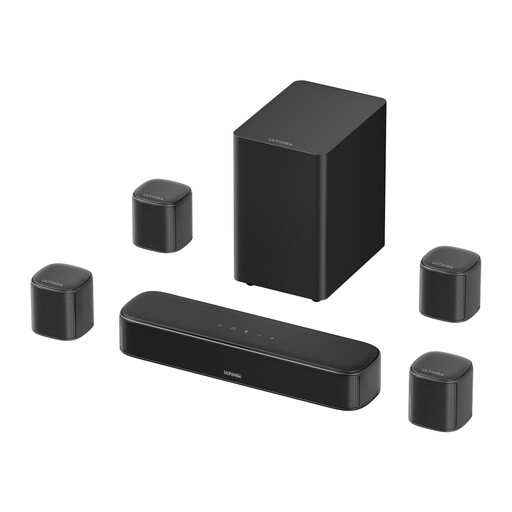
Ultimea Aura S4T 7.1-channel TV soundbar system
The product name mentions both music and home cinema use; consider this system if you want to use it for TV audio as well as music.
The product name lists four surround speakers, a 5.25-inch subwoofer, and HDMI, optical, AUX and USB connections. Check that the included components and connections suit your setup.
Joybuy
 No image available
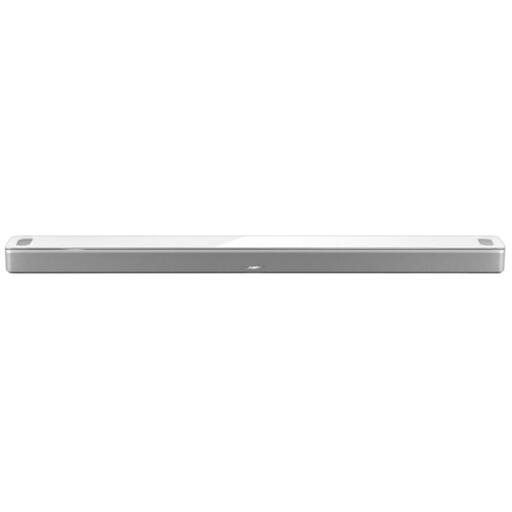
Bose Smart Ultra Soundbar, white
A soundbar to consider if you’re looking for one setup for music and TV audio. Check beforehand that its connections and controls work with your sources.
Joybuy
 No image available
HiVi-Swans D3.1MKII passive bookshelf speakers, pair
A stereo pair to consider if you can position two speakers to the left and right and have a suitable amplifier.
The product name lists a pair of passive bookshelf speakers with 6.5-inch drivers. You’ll need a separate amplifier to use them.
Joybuy
 No image available
Edifier ES300 Wi-Fi and Bluetooth speaker
An option to compare if you want wireless music playback and also need wired connections.
The product name lists WLAN, Bluetooth, AirPlay 2, LDAC, USB and AUX. It also mentions 60 W and 12 hours of battery life; check which connections and ways of using it matter to you.
Joybuy
 No image available
Edifier G1500 computer speakers
Consider this model if you’re looking for speakers for a computer setup, and check that the connections suit your source.
The product name lists Bluetooth 5.3, USB and 3.5mm AUX. Its computer and gaming focus is worth bearing in mind when deciding whether this setup suits your listening spot in the living room.
Joybuy
Frequently asked questions
Is one speaker enough for blues recordings?
It can be, if simplicity and having just one speaker position are your priorities. If you want a distinct left-right soundstage from a regular listening spot, check whether your model supports a pair and whether you can position both speakers suitably.
Where should I start when positioning speakers in an open-plan room?
First decide where you’ll listen and where the speakers can actually go. Genelec explains that positioning, reflections from walls and left-right symmetry affect stereo playback; any model-specific tuning is no substitute for a suitable setup.
Can I connect a CD player or another wired source?
Only if the output from your source is compatible with an input on the system you choose. Sonos lists a line-in adapter for the Era 100; KEF lists digital inputs for the LSX II LT but no analogue 3.5mm input; and Edifier lists analogue and optical inputs, among others, for the R1280DBs.
What are my rights when buying online in the Netherlands?
For eligible distance purchases from a business, you generally have a 14-day cooling-off period, according to the Dutch government. You’re also entitled to a product that’s fit for purpose; the Dutch government says there’s no fixed statutory guarantee period covering all products in the Netherlands. Check the terms that apply to your purchase.
Is music always allowed in a Dutch flat as long as it’s played during the day?
No. The time of day alone doesn’t mean it’s always permitted. The Dutch government advises people dealing with noise from neighbours to agree on arrangements first, such as what time music can be played. Rules and circumstances may vary from one home to another.


