What should you look for in a TV for lectures?
Compare screen types using your own lecture source, viewing distance and viewing habits. You can’t judge how easy slides are to read or speech is to understand from screen type alone.
OLED
A good fit if: you mainly watch varied video content and value deep blacks in a dark room.
Keep in mind: an RTINGS test of six TVs in 2023 showed that prolonged static images can cause burn-in. This isn’t a prediction for every model or usage pattern.
Mini-LED LCD
A good fit if: you often display static slides for long periods or want to compare an LCD alternative with OLED.
Keep in mind: haloing may be visible around white text on a dark background. RTINGS describes this effect on screens with dimming zones, so check the specific model.
| What to consider |
What should you check? |
Who might find this especially important? |
| Contrast and subtitles |
Watch a dark scene with bright subtitles; with mini-LED LCD, look for dimming around text. |
If I watch in the dark, I want to follow subtitles without distracting halos. Around 25% of consumers prioritise dark-scene contrast and subtitles. |
| Slide readability |
Measure the viewing distance and available space; try small text in a representative lecture video. |
If I need to read maps or small slide text from my seat, I want to know whether the screen size is right for me. Around 25% of consumers put readability first. |
| Speech clarity |
Listen to a lecture clip; if necessary, check the connections for your existing audio equipment. |
If the lecturer’s explanation is central, I want to be able to follow the spoken words clearly. Around 19% of consumers put speech clarity first. |
| Static slides displayed for long periods |
Consider how often the same image stays on screen for a long time; check the instructions for the exact model. |
If I leave presentations on screen for a long time, I want to factor that into my choice between OLED and LCD. Around 19% of consumers say this is their main consideration. |
| Energy consumption |
Compare the energy label and consumption per 1,000 hours on the same SDR or HDR basis. |
If the TV is often switched on, I want to consider its energy use alongside screen size and brightness. Around 12% of consumers put energy consumption at the top of their list. |
Joybuy TVs for lectures in the dark
These TVs offer OLED and mini-LED LCD options to compare for lectures in a dark room. Consider screen size and how often you display static slides.
 Image unavailable
LG OLED65C68LA 65-inch 4K OLED TV
OLED is an option to consider for lectures in a dark room. Factor in prolonged static slides when making your choice.
65 inches; 4K OLED; Dolby Vision; Dolby Atmos.
Joybuy
Image unavailable
LG OLED55C68LA 55-inch 4K OLED TV
OLED is an option to consider for lectures in a dark room. If you often display static slides, bear OLED’s usage-related considerations in mind.
55 inches; 4K OLED; Dolby Vision; Dolby Atmos.
Joybuy
 Image unavailable
LG OLED42C68LA 42-inch 4K OLED TV
The 42-inch size may be worth considering if you’re looking for a smaller screen. Check that slides are readable from your viewing distance.
42 inches; 4K OLED; Dolby Vision; HDR10; Dolby Atmos; HDMI 2.1.
Joybuy
 Image unavailable
LG OLED48G69LS 48-inch 4K OLED TV
OLED is an option for lectures in a dark room. If you often display static slides, also factor in the general risk of burn-in.
48 inches; 4K OLED; Dolby Vision; Dolby Atmos.
Joybuy
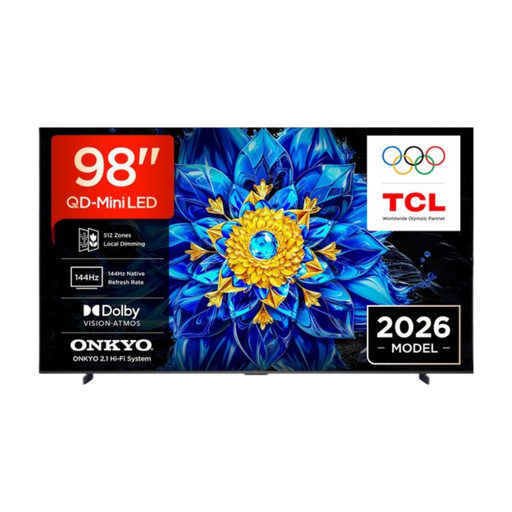 Image unavailable
TCL T8D 98-inch 4K QD-Mini LED TV (2026)
Mini-LED LCD is an alternative to compare if you often leave slides on screen for long periods. Check for possible glow around white text.
98 inches; 4K QD-Mini LED.
Joybuy
Frequently asked questions
What screen size is best for small text on lecture slides?
Start with your viewing distance and try a representative slide on the screen size you’re considering. A larger screen may be more useful at a distance, but 4K can’t restore detail that isn’t present in a low-quality video source.
How should you set up your TV for a lecture in the dark?
Choose a brightness level that feels comfortable, then check dark slides, subtitles and speech using your own lecture source. Adjusting the brightness can also affect energy consumption, so check the picture rather than relying on a fixed setting.
How do you compare energy consumption for extended viewing?
Compare the energy label and consumption per 1,000 hours for the exact models, using the same SDR or HDR basis. Actual consumption also depends on usage and settings, so you can’t work out a cost without knowing your viewing hours and electricity tariff.
Who should you contact about a fault with a TV bought in the Netherlands?
If your TV has a fault, contact the seller. According to the Dutch government, if the fault is covered by your statutory rights, the seller must provide a solution. The assessment depends on the circumstances and how the product has been used. A manufacturer’s guarantee doesn’t replace your statutory rights.
Do online purchases always come with a 14-day cooling-off period?
According to the Dutch government, distance purchases usually come with a 14-day cooling-off period. Check the seller’s information and the terms that apply to your purchase.


