
Vandaag of morgen in huis

Kwaliteit gegarandeerd

Welkomstaanbiedingen ontgrendelen: GRATIS bezorging | Tot 80% korting | Gratis 30 dagen JoyPlus-proefperiode
Download de app
The search for a new OLED gaming monitor can feel overwhelming. Manufacturers bombard you with impressive specifications, but what do they really mean for your gaming experience? Many gamers make a significant investment based on marketing buzzwords, only to find their purchase doesn't meet expectations. As a Joybuy Product Recommendation Officer, I'm here to help you cut through the noise. We'll discuss the common pitfalls and the specs that truly matter.
Before you pull out your wallet, here are three common traps to watch out for:
To avoid buyer's remorse, you need to focus on the specifications that will actually impact your gameplay. These are the three most important considerations.
The choice between resolution and speed is crucial. A 4K 240Hz monitor offers a phenomenal combination of sharpness and fluidity, ideal for high-end PC gamers who want both visual splendour in single-player games and speed in multiplayer titles. However, this requires a very powerful graphics card.
For competitive e-sports athletes, especially in fast-paced shooters, a 1440p 480Hz monitor can be a smarter choice. The lower resolution makes it easier to achieve extremely high frame rates, which provides a direct advantage in reaction time.
Console gamers with a PlayStation 5 or Xbox Series X should primarily look for an HDMI 2.1 monitor. This port is essential for gaming in 4K at 120Hz, the standard for the current generation of consoles.
Not all OLED panels are created equal. The two dominant technologies are WOLED (White OLED) and QD-OLED (Quantum Dot OLED).
For gamers who want the most vibrant and accurate colours, a QD-OLED monitor may be preferable. Content creators also benefit from this.
Screen tearing can completely ruin a smooth gaming experience. Adaptive Sync technology synchronises your monitor's refresh rate with your graphics card's frame rate. Look for the following labels:
A monitor with one of these certifications ensures a smooth, stutter-free experience.
Based on objective specifications, we have selected a number of models that suit different types of gamers and avoid the pitfalls mentioned earlier.

Why This Fits Their Persona: For e-sports athletes, every millisecond counts. This screen focuses on pure speed with a 1440p 480Hz panel. The 1440p resolution is the 'sweet spot' for competitive games, as even high-end graphics cards can approach 480 frames per second for maximum responsiveness.
This is no empty marketing claim. The combination of DisplayPort 2.1 and a 480Hz panel ensures you can actually utilise that speed, provided your GPU can keep up. Furthermore, the VESA DisplayHDR True Black 400 certification guarantees genuine HDR performance.
The combination of a 480Hz refresh rate and a 0.03ms response time offers unprecedented motion clarity. Additionally, the screen is certified as both G-Sync Compatible and FreeSync Premium Pro.
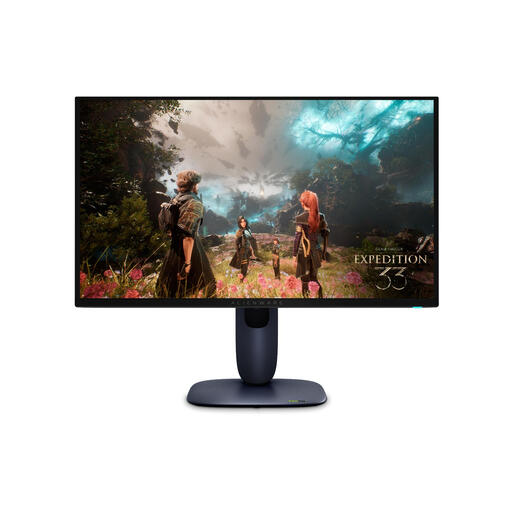
Why This Fits Their Persona: This gamer wants it all: stunning visuals in 4K and a high refresh rate for competitive moments. This 27-inch OLED screen with 4K 240Hz specs is the perfect balance. The QD-OLED panel ensures vibrant colours and high peak brightness.
This screen delivers on its promise. The HDMI 2.1 and DisplayPort 1.4 ports provide sufficient bandwidth for 4K at high frame rates. The VESA DisplayHDR True Black 400 certification and a peak brightness of 1000 nits ensure an authentic HDR experience, not a marketing gimmick.
The combination of a QD-OLED panel with 4K resolution delivers unprecedented image quality. Full support for both G-Sync Compatible and FreeSync Premium Pro guarantees a smooth experience on any high-end graphics card.
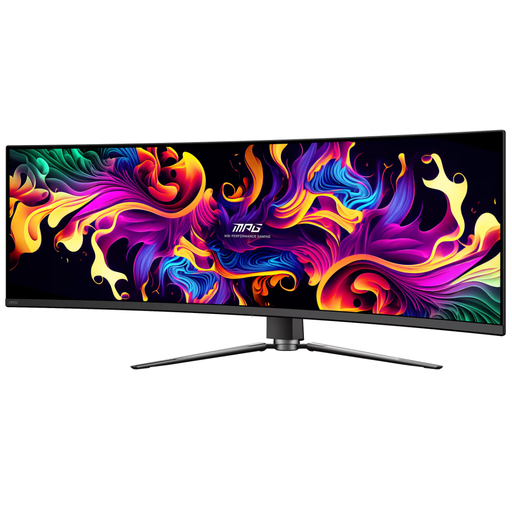
Why This Fits Their Persona: This user wants to be completely absorbed by the game world. An ultrawide gaming monitor like this 49-inch model offers a panoramic field of view that is perfect for racing games, flight simulators, and open-world RPGs. The curved OLED monitor fills your peripheral vision for maximum immersion.
MSI tackles the burn-in risk with 'OLED Care 2.0', a suite of features that detects static elements and adjusts their brightness locally. The 144Hz refresh rate is realistic for the DQHD (5120x1440) resolution, giving you a smooth experience without setting unattainable goals.
The 32:9 aspect ratio is the key selling point, equivalent to two 27-inch 1440p monitors side-by-side without the bezel. The USB-C port with 90W Power Delivery also makes it a powerful docking station for a laptop.
We have compiled a complete, up-to-date list of products that fully meet these strict selection criteria.
Modern OLED monitors have built-in protection mechanisms. Manufacturers like MSI (OLED Care) and ASUS have software that helps to minimise this. You can also take steps yourself: hide the taskbar in Windows, use a screensaver, and avoid leaving programs with bright, static logos open for hours. Most models automatically perform a 'pixel refresh' when the monitor enters standby.
Yes, absolutely. To get the most out of a 4K 240Hz monitor, you need a top-tier graphics card, such as an NVIDIA GeForce RTX 4080/4090 (or the future 50-series) or a comparable model from AMD. For less demanding games, you might get away with a slightly less powerful card, but for the latest AAA titles at maximum settings, a top-end GPU is a requirement.
This is a matter of personal preference. For immersive single-player games, racing games, and simulators, a curved OLED monitor can significantly enhance the experience by filling your field of view. For competitive first-person shooters, many players prefer a flat screen, as it prevents distortion at the edges and makes it easier to keep your aim straight.
