For striking close-ups of a small paint detail, a mirrorless camera with a compatible, separate macro lens gives you more lens options. For a wider detail, a compact camera with a fixed lens may be simpler. Assess the complete set-up against the space available on your table, and test reflections and colour with a trial shot: a higher video resolution won’t fix glare or a colour cast by itself.
Who is this choice relevant to?
Painter filming the texture of paint
Wants to capture a brushstroke or layer of paint clearly. The specifications of the particular lens, its magnification and the shooting distance all matter; Canon and Sony publish magnification figures for their separate macro lenses.
Creator with a cramped worktable
Wants to leave enough room for the painting and their hands. So assess the camera together with its mount and the space taken up by the complete set-up.
Creator making repeatable progress videos
Films the same area repeatedly or over longer sessions, and wants to be able to repeat the framing and colour settings. Canon explains how to set the white balance in tricky lighting conditions; Nikon gives a maximum continuous recording time for the Z30, with a footnote.
What should you look for when buying?
Mirrorless camera with a macro lens
Best suited to: bringing a small area of paint into close-up, if you have room for an interchangeable lens and a sturdy mount.
Bear in mind: the mount, shooting distance and space needed for the complete combination; macro magnification applies to the specific lens, not every camera or kit lens.
Compact camera with a fixed lens
Best suited to: filming a relatively wide detail without having to change lenses. Sony describes the ZV-1 II as a camera with a built-in wide-angle zoom lens.
Bear in mind: you can’t replace the fixed lens with a macro lens; take a test shot to check that the detail looks large enough.
| What to consider |
What should you check? |
Who is this important to? |
| Getting a small paint detail in shot |
Compare the magnification and minimum focusing distance of the specific lens; frame a test shot from the available mounting height. |
If I want to film a small brushstroke clearly, I need to know whether it will appear large enough in shot. Around 33% of consumers prioritise the size and sharpness of the detail. |
| Glare and colour |
Test your planned lighting direction and camera angle; check whether you can adjust the white balance. |
If I want to minimise reflections and capture consistent colours, I test the lighting on the painting itself. Around 27% of consumers focus most on controlling glare and colour. |
| Space on the table |
Measure the available space and height; check that the mount can support the complete set-up. |
If there’s little room left beside the painting, I want the camera and mount to be secure without taking up unnecessary work surface. Around 20% of consumers prioritise the set-up and the space available. |
| Recording time and repeatability |
Check the manual for limits, power requirements and storage for your chosen video settings; mark the camera and lighting positions for future sessions. |
If I want to film a painting process for longer or over several sessions, I need to be able to repeat the settings. Around 20% of consumers place the greatest importance on longer, repeatable recordings. |
Common pitfalls
-
Comparing camera bodies alone
The stated macro magnification applies to a specific lens and doesn’t automatically apply to every camera with the same mount. A different combination may also require a different shooting distance or more space around the table.
Compare the body, lens and mount as one set-up, and test the detail from the distance you actually have available.
For a close-up, you may need a separate compatible lens as well as a sturdy mount.
-
Expecting extra 4K features to fix glare
Reflections can obscure details in the painting, whatever the stated video resolution.
Take a test shot with your planned lighting. If necessary, change the direction of the light or the camera angle before comparing resolutions.
-
Assuming the manufacturer’s warranty covers all your statutory rights
The Dutch Government states that there is no fixed statutory warranty period in the Netherlands and that you should contact the seller if a product is faulty.
Check who the seller is and review any additional warranty terms separately. If you’re considering a paid extended warranty, compare what its terms add.
Brands to consider
Canon
The EOS R50 with an RF mount is an option if you want to choose the lens separately.
- Canon states that its separate RF 35mm F1.8 MACRO IS STM lens offers magnification of up to 1:2.
- That magnification is a feature of this lens, not the EOS R50 body or every kit lens. Canon doesn’t list sensor-shift stabilisation for the body, so assess the need for a sturdy mount separately.
Sony
The ZV-E10 II has an interchangeable E mount, while the ZV-1 II has a built-in zoom lens.
- Sony states that its separate E 30mm F3.5 Macro lens offers 1:1 magnification.
- That figure doesn’t automatically apply to a ZV-E10 II kit lens. The fixed lens on the ZV-1 II can’t be replaced with that separate macro lens.
Nikon
The Z30 is a mirrorless camera to consider if the length of your video sessions is also a factor.
- Nikon lists 4K UHD 30p and up to 125 minutes of continuous recording, with a footnote attached to the stated duration.
- Choose a compatible lens separately to capture the detail you want. The stated recording time isn’t guaranteed for every set-up or setting.
Panasonic
The LUMIX G100D kit with a 12–32mm lens is a Micro Four Thirds option to compare if you also want to film a wider view of your table.
- Panasonic lists 4K/30p for the kit.
- That video specification alone doesn’t tell you whether the supplied lens will magnify the small paint detail enough. Check with a test shot.
Cameras for video recording
These Joybuy products are cameras for video recording. Check each model and lens to make sure the combination suits the close-up you want, the space available on your table and the way you film.
 No image available
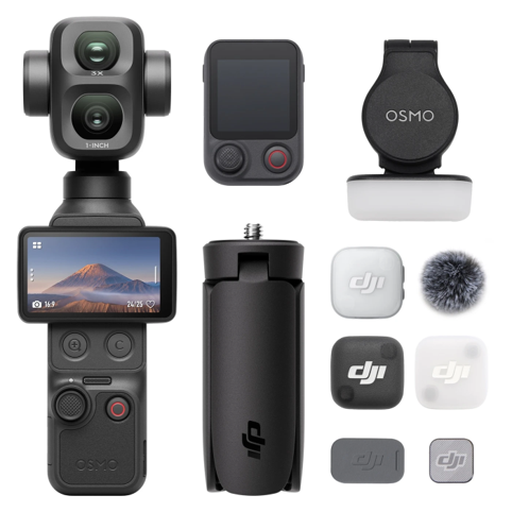
Osmo Pocket 4P Vlog Combo – Black
The description lists 4K video; take a test shot to check that the fixed wide-angle lens captures your paint detail at the size you want.
The stated lens is 20mm f/2.0. According to the product description, 4K/240fps is limited to slow motion.
Joybuy
 No image available
DJI Osmo Pocket 3 Creator Combo
This model is described as a camera for vlogging and video. Take a test shot to check whether the set-up shows the painting detail as you want it.
The product description lists a 1-inch CMOS sensor, 4K/120fps and mechanical 3-axis stabilisation. The title mentions an included microphone.
Joybuy
 No image available
DJI Osmo Pocket 3
The product name presents this model as suited to video recording; check with the painting in place that the framing gives you the detail you want.
The product description lists a 1-inch CMOS sensor, 4K/120fps, 3-axis stabilisation and a 2-inch rotating touchscreen.
Joybuy
 No image available
Songdian Pocket Camera 4K 44MP – Pink
The product name mentions video recording; test whether the camera captures your paint detail clearly from the distance available.
The product name lists 4K, 44MP and 16X zoom. The product description mentions autofocus and digital zoom.
Joybuy
 No image available
Sony ZV-E10 + 16–50mm Zoom Black
The kit includes a zoom lens so you can adjust the framing; check whether the lens can show your chosen small detail at the size you want from the available distance.
The product description lists 4K video at 30 fps and a 16–50mm power zoom lens. According to the kit description, an adapter/charger isn’t included.
Joybuy
Frequently asked questions
Do I need a macro lens straight away?
Not necessarily: if your chosen lens captures the detail at a large enough size, it may be all you need. If you want to magnify a small area of paint prominently, compare the magnification and minimum focusing distance of the specific lens. Canon lists up to 1:2 for its RF 35mm F1.8 MACRO IS STM lens, while Sony lists 1:1 for its separate E 30mm F3.5 Macro lens.
How can I avoid bright spots or a colour cast?
Take a test shot in your actual workspace and change the direction of the light if reflections obscure details. Also check the white balance under the lighting you’ll use to film. This is a practical check, not a guarantee of accurate colour reproduction.
What should I check before filming a painting for a long time?
For your chosen model, check the conditions for continuous recording, as well as power, storage and your preferred video settings. Nikon lists up to 125 minutes of continuous recording for the Z30, with a footnote; this duration doesn’t automatically apply to other cameras or settings.
What are my rights when buying a camera online in the Netherlands?
According to the Dutch Government, distance purchases are generally covered by a 14-day cooling-off period, with some exceptions. Faulty products are also covered by statutory protections; there is no fixed statutory warranty period in the Netherlands, and the seller is your point of contact.
Can I publish a video of a painting?
This depends in part on the rights to the work: according to Auteursrecht.nl, you’ll usually need permission from the rights holder to publish or share images of protected works of art. If identifiable people appear in the video, GDPR rules may also apply; the Dutch Data Protection Authority distinguishes between private use and wider or commercial publication. This doesn’t automatically apply to every recording featuring only your own painting.


