
Vandaag of morgen in huis

Kwaliteit gegarandeerd

Welkomstaanbiedingen ontgrendelen: GRATIS bezorging | Tot 80% korting | Gratis 30 dagen JoyPlus-proefperiode
Download de app
A wireless mouse for the office keeps your desk tidier and is useful with a laptop, PC or home office setup. However, a low price or high DPI rating does not tell you everything. The right choice mainly depends on the connection, size, battery and the way you work.
As a Joybuy Product Recommendation Officer, I therefore focus on verifiable specifications and potential purchasing pitfalls. This helps you avoid buying a mouse that is not compatible with your laptop, feels too small or needs new batteries again after a short time.
A wireless mouse with Bluetooth works directly with devices that support Bluetooth. A mouse with a USB receiver usually uses 2.4 GHz and requires a free USB port. This difference matters with modern laptops that have few USB-A ports.
Check the following in advance:
A multi-device mouse could be useful if you regularly switch between a laptop, desktop and tablet. However, check how many devices can actually be connected at the same time and which connection each one uses.
A quiet wireless mouse generally has dampened buttons. This can be useful in a shared office, during online meetings or when you do not want to disturb other people at home. However, the term does not automatically say anything about the sound of the scroll wheel, side buttons or the mouse moving across your desk.
Look at the product specifications and user experiences as a whole. Some models specifically state that the buttons are quieter. According to information provided by Trust, the buttons on the Yvi+ and Ozaa+ are designed for quieter clicking. This remains a product feature, not a guarantee that every sound will disappear completely.
DPI determines how quickly the cursor moves across the screen for the same hand movement. A mouse with adjustable DPI gives you more control, but a higher value does not automatically mean greater precision for everyday office tasks.
For word processing, spreadsheets and browsing, an adjustable setting is often more useful than simply having a high maximum.
An RF mouse with a USB receiver is usually easy to set up: connect the receiver, switch on the mouse and get started. This is useful for a wireless mouse for a laptop or office PC. Bluetooth, on the other hand, saves a USB port and works well with tablets and ultra-thin laptops.
Also check the operating system. According to the product information, the Trust Ozaa+ and Yvi+ are supported by Windows, macOS and Chrome OS. The Logitech MX Vertical is suitable for Windows, macOS, Chrome OS and iPadOS, among others. Features such as programmable buttons may depend on additional software.
A compact mouse is easy to carry around, but offers less room for your palm. A larger model can be more comfortable at a permanent workstation, but is less convenient to fit into a laptop bag.
Pay attention to:
A rechargeable wireless mouse means you do not need to replace loose AA or AAA batteries. Check whether you can continue working while it is charging and whether a charging cable is included.
Battery-powered models can be practical if you do not want to plan charging breaks. According to the product specifications, the Trust Yvi+ runs on one AA battery, with a stated battery life of up to twelve months under average conditions. Actual battery life depends on usage, the surface and whether the mouse is switched off.
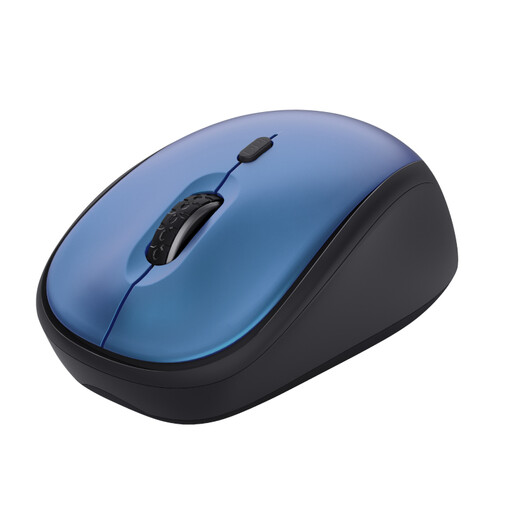
Why it suits this profile: This compact Trust wireless mouse is suitable for students, home workers and laptop users looking for a simple solution with quiet buttons.
The DPI can be adjusted from 800 to 1600, and the USB micro receiver can be stored inside the mouse. You can therefore see in advance which connection and speed settings you will get.
Compact size, quiet buttons, a stated wireless range of 8 metres and one AA battery.

Why it suits this profile: A right-handed user with a permanent workstation can make use of the vertical shape, Bluetooth and USB receiver.
The specifications state the hand orientation, vertical angle and both connection options. This means you can check in advance whether the shape suits the way you use it.
Adjustable DPI up to 4000, rechargeable battery, Bluetooth and 2.4 GHz via the included receiver.

Why it suits this profile: Anyone working with wide spreadsheets, multiple devices and a large desk gets features that go beyond standard pointing and clicking.
The Ozaa+ uses a USB receiver and two Bluetooth channels for up to three connected devices. The large body is less suitable for a small bag, but provides more room for your hand.
Side-scrolling wheel, six buttons, adjustable DPI up to 3200 and a rechargeable battery with LED indicator.
We have put together a complete, up-to-date list of products that fully meet these strict selection criteria and the applicable European safety regulations.
Yes, as long as the connection and compatibility suit your device. A USB receiver is practical for a desktop or laptop with USB-A. Bluetooth is more convenient when you want to keep your USB ports free. For a shared workspace, a model with quiet buttons can help reduce clicking noise.
This varies by model and usage. According to the manufacturer, a mouse powered by one AA battery can sometimes last for months. A rechargeable model does not need a replaceable battery, but it does need to be charged periodically. Switch the mouse off when you are not using it for an extended period and store the USB receiver safely.
Usually not for basic functions. Many models with a USB receiver work immediately after connection. Software may be required for programmable buttons, custom scrolling functions or advanced DPI settings. Before ordering, check support for Windows, macOS, Chrome OS, Android or iPadOS.
