
Vandaag of morgen in huis

Kwaliteit gegarandeerd

Welkomstaanbiedingen ontgrendelen: GRATIS bezorging | Tot 80% korting | Gratis 30 dagen JoyPlus-proefperiode
Download de app
A cluttered desk does more than take up space. Loose documents are easier to misplace, cables get in the way, and your keyboard or monitor may not be positioned at a comfortable height. Good office organisation therefore starts not with buying as many accessories as possible, but with deciding what you use every day and where it should go.
Also be wary of marketing terms that say very little. A “space-saving” product may still be too large for your desk, for example. And an organiser with lots of compartments is not automatically useful if A4 documents, folders or cables do not fit properly. Below, you’ll find the key considerations and some practical options for different working styles.
A desk organiser made from wood, metal or plastic may look neat, but its dimensions determine whether it is genuinely useful. Check the width, depth and height in advance. Also measure the available space next to your monitor, keyboard and desk lamp.
Size is particularly important for documents. A standard A4 folder is wider than a loose sheet of paper. So, if you want to organise folders, you’ll need more than a small document tray.
Not every monitor fits every monitor arm. At a minimum, check:
An arm used beyond its maximum weight limit may become unstable. Also consider the space behind your desk. A monitor arm with a clamp needs enough room to be secured correctly.
A wall-mounted holder for A4 documents saves desk space, but only if it is securely attached to the wall. Use wall plugs suitable for the type of wall, distribute the weight across the compartments and check the screws regularly.
The same principle applies to a desk organiser. A compartment for pens, highlighters and paperclips is intended for lightweight office supplies. Heavy folders belong in a suitable cupboard or on an appropriate shelf.
Choose an organiser based on your everyday tasks. A single A4 compartment works well for incoming post or documents you need straight away. For paperwork, three, five or more compartments are more practical. You could organise them into “to process”, “in progress” and “complete”, for example.
A stackable document holder is suitable for a small desk. A wall-mounted model makes use of vertical space and keeps the desktop clear. However, check that doors, cupboards or desktops will not hit the holder.
Powder-coated metal can generally be wiped clean with a dry or slightly damp cloth. Small edges or welding points may be present on metal mesh storage products, so check the finish and position the product carefully.
Wooden desk organisers made from engineered wood often have a smooth surface and require little maintenance. However, they may need to be assembled. With adjustable models, check that the different positions suit the space you have available.
For a keyboard and mouse, the connection, layout and dimensions matter more than appearance alone. Consider the keyboard layout you need, compatibility with your operating system and how the battery is charged.
Wireless sets can reduce the number of cables on your desk. Check that you have USB ports available and whether Bluetooth is required. For an ergonomic workspace, it is particularly helpful to be able to position your monitor, keyboard and mouse at a suitable height and distance. This does not guarantee comfort; your desk height, chair and posture remain decisive.
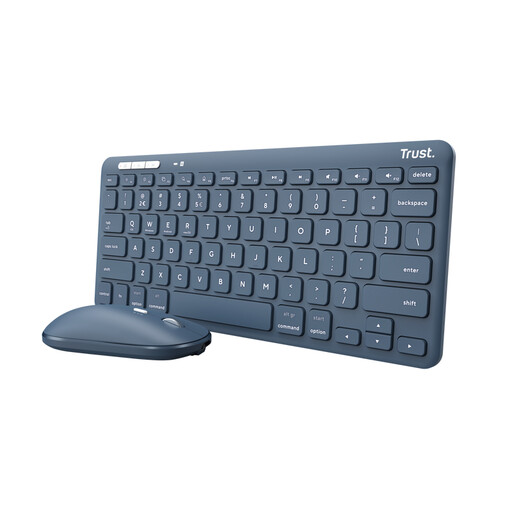
Why it suits this profile: A keyboard and mouse in one set is a straightforward starting point for home workers and students who want to organise their desk with a small number of separate components.
The specifications state that it connects via a USB receiver and Bluetooth, supports three devices and has a compact TKL layout. However, check that the US QWERTY layout suits your preference.
Wireless connectivity, Bluetooth 5.0, 78 keys, a mouse with 1,200 dpi and a rechargeable battery, according to the product information.
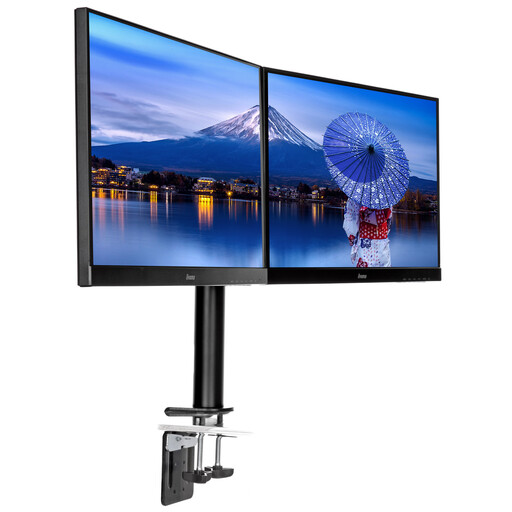
Why it suits this profile: Suitable for office professionals and home workers with two screens who want to keep their desktop clear and regularly adjust their viewing angle.
The load capacity and compatibility are clearly specified: two screens up to 30 inches, a maximum of 10 kg per screen and VESA 75 × 75 or 100 × 100 mm. Also check the strength of your desk beforehand.
Suitable for two monitors, height adjustment from 200 to 400 mm, tilting, swivelling and 90-degree rotation. Cable management is integrated.
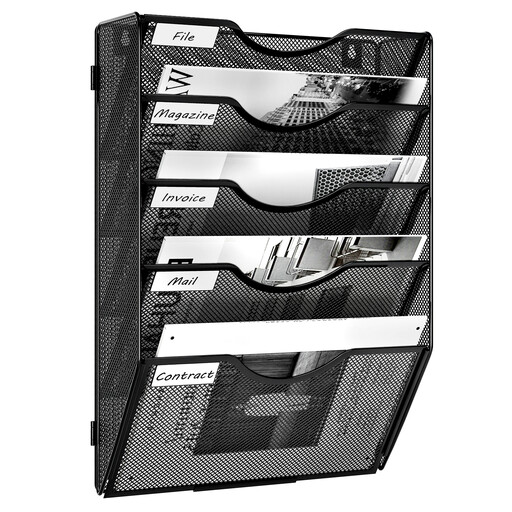
Why it suits this profile: A practical choice for administrative staff, families or small businesses that want to sort incoming post, invoices and work documents by category.
The five separate compartments allow for clear organisation. Mount the holder using suitable wall plugs and distribute documents evenly to prevent it from falling or bending.
Suitable for A4 documents, five tiers, a metal mesh construction and a wall-mounted design measuring 32.5 × 10.8 × 42 cm, according to the product information.
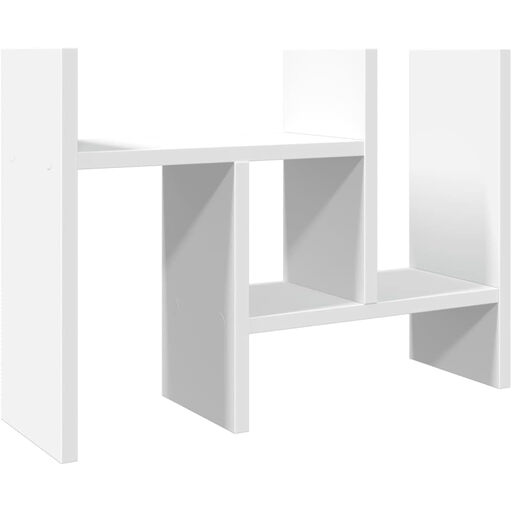
Why it suits this profile: Useful for anyone who wants to keep documents, stationery and small office supplies in one place while occasionally changing their desk layout.
The organiser is adjustable and can be transformed into a corner shelf or a smaller two-tier shelf. This means you do not need to buy a larger piece of furniture straight away.
Dimensions of 34.5 × 15.5 × 35.5 cm, a stated total load capacity of 20 kg and a smooth engineered-wood surface.
A well-planned layout prevents your new storage products from filling up again after just a few weeks. Use simple categories and give each compartment one purpose. Keep documents you need every day within easy reach, and archive older paperwork outside your immediate work area.
For cable management, you can route cables along the back of the desk and bundle up any excess length. Leave enough slack with adjustable monitor arms so that cables do not become taut when you turn the screen.
If you want to combine several solutions, browse the full range of desk accessories. Compare dimensions, material, mounting method and intended use in particular, rather than focusing solely on colour or promotional wording.
We have put together a complete, up-to-date list of products that fully meet these strict selection criteria and the applicable European safety regulations.
Start with three groups: documents, equipment and small office supplies. Then measure your desk and decide which items need to be within easy reach every day. Only then choose a desk organiser, document holder or wall-mounted A4 document holder.
Its lifespan depends on the material, load, installation and maintenance. Metal models can remain useful for a long time if they are not overloaded and are kept dry. With wooden models, secure installation is important. Check moving parts and mounting points regularly.
That depends on the layout you want. You can start with a single keyboard-and-mouse set or a simple pen holder. For a more extensive workspace, you might add a monitor arm, cable management, wall storage and additional document holders. First, make a list of specific problems; this will help you avoid purchases that add little value.
