
Vandaag of morgen in huis

Kwaliteit gegarandeerd

Welkomstaanbiedingen ontgrendelen: GRATIS bezorging | Tot 80% korting | Gratis 30 dagen JoyPlus-proefperiode
Download de app
A dashboard warning light does not automatically mean you need to go straight to the garage. With an OBD2 car scanner, you can read fault codes yourself, view live data and clear certain warnings after carrying out a repair. This is useful for DIY car owners, small garages, mobile mechanics and fleet managers.
However, car diagnostic devices vary considerably in terms of features and vehicle coverage. A low purchase price may come with limited software, recurring subscription costs or support for the engine computer only. So first check what your car and your maintenance tasks require.
Many basic car code readers mainly read engine codes using the standard OBD2 functions. For ABS, SRS, transmission, EPB or climate control, you need a device that explicitly supports full-system diagnostics.
A scanner may therefore communicate with the OBD2 port but still be unable to access all control modules. Check that the product information clearly refers to a full-system scan, rather than only clearing engine fault codes.
Functions such as ABS reset, oil reset, EPB reset, throttle body relearning or crankshaft sensor relearn depend on the make, model, year, engine variant and sometimes the software version installed.
A long list of functions is therefore no guarantee that every function will be available for your car. Before buying, ask for a compatibility check based on the make, model, year and, preferably, the VIN.
Some scanners use an annual licence or offer only a limited number of free updates. This can significantly increase the total cost of ownership. According to the product information, the THINKCAR BD6 and XTOOL D6 and D6S come with lifetime free updates. However, check exactly which software, brands and functions are covered by this promise.
For general maintenance, a car diagnostic device with access to multiple systems is more practical than a basic engine-code reader. Look for support for, among others:
A full-system vehicle scan gives you a broader overview of stored fault codes. The code itself does not always tell you what needs replacing. Use it as a starting point, and also check connectors, wiring, fluids and mechanical components.
With live data, you can see readings while the engine is running, such as engine speed, coolant temperature, battery voltage and fuel trims. Freeze-frame data shows the conditions at the moment a fault was stored.
For beginners, a built-in code library is useful, but the explanation remains general information. A fault code should always be assessed in combination with the vehicle and the reported symptoms.
Check whether the scanner supports your car’s communication protocols, such as CAN, KWP or older standards such as SAE J1850 and ISO9141. For certain modern vehicles, CAN FD and an FCA protocol are relevant.
For FCA vehicles, including certain Chrysler, Dodge, Jeep and Fiat models, access to secure modules may require a personal account or additional authorisation. According to the product information, XTOOL D6 and D6S support FCA access, but vehicle and account requirements still apply.
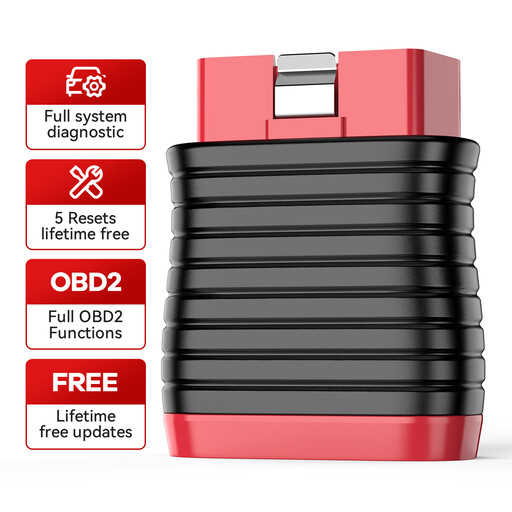
Why it suits this profile: This compact Bluetooth dongle works with Android and iOS devices via the ThinkDiag+ app. That makes it suitable for car owners who occasionally want to carry out their own diagnostics.
The product information mentions full-system diagnostics and five specific reset functions. However, check coverage for your make and model beforehand.
Bluetooth connectivity, support for 22 languages and, according to the product information, a lifetime free subscription. Functions include IMMO, oil, brake, ABS and ETS reset.
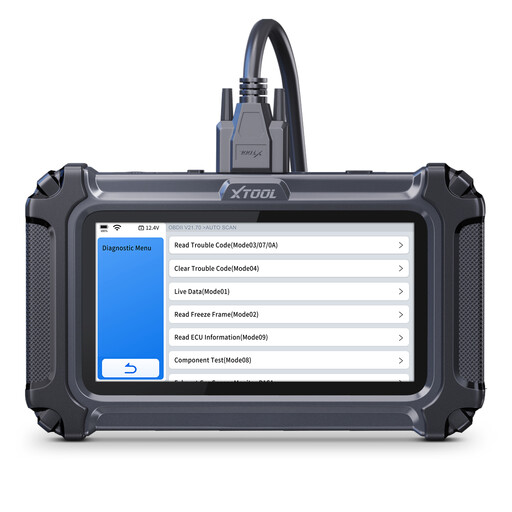
Why it suits this profile: This standalone device features a 5.45-inch touchscreen, reporting functionality and live data support. It is ideal for users who carry out diagnostics regularly without having to connect a smartphone each time.
The specifications list a one-touch full-system scan, FCA and CAN FD support, and functions such as EPB, oil reset and crankshaft sensor relearn. Compatibility still depends on the vehicle.
4-in-1 live data graphs, battery voltage display, 64 GB storage and, according to the product information, lifetime free updates.
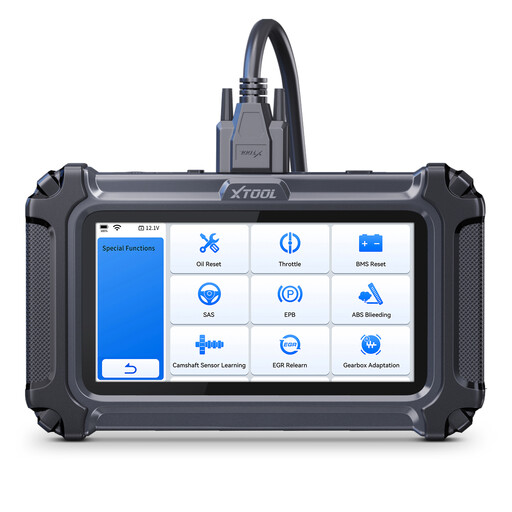
Why it suits this profile: With more than 30 listed maintenance functions, this model is aimed at small garages, mobile mechanics, fleet managers and hobbyists with multiple vehicles.
The product information explicitly states that functions vary by make, model and year. This is important for functions such as injector coding, battery registration, transmission adaptation and throttle body relearning.
Full-system diagnostics, 10 OBD2 modes, 4-PID live data graphs, FCA and CAN FD support and, according to the product information, free updates without an additional subscription.
We have put together a complete, up-to-date list of products that fully meet these strict selection criteria and the applicable European safety regulations.
An ABS reset, oil reset or EPB function can affect a maintenance procedure. Always follow the vehicle manufacturer’s instructions and use a suitable battery charger if the diagnostic process takes a long time. A scanner is not a substitute for a mechanical inspection or repair manual.
No. Standard OBD2 communication is widely used, but access to additional systems and maintenance functions varies by make, model, engine and specification. Before buying, check compatibility using the VIN, make and model.
Many devices allow you to do this once the scanner has connected to the relevant control module. Do not clear a code without understanding the cause. A cleared warning may return if the problem is still present.
That depends on the manufacturer’s terms and conditions. According to the product information, the XTOOL and THINKCAR models mentioned come with a lifetime free update or subscription. Check which vehicle software, functions and future upgrades are included. Also check whether FCA access, account registration or other services need to be arranged separately.
