Who is this buying guide for?

Players of a specific Switch sports game

You want the right individual controller for Nintendo Switch Sports or Sports Resort, so first check which console, sport and play style you’ll be using. Nintendo Netherlands and Nintendo Support explain which controllers are supported for each game and sport.

Motion-control players next to the kitchen

You want to get active while leaving enough room around players, worktops and other objects. Also consider where to place the console and whether anything could interfere with the wireless connection; Nintendo lists metal and electronic objects as possible factors.

Players who want to invite guests to join in

You want to play together on one system, so check how many players and controllers each sport supports. Nintendo Store Netherlands lists Nintendo Switch Sports Resort as supporting one to four players on one system.

What should you look for when choosing?

Buying concern What to look for Who is this important to?
Game and console compatibility Make a note of the full game title, console and sport, then check which controllers are supported. I want to avoid buying a controller that connects to my console but doesn’t work for the sport I want to play. Around 36% of consumers prioritise compatibility above all else.
Space for motion controls Check where players will stand and move. If you’re playing wirelessly, attach the Joy-Con 2 wrist straps according to Nintendo’s instructions. If I’m swinging a controller next to the kitchen, I want enough space between other players, worktops and objects. Around 29% of consumers put having a clear play area first.
Players and controllers Check the maximum number of players and how many controllers you’ll need for your chosen sport. I want to invite guests to join in and know in advance how many controllers the sport requires. Around 21% of consumers place the most importance on playing together and having the right number of controllers.
Connection and usage requirements Test the wireless connection from your play area. Check how the controller charges and what’s required for online play if you want to use that feature. I want to play without unexpected interruptions and know in advance which charging options or online requirements apply. Around 14% of consumers make connection and usage requirements their top priority.

Pitfalls to avoid

  • Choosing a gamepad because it has a motion sensor

    A listed motion sensor doesn’t prove that a gamepad is supported by Nintendo Switch Sports or Nintendo Switch Sports Resort. Nintendo says Pro Controllers aren’t supported for the sports games covered here.

    Before you buy, check the controller requirements for the specific game and sport, then compare extra buttons or sensors.

  • Buying Joy-Con 2 for the Nintendo Switch Sports Leg Strap

    Nintendo states that Joy-Con 2 don’t work with the Nintendo Switch Sports Leg Strap.

    If you want to use the Leg Strap, choose the original Joy-Con that’s compatible with this play style.

  • Buying an extra controller without checking how it charges or how many players can join

    The number of controllers you need varies by sport. Original Joy-Con don’t attach to a Nintendo Switch 2, so they won’t charge when connected to it.

    Check how many controllers your chosen sport requires and how you plan to charge them. Nintendo says you’ll need a Switch system or a compatible charging accessory to charge original Joy-Con with a Switch 2.

Brands to consider

Nintendo

Nintendo describes Joy-Con and Joy-Con 2 as controller options for the Switch sports games covered here, depending on the sport.

  • Nintendo Support says Joy-Con 2 are required for skateboarding in Nintendo Switch Sports Resort.
  • Nintendo says Pro Controllers aren’t suitable for Nintendo Switch Sports. Joy-Con 2 don’t work with the Nintendo Switch Sports Leg Strap.

8BitDo

8BitDo presents the Ultimate 2C Bluetooth Controller as a Switch gamepad with a motion sensor for other supported games.

  • 8BitDo lists six-axis motion control for the Ultimate 2C Bluetooth Controller.
  • This specification doesn’t confirm that the controller is supported as a Joy-Con in Nintendo Switch Sports or Nintendo Switch Sports Resort.

PowerA

PowerA describes the Enhanced Wireless Controller Rechargeable as a licensed Switch gamepad with motion controls.

  • PowerA lists a rechargeable battery and motion controls for the version covered here.
  • PowerA says it doesn’t include HD rumble, IR or amiibo NFC. Separately, check whether your chosen sport supports the controller.

HORI

The Split Pad Pro version covered here is designed for players who want larger handheld-style grips for other Switch games.

  • The larger grips are useful if you’re looking for a handheld-style controller.
  • HORI doesn’t list a wireless connection, gyroscope or accelerometer for this version, so it can’t replace individual Joy-Con for the motion-controlled sports covered here.

Xbox

The Xbox Wireless Controller is an option for sports games that support gamepad controls on Xbox or a Windows PC.

  • Xbox lists support for Xbox, Windows and Bluetooth.
  • Check that your specific game supports it too; the listed platform compatibility doesn’t confirm Switch compatibility.

Joybuy products

This selection includes Joy-Con for Switch sports games, gamepads with motion sensors for other supported games, and gamepads for supported sports games on PC or Xbox.

Game controller with dual vibration and gyro for Switch and PC

Game controller with dual vibration and gyro for Switch and PC

An option for a Switch or PC game that supports this controller. The listed gyro doesn’t automatically make it suitable for Nintendo Switch Sports or Nintendo Switch Sports Resort.

The product name lists dual vibration, gyro, Switch and PC.

View at Joybuy
GameSir Cyclone 2, Black-Bundle Edition

GameSir Cyclone 2, Black-Bundle Edition

A gamepad option for a supported Switch, PC, iOS or Android game. Check the game’s controller requirements before choosing it for motion controls.

The product name lists Mag-Res TMR sticks, a 1000 Hz polling rate, Hall and Micro triggers, RGB lighting and a charging dock.

View at Joybuy
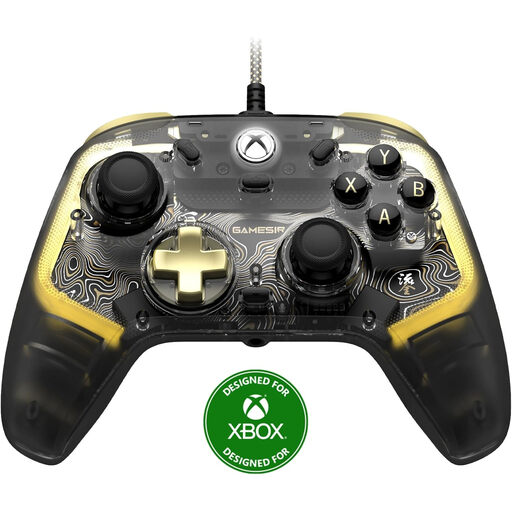
GameSir Kaleid Flux, smoke transparent, wired Xbox controller

GameSir Kaleid Flux, Smoke Transparent RGB

A wired gamepad for a sports game that supports standard controller controls on Xbox or a Windows PC. It isn’t suitable for games that require swing controls with individual Joy-Con.

The product name lists Xbox Series X/S, Xbox One and Windows 10/11.

View at Joybuy

Nintendo Switch Joy-Con pair, Neon Red and Neon Blue

Nintendo Switch Joy-Con pair, Neon Red and Neon Blue

A pair of Joy-Con for supported Switch sports games. Check which controller is needed for each sport; original Joy-Con are required to use the Nintendo Switch Sports Leg Strap.

The product name lists a pair of Joy-Con for Nintendo Switch.

View at Joybuy

Nintendo Switch 2 Joy-Con 2 pair, Light Blue and Light Red

Nintendo Switch 2 Joy-Con 2 pair, Light Blue and Light Red

A suitable option if you’re using Nintendo Switch 2 and Nintendo Switch Sports Resort and want to skateboard; Nintendo says Joy-Con 2 are required for this sport.

The product name lists a pair of Joy-Con 2. Nintendo says you should attach the wrist straps when playing wirelessly.

View at Joybuy

Frequently asked questions

Does a Switch Pro Controller work with Nintendo Switch Sports or Sports Resort?

No. Nintendo says Switch and Switch 2 Pro Controllers aren’t supported for these games. A motion sensor on a controller doesn’t change this game requirement.

Can you use your original Joy-Con with a Switch 2?

Yes, you can wirelessly pair original Joy-Con with a Switch 2. They don’t attach to the console; Nintendo says you’ll need a Switch system or a compatible charging accessory to charge them. They work for most sports in Sports Resort, but not for skateboarding.

What can you check if motion controls stutter near the kitchen?

Check where the console is placed and whether anything between the console and controllers could interfere with the wireless connection. Nintendo lists metal objects, other electronic equipment and microwave ovens as possible factors. This doesn’t mean that a specific device in your home is the cause.

Do you need an online subscription to play together?

Not if you’re playing locally on one system. However, Nintendo says you need an active Nintendo Switch Online membership to play Nintendo Switch Sports online. Check the requirements for other games separately.

What are your rights if a controller breaks too soon during normal use?

According to ACM ConsuWijzer, statutory guarantees apply: if the product doesn’t meet what you could reasonably expect, the seller must put this right free of charge, subject to the applicable conditions. Online purchases generally also come with a cooling-off period of up to 14 days after delivery; ACM ConsuWijzer explains the exceptions.
