If you want to monitor your audio through the same set while recording, choose a broadcast headset with separate microphone and headphone connections, provided they’re compatible with your equipment. If you don’t need headphones, or you’d prefer a less noticeable microphone on camera, a standalone headworn microphone may be a better fit; check the input, any power requirements and how it’s positioned. A directional microphone can help reduce distracting sounds outside the direction you’re speaking in, but it needs careful positioning to minimise plosive sounds.
Who is this choice relevant to?
Newsreader who wants to monitor audio
If you record while seated and want to hear audio or direction at the same time, a broadcast headset may be worth considering. Check that the microphone and headphone connections are compatible; Audio-Technica and Sennheiser describe models with both functions.
Creator looking to reduce background noise
If you’re recording in a room with distracting sounds, a directional microphone may be worth considering. Audio-Technica and Shure describe models with a cardioid microphone; positioning and the room itself still matter when recording.
Presenter on camera
If you want to speak hands-free without a large headset showing on camera, you could consider a standalone headworn microphone and arrange monitoring separately. RØDE describes the HS2 as a low-profile microphone with an adjustable boom.
What should you look for when choosing?
Broadcast headset with headphones
A good fit if: you want to speak and monitor audio through the same headset while recording.
Bear in mind: the earcups will be visible, and you’ll need compatible microphone and headphone connections. Some models are sold without a cable.
Standalone headworn microphone
A good fit if: you don’t need integrated headphones or want the microphone to be less noticeable on camera.
Bear in mind: this option doesn’t provide headphone monitoring on its own. Check the microphone connection and any power requirements.
| What to consider |
What to look for |
Who is this important for? |
| Clear speech |
Check the polar pattern and position the microphone boom beside your mouth; make a test recording in the room where you’ll be recording. |
If I’m recording in a room with background noise, I want my speech to remain clear. Around 28% of consumers prioritise speech clarity. |
| Monitoring |
Decide whether you need a return or direction feed while recording, and check the headphone output. |
I want to hear the recording or direction while speaking, so I’m looking for a headset that also includes headphones. Around 22% of consumers prioritise monitoring. |
| Connection and power |
Check the exact model variant, microphone input, any power requirements and whether a connection cable is included. |
If I want to connect the microphone to my existing equipment, the whole recording chain needs to be compatible, not just the plug shape. Around 22% of consumers prioritise connectivity and what’s included. |
| Visibility on camera |
Check whether a standalone microphone boom will suit your camera angle and whether you can arrange monitoring separately. |
When I’m on camera as a presenter, I want to know in advance how noticeable the microphone and any headphones will be. Around 17% of consumers prioritise a discreet microphone. |
| Comfort and maintenance |
Check the fit and whether parts such as the cable, ear cushions or microphone boom can be replaced on the version you’ve chosen. |
For longer recordings, I want a comfortable headset with parts that can be maintained or replaced as needed. Around 11% of consumers prioritise comfort and maintenance. |
Common buying mistakes
-
Assuming every headset microphone includes headphones
A standalone headworn microphone, such as the RØDE HS2 or Shure WH20, doesn’t serve the same purpose as a broadcast headset with earcups. Without separate headphones, you can’t monitor audio in the same way while recording.
Before choosing a model, decide whether you want to hear a return or direction feed while recording.
If you need monitoring, you’ll need a separate pair of headphones to use with a standalone headworn microphone.
-
Comparing only the shape of the plug
A plug that fits doesn’t guarantee that the microphone will work with the input. Some models require a specific microphone input or power supply; certain headsets are sold without a connection cable.
Compare the details for the exact model variant with the inputs and outputs on your recording equipment, and check what’s included.
Depending on your setup, you may need a compatible cable, interface or a different microphone input.
-
Choosing wireless without checking the frequency band
Frequency options for wireless microphones vary by region, and some bands require a licence. The Dutch Authority for Digital Infrastructure (RDI) says that a licence usually isn’t needed for wireless use, although some bands do require one.
Check with the RDI which frequencies are available at your recording location and what rules apply to your chosen band. Also consider whether a seated speaker really needs a wireless setup.
Relevant brands
Audio-Technica
The BPHS1 is a broadcast headset for situations where you want to wear a microphone and headphones together.
- According to Audio-Technica, the BPHS1 has a dynamic cardioid microphone, closed-back earcups and a replaceable cable.
- The standard BPHS1 cable has an XLR connection for the microphone and a 6.3 mm connection for the headphones. The BPHS1-XF4 has a different intercom connection, so check the exact version.
Shure
The WH20 series consists of standalone dynamic headworn microphones for anyone who doesn’t need integrated headphones.
- Shure describes an adjustable headband, cardioid pickup and a windscreen.
- The WH20 series doesn’t provide headphone monitoring on its own. The WH20XLR, WH20TQG and WH20QTR have different connectors.
RØDE
The HS2 is a low-profile headworn microphone for hands-free speech, for example when the speaker is on camera.
- According to RØDE, the HS2 has an omnidirectional condenser capsule and an adjustable, repositionable microphone boom.
- The HS2 requires a compatible 3.5 mm microphone input with plug-in power and doesn’t include headphones. The acoustics of the room are also worth considering.
beyerdynamic
The DT 290 MK II is a closed-back broadcast headset with a dynamic microphone for a wired recording setup.
- beyerdynamic’s product information lists a hypercardioid microphone and a detachable cable.
- According to the manufacturer, the DT 290 is supplied without a connection cable. Also check the headphone impedance and connector on the version you choose.
Sennheiser
The HMD 26 is an on-ear broadcast headset for anyone looking for integrated monitoring.
- For the HMD 26 with article number 700318, Sennheiser specifies a dynamic supercardioid microphone and switchable ActiveGard limiting.
- According to the product page, the cable isn’t included. These details apply to the version listed and not automatically to older HMD 26-II variants.
Joybuy product picks
These products are headsets with microphones for speaking and listening. Before using one for a news recording, check that the connections and microphone setup suit your recording equipment and room.
 No image available
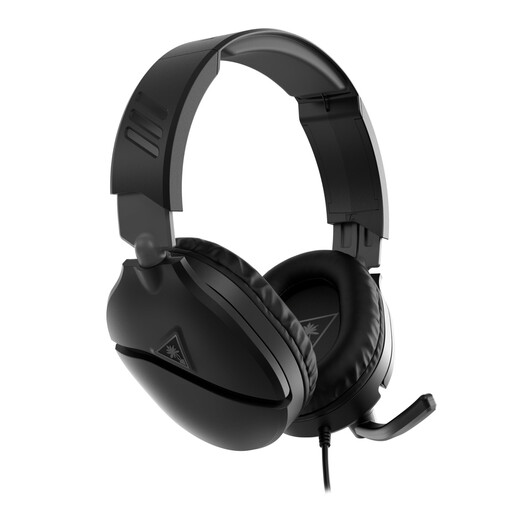
Turtle Beach Recon 70 Xbox, wired, 3.5 mm
Could suit you if you want to listen through the same headset while speaking; check that the connection is compatible with your recording equipment.
The product name describes a wired headset with a 3.5 mm connection. The description mentions a flip-up microphone boom with a mute function.
According to the product description, older PCs with separate audio connections may require a splitter adapter.
View at Joybuy
 No image available
Razer Kraken V3 X, black
Could suit you if you’re looking for a headset with a microphone that lets you listen while speaking; check the connection for your recording setup.
The product description lists a wired headset with a cardioid microphone.
View at Joybuy
 No image available
Jabra Evolve2 75
Could suit you if you want to listen through the same headset while speaking; check that the wireless setup is suitable for your recording chain.
The product description lists Bluetooth, microphones for communication and an included USB-C cable.
View at Joybuy
 No image available
Jabra Evolve2 75 USB-A MS Teams, black
Could suit you if you’re looking for a headset with a microphone for speaking and listening; check that the USB-A version connects to your recording equipment.
The product name specifies the USB-A MS Teams version. The product description lists Bluetooth and eight-microphone beamforming.
View at Joybuy
 No image available
Jabra Evolve2 65 USB-A Black MS Mono
Could suit you if you’re looking for a mono headset for speaking and listening; check that the USB-A connection and included adapter are compatible with your recording equipment.
The product name specifies a USB-A mono headset. The product description lists Bluetooth 5.0, three microphones and a USB-A adapter.
View at Joybuy
Frequently asked questions
Can I connect any headset microphone directly to a laptop?
No. First check which inputs your laptop or audio interface has. According to Audio-Technica, the Audio-Technica BPHS1 version has an XLR microphone plug and a separate 6.3 mm headphone plug; according to RØDE, the RØDE HS2 requires a suitable 3.5 mm microphone input with plug-in power.
Where should you position the microphone boom for spoken news?
Position the microphone beside your mouth and make a test recording to check how it sounds in your room. Audio-Technica’s user guide recommends positioning it near the corner of your mouth; DPA notes that directional headworn microphones can be more susceptible to plosive sounds.
Which additional connections and after-sales details should you check?
Check the connector on the version you’ve chosen and what’s included in the box. The manufacturers state that the Sennheiser HMD 26 and beyerdynamic DT 290 MK II are supplied without a connection cable. For many online consumer purchases, the Dutch government says you have a 14-day cooling-off period; if a product is faulty, you can ask the seller to repair or replace it.
Do you need a licence for a wireless headworn microphone in the Netherlands?
That depends on the wireless system and the frequency band used. According to the Dutch Authority for Digital Infrastructure, a licence usually isn’t needed, although some bands do require one; also check which frequencies are available at your recording location. This radio-frequency issue doesn’t apply to a wired microphone.


